◦ Robust security
Why WordPress keeps winning: What users love and how to avoid plugin fatigue
WordPress continues to dominate the web, powering 43.5% of all sites and claiming 61.2% market share among known CMS platforms, according to W3Techs daily reports. WordPress’ blend of simplicity, flexibility, and a massive ecosystem keeps businesses, developers, and creators coming back for more.
But raw market share only tells part of the story. To uncover what truly drives user loyalty, and where real pain points lie, Liquid Web surveyed over 1,000 WordPress professionals. We dug into the root causes of plugin fatigue, performance hurdles, and the tools that make, or break, a seamless WordPress experience.
Dive in to see what we uncovered and learn how with the right hosting and management tools in place, WordPress continues to deliver a powerful, streamlined experience.
Key findings
- 67% choose WordPress for ease of use; 63% say it’s become even easier over time.
- 71% of WordPress users said speed and performance are the most important hosting features.
- 63% manage plugins smoothly; 37% report fatigue from manual updates, hosting limitations, or a lack of automation.
- 22% of former WordPress users said their plugin fatigue worsened after switching platforms, with fatigue levels increasing by an average of 36%.
- Managed hosting automates updates, security scans, backups, and performance tuning, eliminating the main sources of frustration.
- With the right managed host, you get faster, more secure sites without having to experience that the grass isn’t always greener on the other side.
Why WordPress works and keeps getting better
Two-thirds of users said they chose WordPress because it was easy to use, and for many, that experience only gets better with time – 63% felt the platform had become easier to use since they first got started.
Continuous enhancements reinforce long-term loyalty. WordPress’ unrivaled market share is further validated by high-profile deployments on sites like Microsoft.com, Forbes.com, and Walmart.com—proof of its enterprise-grade scalability and rock-solid reliability.
Whether you’re running a personal blog or a high-traffic business portal, WordPress equips you with the flexibility and control to grow, adapt, and stay ahead.
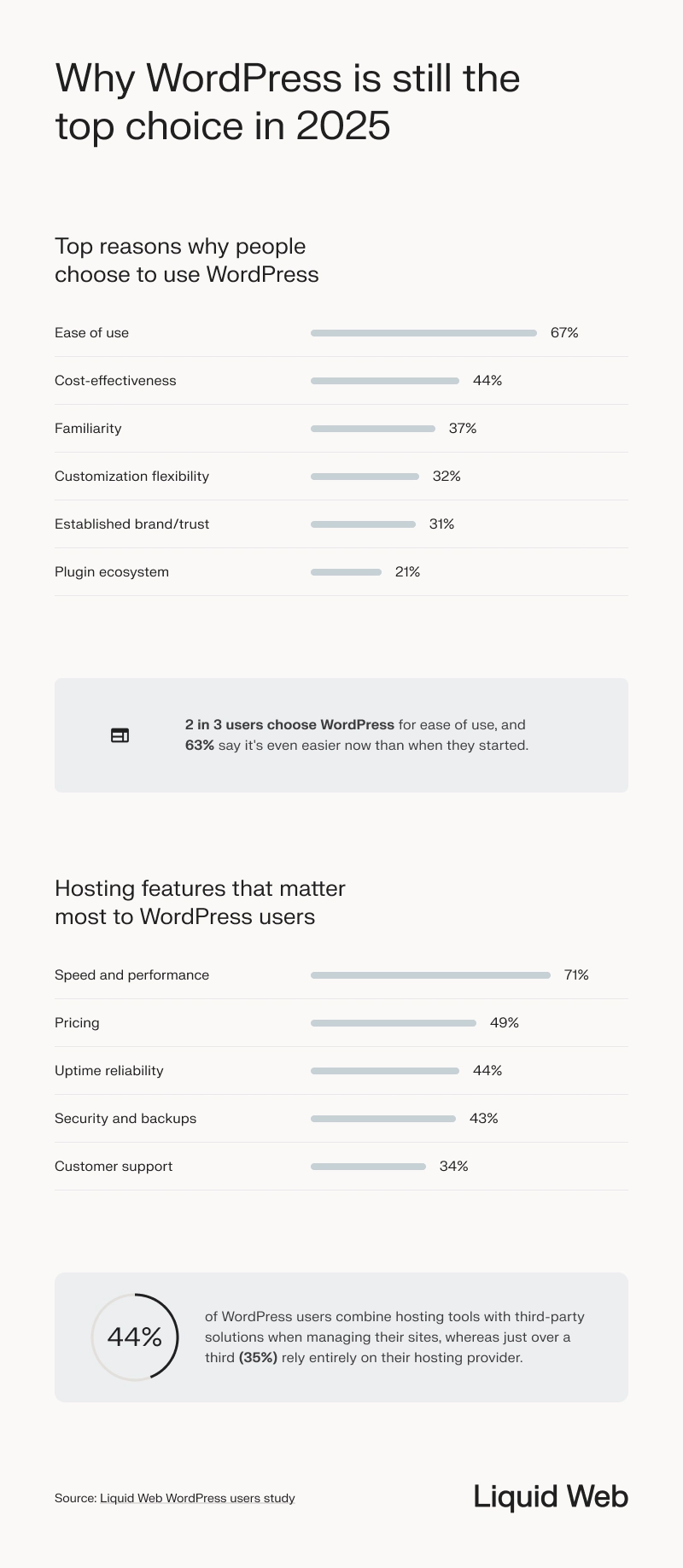
Speed and performance top the list for 71% of WordPress users. Yet as sites grow feature-rich, 25% find themselves installing multiple plugins just to handle caching, backups, and performance tuning.
With Nexcess and Liquid Web managed hosting, server-level caching and optimized infrastructure are baked in from day one, and automated backups protect your data without any extra plugins.
You can still use the add-ons you love, while automatic updates keep everything current with minimal effort.
As Tiffany Bridge, Product Manager at Liquid Web, explains: “Not all plugins are created equal, which is why when you pair managed hosting with best-in-class tools like the StellarWP suite of products, WordPress transforms from plugin overload into a streamlined powerhouse.”
More plugins, more problems – but not with the right setup
Plugins are a core part of WordPress functionality, but mismanagement can turn them into a source of friction.
Plugin fatigue, the overwhelm of juggling too many add-ons, isn’t a flaw in WordPress itself, but often a sign of poor plugin management, hosting limitations, or a lack of automation.
With the right managed hosting setup and support, and discerning plugin choices, WordPress users can reduce fatigue without giving up flexibility or power.
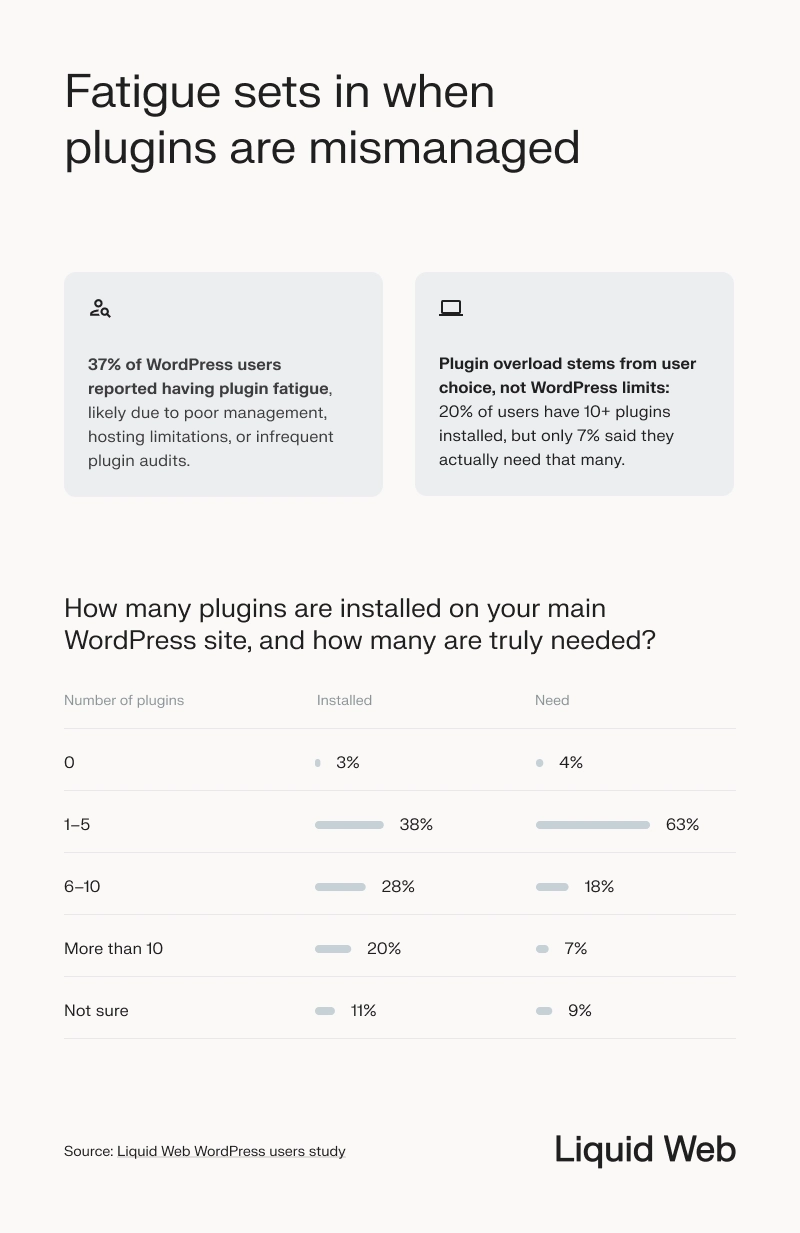
Both the number of installed plugins and how the plugins are managed, shaped users’ WordPress experience. Those with 10 or more plugins were over twice as likely to report plugin fatigue compared to users with five or fewer (57% vs. 26%).
Only 7% of users said they need more than 10 plugins, yet 20% have that many installed, which shows that plugin overload is often driven by user choice rather than actual site requirements.
Limited oversight is another factor at play: 77% of WordPress users said they rarely or only occasionally review and remove plugins. This can lead to slower performance, compatibility problems, and unnecessary upkeep.
However, most people aren’t overwhelmed. While plugin fatigue affected 37% of WordPress users overall, 63% said they don’t struggle with it. For those that do, solutions like managed hosting, regular plugin audits, and built-in performance tools can significantly reduce friction and simplify site management.
“Plugin fatigue is a growing challenge, especially for users managing updates manually. Managed hosting with automatic plugin previews and updates can ease the load – and when it’s backed by WordPress expertise, it becomes the most reliable solution.”
Zach Tirrell
General Manager at StellarWP

Smarter plugin choices reduce both cost and fatigue
While plugin fatigue is real for some users, thoughtful plugin selection can make a big difference. Not every site needs a long list of add-ons.
By focusing on the most essential plugins and choosing trusted options that deliver reliable performance users can avoid unnecessary bloat and better control costs.
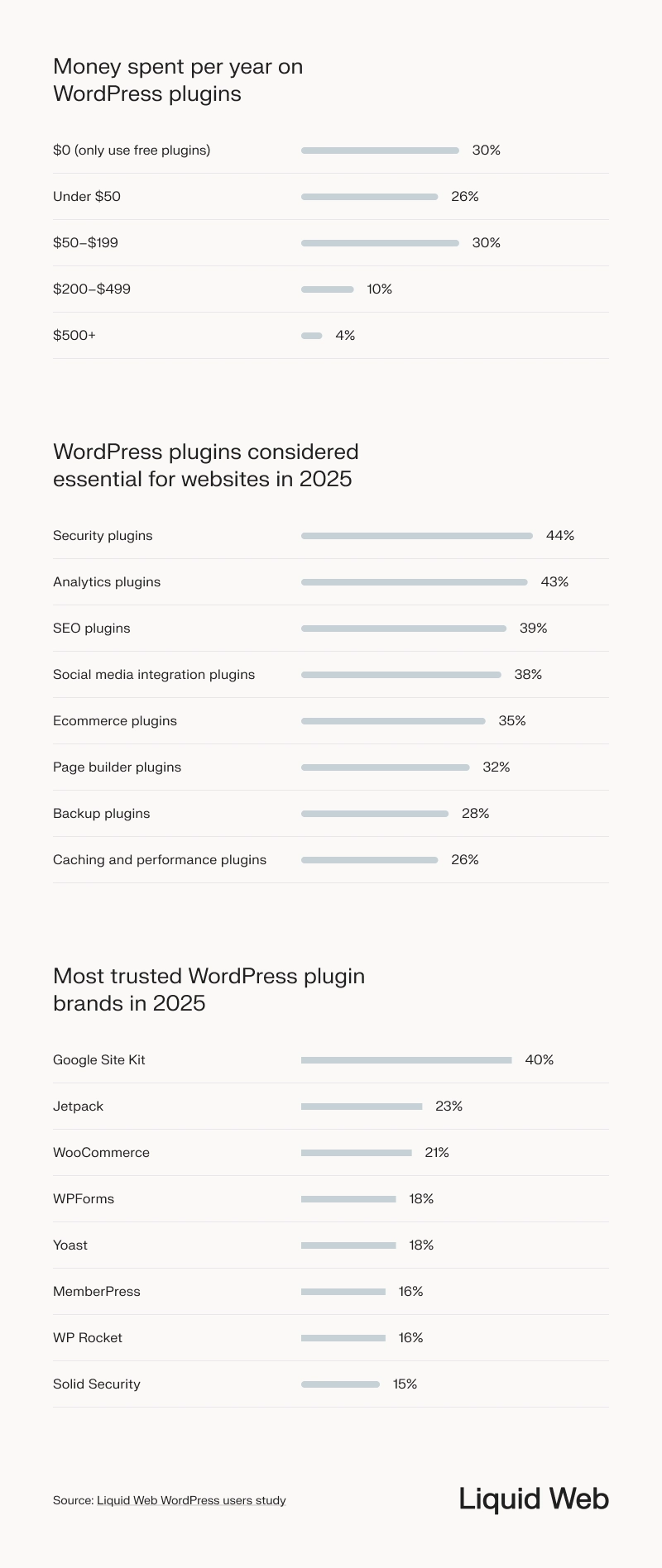
Most WordPress users keep plugin spending modest: 30% rely solely on free plugins, 26% spend under $50 per year, 30% budget $50–$199 annually, and just 14% invest over $200—underscoring that while cost matters, a meaningful minority will pay for premium plugins that deliver real value.
So what are users spending on? In 2025, WordPress users are investing their plugin budgets on the following tools:
- Security: protecting sites and data at the server and application level.
- Analytics: capturing visitor behavior and performance insights.
- SEO: improving search visibility and on-page optimization.
- Social media integrations: enabling sharing, feeds, and social logins.
- Ecommerce tools: powering carts, payments, and product management.
These categories reflect core business needs, from safeguarding assets to tracking growth and driving sales—setting the stage for our next deep dive into user spending patterns.
Trusted plugin brands can also play a role in reducing friction. Google Site Kit led, with 40% of users naming it the most trusted. Jetpack, WooCommerce, WPForms, and Yoast rounded out the top five, helping users streamline functionality without relying on dozens of unknown third-party tools.
Prioritizing proven, essential plugins doesn’t just help performance. It simplifies management, keeps spending in check, and ensures WordPress users get the most out of their sites, all without the fatigue.
The real cost of switching from WordPress
Only a small number of users have moved away from WordPress. Just 18% said they had switched to another CMS, most often in search of easier customization (33%), a no-code setup (31%), or lower costs for plugins, hosting, or maintenance (31%).
But for many, the switch didn’t deliver the improvements they were hoping for.
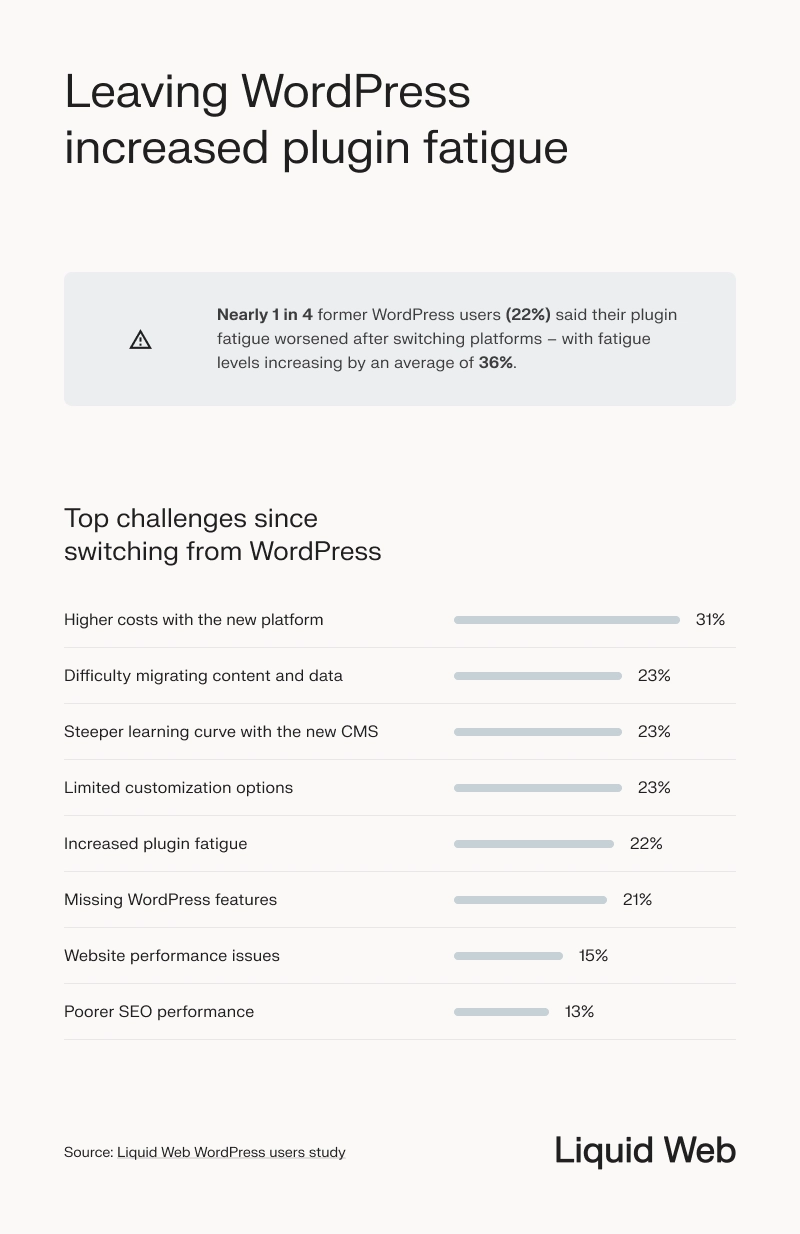
Instead of a different CMS simplifying their experience, many former WordPress users found new challenges. The most common challenges were higher costs (31%), difficulty migrating content and data (23%), and a steeper learning curve with the new CMS (23%).
Former users also said their new CMS had limited customization options (23%), caused performance issues (15%), and hurt SEO (13%). Another 22% said their plugin fatigue actually worsened, with fatigue levels increasing by an average of 36%, and 21% missed WordPress features they had relied on regularly.
The real issue isn’t WordPress. As Bridge explains, “Quality plugins and WordPress hosting makes all the difference between fatigue and flow. With the right foundation in place, WordPress delivers the ease, performance, and flexibility users want, without needing to start over.”
Why WordPress still wins
WordPress remains the platform of choice for users who value flexibility, scalability, and ownership. While managing plugins can be challenging, especially for growing or complex sites, users overwhelmingly report that the benefits outweigh the trade-offs.
And fortunately, with better plugin management, reliable WordPress hosting, and the right support, WordPress site owners can reduce fatigue without giving up the flexibility that makes WordPress so powerful.
Fair use statement
This content is based on proprietary research conducted by Liquid Web and is shared here under fair use for educational and informational purposes. If you reference any part of this article, please provide proper attribution with a link as the original source.
Share this content
<a href="https://www.liquidweb.com/white-papers/wordpress-plugin-fatigue-study/" target="_blank" rel="noopener noreferrer">Liquid Web WordPress plugin fatigue study</a>
Learn more about this study
WordPress hosting that just works
Switch to hosting that keeps pace with your business. Explore managed, VPS, and dedicated WordPress plans now.
