WooCommerce vs. BigCommerce: Which One Should You Choose? – Nexcess
How do they stack up in the hypercompetitive ecommerce platform market, WooCommerce vs. BigCommerce? Find the best ecommerce platform for your online store.
Get fast, reliable hosting for WordPress
Power your site with the industry’s fastest, most optimized WordPress hosting
How do they stack up in the hypercompetitive ecommerce platform market, WooCommerce vs. BigCommerce? Find the best ecommerce platform for your online store.
WooCommerce vs. BigCommerce
Picking a platform for your ecommerce website is not an easy task as a few factors need to be taken into consideration. It all depends on what you sell, your target audience, technical knowledge, and how you want to manage your website.
WooCommerce (What is WooCommerce?) and BigCommerce are the two most popular ecommerce platforms in the market today. The competition is intense however, and both platforms have their pros and cons, so keep on reading to learn which one is the best fit for your ecommerce store!
WooCommerce vs. BigCommerce: Overview
WooCommerce is a free ecommerce plugin for WordPress which turns the site into an online store. Since it is based on WordPress, it has everything WordPress offers — powerful SEO tools, a high level of customization, and thanks to a massive library of themes, plugins, and extensions, it allows to build ecommerce sites at all levels from scratch.
BigCommerce is a full-stack ecommerce solution that includes hosting, website building software, and SEO and marketing tools. The one major downside is that users are limited with the kit BigCommerce offers in their plans, and the possibilities to extend it are not that impressive compared to WooCommerce.
WooCommerce vs. BigCommerce: Pricing
BigCommerce has four subscription-based plans:
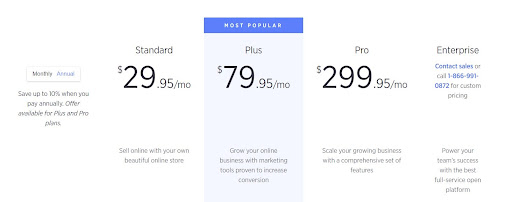
The entry-level BigCommerce pricing for $29.95 / month includes the bare minimum to get an online store up and running:
- Hosting with unlimited file storage and unlimited bandwidth
- SSL certificate
- BigCommerce subdomain (looks like mystore.bigcommerce.com)
- Website building software
Paid themes start at a $150 one-time fee. While there are options to utilize free themes, most of them look similar to one another, so it is advisable to invest in a paid theme to enhance the “look and feel” of your website.
WooCommerce as a plugin is entirely free, but to make it work, you would need the following:
- Hosting (WooCommerce hosting starts at ($19/month)
- SSL Certificate (can be free or paid and starting at around $8/year)
- Domain (around $15/year)
- Theme – Picking from the best WooCommerce Themes (can be free or paid, starting at about $20 with the one time fee)
Extensions for WooCommerce and additional WordPress plugins are mostly free. However, some hosting companies also include premium themes and page builders in their hosting packages, so there are opportunities to save on these items.
Pricing Conclusion
WooCommerce is a more budget-friendly solution compared to BigCommerce as you would have a more cost-effective and granular approach to the items comprising your store.
WooCommerce vs. BigCommerce: Scalability
Rapid business growth is an excellent problem to have. However, your ecommerce platform should be reliable enough to handle the increased traffic that comes with it.
BigCommerce addresses the issue of scale before it arises, thanks to unlimited storage and bandwidth. They take care of all the security updates, which is a good thing when your store grows and is more and more likely to be targeted by hackers. The upgrade at BigCommerce is a reasonably simple process.
However, if your business brings more than $50,000 in revenue (for the Standard Plan) you would be required to upgrade to a more expensive plan. Some store owners might not like such an approach as they are forced to spend more on their online presence even if they are satisfied with their current plan. On the other hand, upgrading the plan adds new features to the store, which may help increase conversion rates.
WooCommerce scalability mainly depends on the hosting company. When your ecommerce website grows larger, it needs more resources to store data and deal with traffic surges. Naturally, it involves additional costs, but it is necessary to upgrade when the time comes as lack of resources results in degraded performance or even can make your site go down. The upgrade process depends on the server type — cloud-based servers offer fast and easy scalability, while dedicated servers might require a maintenance window to add more resources.
Scalability Conclusion
Both platforms offer possibilities to upscale easily as your business grows, with a few minor drawbacks specific to each platform.
WooCommerce vs. BigCommerce: Payment Gateways
Getting paid for the goods or services provided is one of the most important business activities for a new retailer. Providing a broad range of available payment options to your customers allows them to choose the most convenient way to pay and extends your customer base since there will be more opportunities to pay.
Both WooCommerce and BigCommerce accept all major credit and debit cards and the largest payment gateways in the market, such as PayPal, ApplePay, Stripe, Square. These platforms support alternative payment gateways, but the numbers are in favor of WooCommerce — with over 100 supported payment gateways vs. about 65+ from the BigCommerce side.
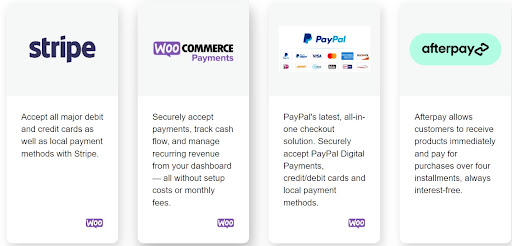
The number of available payment gateways is significant to retailers serving their customers from all over the world. For example, PayPal may not be available in certain countries, so a WooCommerce store owner can resort to regional payment gateways to enable a portion of their customers to pay or lower their transaction or conversion fees.
The good thing about both platforms is that they do not incur any transaction fees. However, payment gateways do. It is recommended to examine their policies and prices before committing.
Payment Gateways Conclusion
Although both platforms offer a great choice of payment gateways, the winner here is WooCommerce. Having a large number of payment services is more convenient for both the store owner and their customers.
WooCommerce vs. BigCommerce: Features & Design
To run an ecommerce store effectively, you will need a few tools and instruments related to SEO, marketing, and analytics. Design is also crucial to the initial perception of the website. Undoubtedly, a potential customer is more likely to stay on a website that has pleasing aesthetics.
BigCommerce offers many of in-built features related to marketing and analytics — it is possible to leverage marketing options easily by configuring coupons, gift cards, discounts. In addition, there are possibilities to integrate your store with Amazon, Facebook, eBay, and even Instagram.
Every but Standard Plan includes the Abandoned Cart Saver feature, which sends out emails to potential customers to motivate them to complete the purchase. According to statistics, it wins back every fourth shopper.
As far as design is concerned, BigCommerce has an in-built webpage builder, but its possibilities are somewhat limited. Free themes do not look much different from one another, and their choice is not comprehensive, so a paid theme might be a good choice. However, their prices range from $150 to $300 — a considerable amount for a new ecommerce project.
WooCommerce’s out-of-box functionality is fairly standard, however, since WooCommerce is based on WordPress, there are almost limitless options to customize your store by installing plugins and extensions.
WooCommerce has a built-in tool provided for reporting and data analysis to help you manage and monitor all the essential metrics. In terms of SEO, WordPress is a very SEO-friendly platform that helps rank your store higher in search results.
Additional resources
What is managed WordPress hosting? →
Get details and decide if managed WordPress hosting is right for you.
Must-have web development plugins to create WordPress websites at scale →
Explore the best web development plugins to enhance functionality, improve performance, and streamline your WordPress site.
A complete guide to WordPress shortcodes →
Shortcodes make life easier. Learn how to get started!
