WooCommerce: automatically apply coupons in cart

Providing great deals is a wonderful way to entice first time and returning customers. Imagine if you’ve created a coupon for a product on your store that you want everyone to use. Sure, you can add a site banner to inform the customers of the coupon, what if they forget to enter the code, though? There may be another way, what if you can have the coupon automatically apply at the time of checkout if conditions are met.
Get fast, reliable hosting for WordPress
Power your site with the industry’s fastest, most optimized WordPress hosting
Using the WooCommerce Extended Coupon Features this is totally possible! Let’s see how it’s done.

How can I set a coupon to automatically apply to the cart for my customers?
Applying coupons to the cart automatically simplifies the checkout process even further, making purchasing with a coupon as easy as possible for your buyers. First, install the WooCommerce Extended Coupon Features plugin on your shop. Once the plugin is installed and activated on your site you can continue.
To start using this plugin, go to WooCommerce > Coupons. Under Coupon data > Miscellaneous choose Auto coupon as shown in the example and check the Auto coupon box.
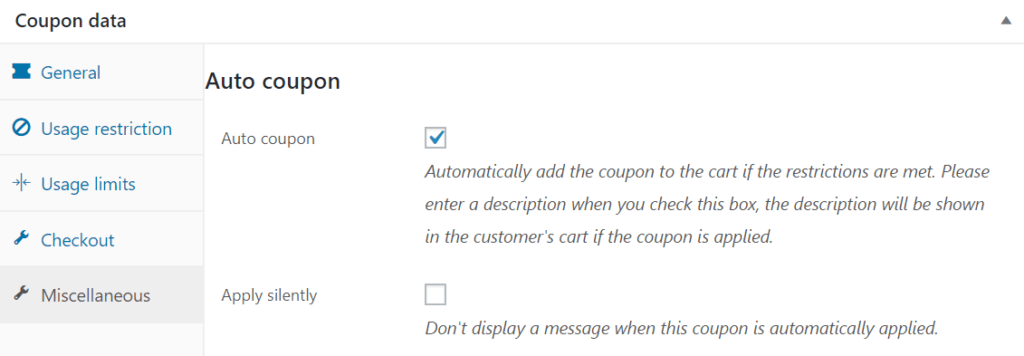
And that’s about it! More or less, the coupon system and configuration works the same as before — now you have the option to auto apply your coupons though.
Consider managed hosting
If you want to start your own ecommerce business consider Liquid Web, a leading service provider, with amazing prices and a 24/7 support team that is ready to help you with whatever you need. Not to mention the 30 days free option that comes with your plan.
Recent articles
- Setup & Settings for the W3 Total Cache Plugin
- Best Mailchimp Alternatives for Email Marketing
- How to Use the Liquid Web Client Portal API Token
Related articles
- How to Add Discounts to Products in WooCommerce
- Using Traditional Sales Tactics in WooCommerce
- Pull Marketing: What Is a Pull Promotion Strategy?
Additional resources
Starting a WooCommerce subscription box service →
Discover how to start a subscription box service.
Fixed: WooCommerce not showing products on shop page →
Learn to fix shop pages that are not showing products.
How to get WordPress products in Google products →
Get products into Google with the right feed setup.
