◦ Comprehensive security
◦ 24/7 support
WordPress Guide → WooCommerce → Ajax
Best Ajax filter plugins for WordPress

Ajax filter plugins give your visitors faster, smoother ways to interact with your site—without refreshing the page. Whether you’re selling products or publishing tons of posts, Ajax filtering can make your WordPress site feel like a modern web app.
Get fast, reliable WooCommerce hosting
Power your site with the industry’s fastest web hosting built specifically for WordPress and WooCommerce
Why use an Ajax filter plugin in WordPress?
Ajax filtering lets users sort and refine listings without triggering a full page reload. Filters work instantly and feel more natural to interact with.
Here’s why it matters:
- Speeds up navigation and reduces bounce rates.
- Makes WooCommerce stores feel faster and more professional.
- Improves filtering for blogs, portfolios, directories, and other custom post types.
- Boosts mobile usability with snappy, responsive behavior.
What to look for in a WordPress Ajax filter plugin
Not every plugin fits every use case. Choose based on your site structure, design flexibility, and content volume.
Key features to look for:
- Support for custom post types and WooCommerce products.
- Seamless Ajax-based results without reloads.
- Filtering by categories, tags, attributes, price, or custom fields.
- Easy styling and layout controls.
- Caching support and fast performance.
- Developer-friendly customization or shortcode support.
6 best Ajax filter plugins for WordPress
Each of the plugins below offers live filtering with unique strengths for different kinds of sites—from ecommerce to blog archives.
1. Filter Everything
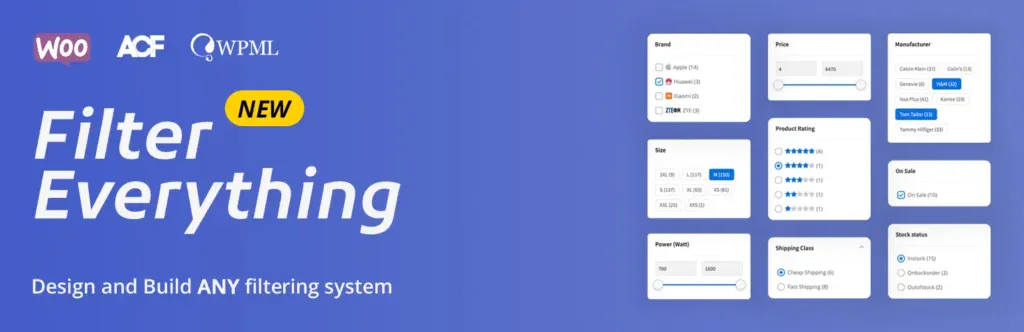
Filter Everything is a clean, SEO-friendly option that works with any post type—great for both WooCommerce stores and custom content directories.
It creates smart, Ajax-based filter sets with flexible rules and supports SEO-optimized URLs so filtered pages can still be indexed by search engines. The free version works for blogs and simple custom post types, while the Pro version expands functionality for stores and multilingual setups.
Key features:
- Filter any post type or taxonomy
- SEO-friendly filter URLs
- Works with Elementor and popular themes
- WooCommerce support in the Pro version
Best for: Content-heavy blogs or directory sites
Starting at: Free (Pro from $40/year)
2. HUSKY – Products Filter for WooCommerce

Formerly known as WOOF, HUSKY is one of the most widely used Ajax filter plugins for WooCommerce. It supports a broad range of filter types and includes shortcodes and widgets that work out of the box with most themes.
You can filter by price, categories, attributes, tags, stock status, and even custom taxonomies. The premium version adds even more control, like image filters and SKU search.
Key features:
- Ajax filters for price, tags, attributes, categories
- Custom widgets and shortcode support
- Works with most themes and builders
- Premium features include color/image filters, hierarchy controls
Best for: WooCommerce stores of any size
Starting at: Free (Premium from $39)
3. JetSmartFilters by Crocoblock

JetSmartFilters is a dynamic Ajax filtering plugin made for Elementor and Gutenberg sites. It integrates smoothly with the entire JetPlugins suite, making it a top pick for users building advanced front-end layouts with JetEngine.
You can set up range sliders, rating filters, checkboxes, and dropdowns—plus create chained filters where one option dynamically changes another. It’s ideal for building interactive, filterable grids.
Key features:
- Wide variety of filter types (search, range, date, etc.)
- Compatible with Elementor, Gutenberg, and JetEngine
- Ajax-based filtering with no reloads
- Combine filters visually with Query Builder
Best for: Elementor users building dynamic listings
Starting at: $43/year (included in JetPlugins subscription)
4. Search & Filter

Search & Filter is a straightforward plugin that lets you create searchable, filterable archive pages. It works with categories, tags, taxonomies, post types, and more.
The free version supports basic filtering, while the Pro version adds advanced UI elements like Ajax live updates, dropdowns, and integrated sorting. Developers will like the flexible templating system and shortcode options.
Key features:
- Filter by categories, tags, post types, taxonomies
- Shortcode support for embedding filters anywhere
- Developer-friendly template system
- Pro version includes Ajax, range sliders, checkboxes
Best for: Custom blogs or developers building filtered search forms
Starting at: Free (Pro from $20)
5. Ajax Search Pro
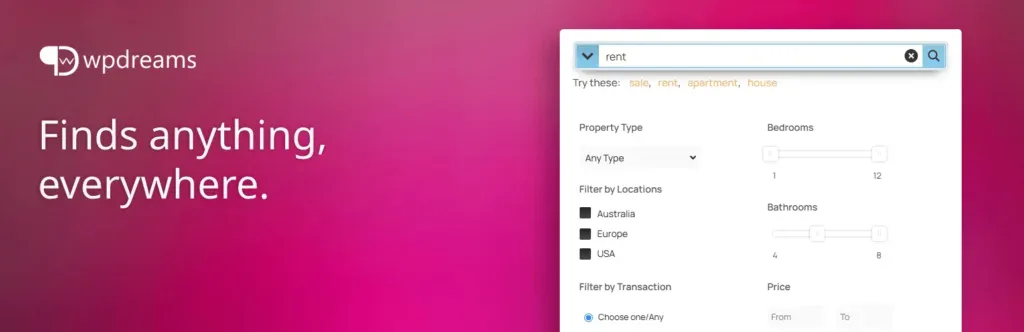
Ajax Search Pro takes your WordPress search bar to the next level. It provides a live search experience with filters, thumbnails, category selectors, and real-time previews—all with Ajax.
Although it’s technically a search plugin, it acts like a live filter, especially for content-heavy or directory-style sites. You can configure it to search posts, products, or custom fields.
Key features:
- Live Ajax search with real-time results
- Custom post type and taxonomy filtering
- Grid and list layouts with images
- WooCommerce and bbPress compatible
Best for: Content-heavy sites or directories with advanced search needs
Starting at: $39 (Lite version available free)
6. Premmerce Product Filter for WooCommerce

Premmerce is built specifically for high-performance WooCommerce shops. It offers Ajax-powered filtering by categories, attributes, price, availability, and sale status.
Designed for scalability, it works well with large product catalogs and supports custom attributes. It also plays nicely with popular WooCommerce extensions and caching plugins.
Key features:
- Ajax filters for price, attributes, stock, sale
- Built for large product catalogs
- Works with caching and performance plugins
- Compatible with major WooCommerce extensions
Best for: Large-scale WooCommerce stores
Starting at: Free (Pro from $69/year)
Best use cases for Ajax filters
Ajax filtering can improve any WordPress site where users need to sort through a lot of content.
- WooCommerce stores: Help customers find what they want faster.
- Real estate listings: Combine map views with instant filters.
- Portfolio sites: Let users sort by category or skill.
- Directories: Make browsing businesses, services, or listings easier.
- Blogs or archives: Give readers fast tools to narrow down posts.
Tips for improving Ajax filter performance
Even with Ajax, filtering can slow down on high-traffic or large-scale sites, unless your backend is optimized.
- Use object caching to reduce database load.
- Exclude filter pages from full-page caching to prevent conflicts.
- Keep filter sets simple for faster rendering.
- Choose WordPress-optimized hosting that supports PHP workers and scalable memory.
Next steps for choosing the best Ajax filter plugin
Ajax filtering can make your WordPress site feel faster, smarter, and more professional—especially if you run a WooCommerce store, directory, or content-rich site. With the right plugin, you’ll boost usability and reduce friction for your visitors.
Pick the plugin that matches your layout and filtering needs, test it on a staging site, and fine-tune the performance with caching and server settings.
Ready to upgrade your WooCommerce experience? Professional hosting improves speeds, security, and reliability for a website and a brand that people find engaging and trustworthy. Liquid Web’s WooCommerce hosting options configure business-class servers and support plans specifically for WordPress websites.
Don’t want to deal with server management and maintenance? Let our experts deal with server management and maintenance. Our fully managed hosting for WordPress is the best in the industry. Our team are not only server IT experts, but WordPress hosting experts as well. Your server couldn’t be in better hands.
Click through below to explore all of our WooCommerce hosting options, or chat with a WordPress expert right now to get answers and advice.
Get fast, reliable WooCommerce hosting
Power your site with the industry’s fastest web hosting built specifically for WordPress and WooCommerce
Additional resources
What is managed WordPress hosting? →
Get details and decide if managed WordPress hosting is right for you.
How to add a coupon on WordPress products →
Discover how to easily add and manage coupons in WooCommerce to boost sales and customer engagement.
A complete guide to WordPress shortcodes →
Shortcodes make life easier. Learn how to get started!