◦ Comprehensive security
◦ 24/7 support
WordPress → Total Cost
WordPress website cost: How to calculate the true total cost of ownership

WordPress powers more than 40% of all websites on the internet, largely because you can launch a polished site without deep coding skills or a giant budget. But what does “affordable” really look like once you add hosting, design, security, and day-to-day maintenance?
When we talk about WordPress website cost, we mean every dollar you’ll spend to launch, run, and grow a self-hosted WordPress.org site, both upfront and over time.
This guide zeroes in on how to calculate the complete cost of owning a self-hosted WordPress.org site. For a straightforward brochure site or personal blog, that all-in figure usually falls between $500 and $1,000 in the first year. Bigger builds or e-commerce stores naturally sit higher on the scale.
We’ll give you a practical cost-estimation framework, highlight every recurring expense, and share proven budget-planning tips, so you can see the true numbers before you hit “Publish.”
By the end of this article, you’ll know exactly which costs are one-off, which repeat every month or year, and where you can trim expenses without hurting performance or security.
Get fast, reliable hosting for WordPress
Power your site with the industry’s fastest, most optimized WordPress hosting
The cost of a WordPress website: Pricing
Is WordPress free? This question is often asked by aspiring website owners. WordPress is an open source platform for website building, which means that the core functionality it offers is free, and you do not have to pay a subscription fee to keep using it. Moreover, as WordPress improved over the years, its built-in features can be just enough to run a small blog or even an ecommerce website if you use all the tools at your disposal wisely.
WordPress is definitely the best choice to create a website on a budget. However, it takes a significant amount of time and effort to make the most of its free functionality. Is it actually worth it in the long run? Most of the time, you will need a number of additional features, which can be provided by WordPress plugins and themes, both free and paid.
Before building your online presence, you need a clear understanding of WordPress website costs, including WordPress hosting. The costs of running a WordPress website differ dramatically, ranging from just $10-20 to a few thousand dollars a month.
Online resources can help you understand how WordPress works. You can also learn about the plugin, functionality, and customization options available to you.
WordPress.com and WordPress.org are the two major online platforms that you as a future WordPress website owner will choose between.
WordPress.com vs WordPress.org
Throughout the long and fascinating history of WordPress, the platform has undergone many changes, with thousands of individual developers and whole companies contributing to its success. The existence of WordPress.com and WordPress.org is a great representation of how the platform can remain free open source software, but at the same time allow its creators to build and maintain the brand.
WordPress.com is an online platform for building and hosting WordPress websites offered by Automattic, the company behind WordPress. It is the official WordPress hosting solution that includes both free and paid plans. The free WordPress hosting plan includes very limited functionality and can not be used to launch an online business, as its main goal is to help you learn what WordPress has to offer.
WordPress.org is the platform that unites the WordPress community and provides a catalog of open source software for expanding the core functionality of the content management system. WordPress.org is a resource where you can explore WordPress plugins and themes, and choose what additional features you would like to add to your website. Plugins and themes will form a large part of your WordPress website costs.
TL; DR? Here’s an easy, component-by-component website cost estimation framework that shows what you’ll really pay and why.
WordPress website cost estimator
How the estimator works
- List every cost component that will appear on your website, both one-time and recurring.
- Select realistic price bands based on your required feature set from the available options (hosting, domain registration, SSL certificates, and more).
- Add only the items you need for your specific site type (e.g., blog, brochure, e-commerce).
- Prorate annual fees to monthly figures so you can compare apples to apples.
Follow the steps, plug in your choices, and you’ll land on a solid working budget right away.
Core cost components
- Domain name: $12 – $60 per year. Your branded web address; most registrars include free privacy protection in this range.
- Hosting: $3 – $38 per month. Shared/cloud at the low end, managed VPS or entry-level dedicated at the top.
- WordPress software: $0. The core CMS is open-source and forever free.
- Theme: $0 – $250 per year. Free starter themes work for many blogs; premium multipurpose or niche designs sit at the higher end.
- Plugins: $0 – $125 per month. Essential add-ons such as backups, SEO, security, or WooCommerce extensions.
- Development/design help: $20 – $250 per hour. Freelance rates vary by expertise; full-service agencies skew to the upper band.
- Ongoing maintenance: $380 – $1,250 per month. Includes updates, backups, security monitoring, and content tweaks, depending on whether you choose DIY or managed service.
Jot down which components you’ll need, circle the price that fits your ambition and skill level, then total the column.
Example monthly budgets by site type
| Site type | Typical monthly range | Where the money goes |
| Personal blog | $4 – $35 | Domain + budget hosting, free theme, a few free/low-cost plugins, DIY updates. |
| Small business | $50 – $250 | Mid-tier managed hosting, premium theme, paid SEO/security plugins, part-time maintenance. |
| E-commerce (WooCommerce) | $100 – $800+ | High-performance hosting, pro theme, multiple paid extensions (payments, shipping, analytics), PCI/security services, larger maintenance retainer. |
Instant cost decision tree
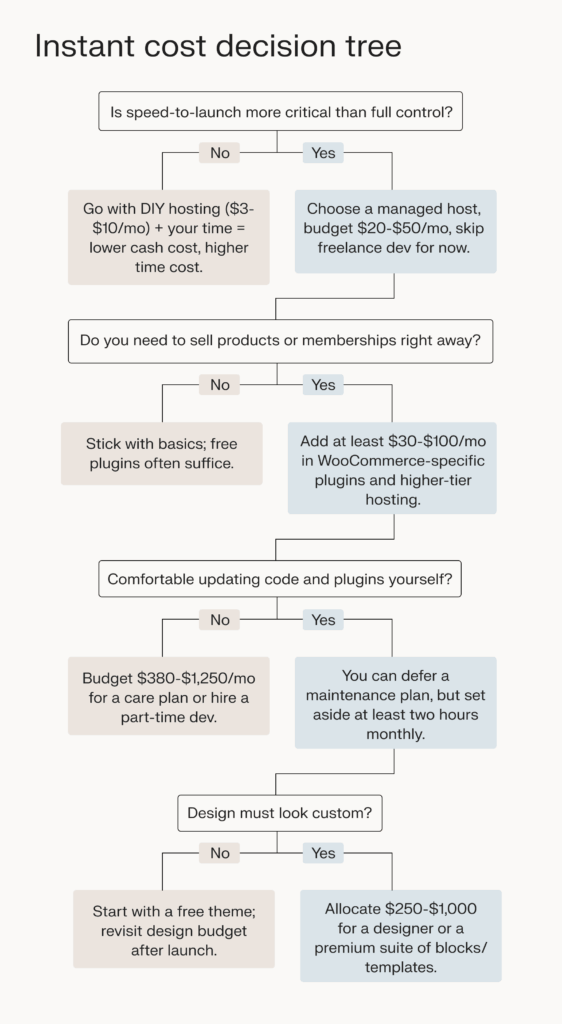
Work through the tree once, total the component bands that apply to you, and you’ll have a credible “sticker price” for the first year of ownership, without any guesswork or nasty surprises.
You can use this WordPress website cost estimator to translate fuzzy ideas into hard numbers, then align those numbers with your goals and skill set before you spend a single dollar.
Factors that influence the cost of a WordPress website
Key factors impacting your WordPress website cost can be broken down into two categories: WordPress website building and administration costs, and WordPress hosting expenses. The chosen WordPress hosting provider will ensure that your website stays accessible to your potential customers, while you work on improving the user experience and growing your online business.
WordPress hosting plans
A hosting plan is a set of hosting services available to you on a monthly or yearly subscription basis. It will include a fast and secure hosting platform for running your website, along with a number of software solutions for website management. Your hosting provider will become the point of contact if any issues occur, or you need any assistance performing website administration tasks.
WordPress hosting plans offer server infrastructure optimized for the needs of the content management system, and a range of tools for technical aspects of running a WordPress website. The infrastructure optimizations provide improved website performance and security, and can include SSL certificates, caching solutions, and a content delivery network. WordPress website management tools can include automatic updates and backups, staging environments, and premium plugins and themes.
We will discuss WordPress themes, plugins, and extensions later in the guide. However, keep in mind that your hosting provider can help reduce your WordPress website costs significantly with server-side solutions and plugins included in WordPress hosting plans. Another aspect to keep in mind is email, and whether your WordPress plan will include email hosting, or you will need to search for an email service provider.
WordPress hosting pricing
Hosting expenses will greatly increase your WordPress website costs. WordPress hosting pricing starts at around $10 per month for shared and managed cloud hosting plans. It can go up to $1000+ for high-availability enterprise hosting solutions. Choose a WordPress hosting provider that includes more features and offers great support for an affordable price.
Choosing a domain name
No online business can exist without a domain. A domain name is a unique identifier for your business that helps potential customers find you online. Choosing the right domain name is key to standing out from the competition and ranking well on search engines like Google.
Building a strong brand identity and your SEO strategy starts with domain registration. You can choose any domain registrar — a company offering domain registration services — but purchasing a domain and hosting together often offers a number of benefits. Some hosting companies offer a free domain name for the first year and one management portal for both hosting and domain administration.
Domain registration pricing
Depending on the top-level domain, or the domain extension, domain registration costs range from $10 to $30 annually. Most of the time, you will need to renew your domain name every year, with most companies allowing for automatic renewal. Having a free domain name or a discount included in the WordPress hosting plan is a great way to lower your WordPress website costs, especially at the start.
WordPress themes: Free or premium?
Building a WordPress website, you can choose from thousands of spectacular web designs with a wide variety of features and customization options. WordPress themes are templates that help you bring your ideas to life without any previous experience in website building and design. Whatever WordPress theme you choose defines the content layout and the overall look of your website.
Default WordPress themes
WordPress offers a number of free default themes that are included in each WordPress installation. Once you install WordPress for the first time, you will see three standard themes named after the years in which they were released — Twenty Twenty-Three, Twenty Twenty-Four, and Twenty Twenty-Five. Default WordPress themes offer basic functionality and customization options for website building.
Free and premium WordPress themes
WordPress is highly customizable. You can choose from thousands of multipurpose and business-specific themes, both free and premium. Premium themes often provide better designs and customization, and more content templates, although a large percentage of WordPress website owners are fully content with what some free themes have to offer.
Numerous premium-like WordPress themes are free and provide a great user experience, such as OceanWP, Neve, and Kadence WP, the default theme on all managed WordPress hosting plans by Liquid Web. Themes like StoreFront and ShoppingCart are among the best WordPress ecommerce themes.
WordPress website design costs
Choose a theme according to the type of website you are designing, but keep in mind that the template you pick will be the central part of your WordPress website design costs. WordPress theme prices vary dramatically, ranging from $50 to $300 yearly, although some allow for purchasing a lifetime license.
If you do choose to use a WordPress design service, you can expect either a one-time payment or an hourly rate until the job is done.
Plugins and extensions
Plugins and extensions are indispensable and absolutely necessary for running a WordPress website of any kind. By extending the native capabilities of WordPress, plugins can help you accomplish a large number of tasks. Performance and security, backups, search engine optimization, and ecommerce functionality — these are just a few areas where WordPress plugins can help you improve your website and add the functionality you need.
As plugins are essentially add-ons, a fresh WordPress installation won’t have any plugins installed by default. You can browse the catalog of WordPress plugins with their descriptions and user reviews on WordPress.org. Just like themes, WordPress plugins can be free or paid, depending on the list features included.
While there are some great free plugins available, most security, performance, and backup plugins, as well as ecommerce extensions, are paid. Premium plugins can be included in your hosting plan, which again highlights the importance of choosing the right WordPress hosting solution. For example, Liquid Web provides Solid Security Pro, the industry-leading premium WordPress security plugin, for free on all fully managed WordPress hosting plans.
WordPress plugins and extensions pricing
Prices for most premium WordPress plugins range from $10 to $100 monthly, although sometimes you can purchase a lifelong subscription. You can substantially reduce your WordPress website costs if your hosting plans include premium plugins installed by default. Regardless of what plugins you choose, do not install any software from unverified sources. This can put your website at great risk, which can then turn into hundreds of dollars spent on malware remediation.
Monthly WordPress costs
Typically, monthly WordPress website costs are comprised of hosting, domain registration, design costs, and plugin subscription expenses. Those can vary dramatically depending on the type of website you are running, the chosen WordPress hosting provider, and the software solutions you choose to extend the native capabilities of WordPress.
If you are building a small WordPress website which does not require using a premium theme or any paid plugins, you can significantly reduce your WordPress website costs. In this case, your WordPress costs will be defined by WordPress hosting and domain registration expenses, and can be as low as $10-20 monthly.
For medium-sized and large websites, including ecommerce sites, monthly WordPress website costs can range from $100 to a few thousand dollars, depending on the chosen WordPress hosting plan and types of plugins installed. Moreover, most mission-critical WordPress websites, including huge WooCommerce marketplaces, often require hiring a developer or even a whole team dedicated to web development and maintenance, which results in higher costs.
How to estimate the cost of building a WordPress website
To estimate the cost of building and managing a WordPress website, you need to take three main aspects into account.
- Website type. Clearly define what type of WordPress website you would like to build. Depending on whether it is a blog, an online portal for your business, or an online store or marketplace, WordPress website costs will vary significantly.
- Hosting. Shared, cloud, VPS, and dedicated hosting — the many types of WordPress hosting available in today’s saturated market can meet diverse requirements of all business owners. Monthly hosting costs can range from $10 to $1000+ depending on the type of hosting and features included in the hosting plan.
- Website design and functionality. WordPress plugins and themes define the design of your WordPress website and its functionality. Consider which features you absolutely need and which can possibly be included in your hosting plan, so you can reduce your monthly WordPress website costs.
The cost of a WordPress blog
A blog is the easiest to build and the most affordable type of website you can create using WordPress. Moreover, blogs are natively faster and more secure, which results in lower requirements for the features WordPress hosting plans and plugins need to provide.
Lower requirements for hosting and WordPress add-ons
There is a simple explanation for that. WordPress blogs have significantly less dynamic content compared to business websites and ecommerce, so it requires fewer hosting resources to work correctly. Blog posts remain unchanged, which means that static content largely prevails on WordPress blogs. This ensures better performance with lower requirements for server infrastructure, and a reduced attack surface.
WordPress website design costs
There are a large number of free WordPress themes that will help you design your blogs. The most popular and widely used of them include GeneratePress, Kadence WP, and OceanWP.
WordPress blog total costs
The cost of running a WordPress blog typically ranges from $15 to $30 monthly, which includes WordPress hosting and domain registration costs. If you would like to use a premium theme or install a number of paid plugins, your monthly costs can double or even triple, reaching $100-$150.
The cost of a small business website
A small business website sits between a WordPress blog and an online store when it comes to the costs associated with bringing it online. The amount of dynamic content and the additional features you may need can vary greatly depending on your goals and what exactly you are planning to host.
Higher requirements for security and performance
Your website represents the image of your business online. It’s important for your site to have great performance and security to make sure that your business is well represented. Moreover, if you accept inquiries from your customers or even store any customer data, you will need to make sure that their sensitive information is secure on your website.
Design and functionality
You can still use free WordPress themes to design your business website, as those would meet all your requirements in most cases. You may need to use premium plugins, which can include security, search engine and performance optimization solutions, and email software.
WordPress business website total costs
For a classic business site, which usually has five core pages such as Home, About, Services, Blog, and Contact, plan on spending roughly $650 to $3,100 upfront. The wide spread exists because page count is only a small slice of the real cost equation. A minimalist layout with stock images and a simple contact form can land on the lower end, while the same five pages built with custom design elements, copywriting, animations, or advanced booking tools can push toward the top. In short, complexity, not page tally, drives price.
After launch, a lean five-page site normally fits the small-business bracket we outlined earlier, about $50 to $300 per month for hosting, essential plugin renewals, and routine maintenance. Adding a couple more static pages later usually won’t nudge that figure, but adding high-traffic features (like multilingual support, gated content, or e-commerce) will. So, when budgeting, focus less on “How many pages?” and more on “How sophisticated will those pages be, and how much ongoing care will they need?”
The cost of building an ecommerce website on WordPress
With the rapid development of ecommerce, online store owners face more challenges than ever before. Online stores and marketplaces built on WooCommerce require high performance and advanced security measures in order to provide a safe and enjoyable shopping experience. It inherently results in higher website building and maintenance costs.
Security and performance
Dynamic content, sensitive customer information, and accepting payments significantly extends the list of software solutions you will need to use. Moreover, you will need to ensure fast page load times. If your product catalog loads slowly, your potential customers will find another seller.
Choose high-performance WooCommerce hosting with advanced security features, such as a CDN, SSL certificates, and PCI compliance.
Ecommerce functionality
WooCommerce is a robust ecommerce platform that offers a wide range of built-in solutions for product catalogs, payment processing, and pricing management. There are a number of premium plugins and extensions that simplify most ecommerce management tasks as your online store grows and attracts more customers.
WordPress ecommerce website total costs
Ecommerce businesses cost more to build and host. A small online store will cost you $30-80 to operate monthly. Midsize and large ecommerce websites require a monthly budget of $100-1000+ depending on the number of daily visitors, orders placed, and the additional functionality you wish to implement.
One-time vs recurring costs
Google Analytics can tell you where visitors come from, but your bank account needs to know where the dollars go, especially after launch.
The real story is the recurring stack, including the money spent on hosting, renewals, and upkeep, that repeats every 30 days. Track those line items now, project them three years out, and you’ll never be blindsided by “surprise” costs down the line.
Common recurring costs
| Component | Monthly range | Annual range | Quick note |
| Domain renewal | ≈ $1 – $5 | $12 – $60 | Keeps your .com active. |
| Hosting | $3 – $38 | $36 – $456 | Shared on the low end; entry-level managed VPS on the high end. |
| Theme subscription (if annual) | ≈ $0 – $21 | $0 – $250 | Some premium themes bill yearly for updates/support. |
| Plugins & extensions | $0 – $125 | $0 – $1,500 | SEO, backups, WooCommerce add-ons, etc. |
| Maintenance or care plan | $380 – $1,250 | $4,560 – $15,000 | Security patches, updates, performance tuning, small content edits. |
It’s necessary to focus on recurring fees because they compound. A $30 plugin feels small, but over three years, it’s a $1,080 commitment. Factor the multiplier effect into every “Add to cart” moment.
12- and 36-month budget estimates
| Site type | Typical monthly total | Year-1 cost | 3-year cost |
| Personal blog | $4 – $35 | $48 – $420 | $144 – $1,260 |
| Small business | $50 – $300 | $600 – $3,600 | $1,800 – $10,800 |
| E-commerce / WooCommerce | $100 – $800 | $1,200 – $9,600 | $3,600 – $28,800 |
Numbers assume you renew all services and plugins at the same tier for the full term.
How to keep recurring costs in check
- Audit renewals twice a year. Cancel plugins you no longer use before they auto-bill.
- Bundle where possible. A managed host that includes backups, staging, and security can replace multiple paid plugins.
- Scale hosting—not everything else. When traffic spikes, upgrade your plan first; you may not need pricier add-ons right away.
Getting started
With its extensive native capabilities, WordPress allows you to design and build a website without any coding skills or huge investments. WordPress hosting pricing, domain registration fees, and what theme and plugins you select are the main factors determining your WordPress website costs.
How much should a WordPress website cost? There is no definitive answer to this question. If you plan to build an online business using WordPress, think of what functionality you absolutely need on your future website, and find the best WordPress hosting solution depending on your budget and the features you would like to see included.
While there are many different types of WordPress hosting providers out there, one of the best choices you can make is to choose a fully managed WordPress host.
A fully managed WordPress host is a provider that takes care of all the technical aspects of running your WordPress website for you.
Liquid Web offers WordPress hosting for every need and skill level. If managed hosting sounds like a weight off your shoulders, our WordPress experts can take care of the technical server work for you.
But if you’re confident — or you want learn — self-managed WordPress VPS options are available too. Either way, you’re getting the very best server performance, so your WordPress site stays fast, available, and secure.