◦ Comprehensive security
◦ 24/7 support
WordPress Guide → Theme → Doctor Website Templates
Doctor website templates: 10 simple, professional WordPress themes for private practices

Launching a website for your private practice doesn’t have to be overwhelming. With the right WordPress template, you can create a professional online presence that builds trust with patients and makes it easy for them to connect with your office.
Let’s look at how WordPress themes work, whether they’re HIPAA-compliant, and explore 10 simple doctor website templates designed specifically for private practices.
Get fast, reliable hosting for WordPress
Power your site with the industry’s fastest, most optimized WordPress hosting
What is a WordPress theme?
A WordPress theme is essentially a template that controls how your website looks and feels. It sets the layout, color scheme, fonts, and design elements so you don’t have to build everything from scratch.
For beginners, a theme makes creating a website much easier. You choose a template that matches your practice’s style, then customize it with your own text, images, and logo. Most medical WordPress themes also come with built-in pages for services, contact information, and appointment scheduling.
Is WordPress HIPAA-compliant?
If your doctor’s office website collects or stores patient health information—such as online appointment forms, patient records, or secure messaging—you need to be HIPAA-compliant.
WordPress itself provides the flexibility to build HIPAA-compliant sites, but compliance depends on how you host and manage your site. Choosing an experienced WordPress hosting provider that offers HIPAA-compliant hosting is critical.
With the right setup, you can have a secure, fully compliant website while still enjoying WordPress’s ease of use and flexibility.
WordPress vs Wix vs Webflow for doctor’s office websites
When comparing WordPress, Wix, and Webflow for private practices, the key differences come down to customization, compliance, and scalability.
- Wix is a beginner-friendly website builder with drag-and-drop design, but it has limited flexibility for HIPAA compliance and long-term customization.
- Webflow offers more design freedom but has a steep learning curve, especially for non-technical office staff.
- WordPress is a little less beginner-friendly, but much more flexible and secure—and the enormous body of “how to” content online means anyone can figure it out.
With plugins for scheduling and forms, thousands of medical templates, WordPress gives private practices a reliable and customizable foundation.
10 simple, professional doctor website template themes
Here are 10 professional WordPress themes for private practices, compared side by side.
| Theme | Appointment Booking | WooCommerce Support | Mobile-Friendly | Best For | Starting Price |
|---|---|---|---|---|---|
| Dotus | ✔ | ✔ | ✔ | Multi-specialty clinics | $16 |
| Avicenna | ✔ | ✔ | ✔ | Holistic/alternative practices | $69 |
| Bosa Dental Care | ✖ | ✖ | ✔ | Dental clinics and small practices | Free |
| UniCare PRO | ✖ | ✔ | ✔ | Pharmacies and medical centers | $29 |
| Obstella | ✔ | ✖ | ✔ | OB/GYN and maternity clinics | $16 |
| Cardioly | ✔ | ✖ | ✔ | Cardiologists and specialists | $69 |
| Medicare | ✔ | ✔ | ✔ | Larger clinics and medical offices | $59 |
| Mediclinic PRO | ✖ | ✔ | ✔ | Clinics and hospitals | $29 |
| Medical Clinic | ✔ | ✔ | ✔ | Large clinics and multi-doctor practices | $59 |
| Resolace | ✔ | ✖ | ✔ | Therapists and mental health professionals | $16 |
1. Dotus

Dotus is a modern and flexible medical WordPress theme that works well for clinics, private practices, and multi-specialty medical centers. It’s built with the Elementor page builder, which means you can drag and drop sections to create pages without any coding skills.
The theme includes ready-to-use templates for services, doctor profiles, and appointment booking, making it easy to get an informative site online quickly. Its clean, professional design helps create trust with patients, while responsive layouts ensure the site looks good on any device.
Key features:
- Elementor support
- Appointment booking integration
- Mobile-friendly design
Best for: Multi-specialty clinics and practices that want a flexible layout
Starting at: $16 (with Envato Elements subscription)
2. Avicenna
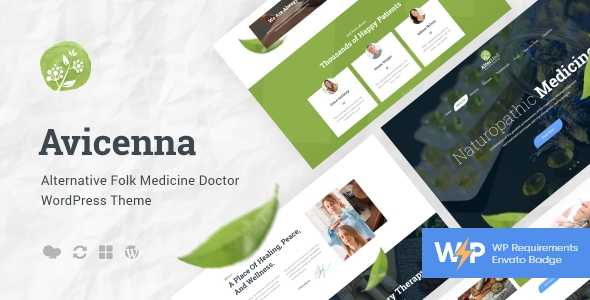
Avicenna is designed specifically for alternative medicine, wellness centers, and holistic practices. It comes with calming colors and modern layouts that reflect a natural, healthy lifestyle, which appeals to patients seeking non-traditional healthcare.
The theme integrates with WooCommerce, so practices that sell supplements, herbal remedies, or wellness packages can easily add an online store. With appointment scheduling and multiple homepage designs, it’s both practical for office use and customizable for branding.
Key features:
- WooCommerce-ready
- Appointment booking
- Multiple homepage designs
Best for: Alternative and holistic practices
Starting at: $69
3. Bosa Dental Care

Bosa Dental Care is a free theme tailored to dentists, orthodontists, and small dental clinics. Its design is straightforward but professional, giving patients clear access to services, office details, and contact information.
As a free theme, it doesn’t come with advanced features like built-in booking, but it integrates well with WordPress’s block editor, so you can still customize your content easily. It’s a strong choice for practices that want a clean website without investing in a premium template upfront.
Key features:
- Free to use
- Lightweight design
- Built for dental services
Best for: Dental clinics and small practices with limited budgets
Starting at: Free
4. UniCare PRO

UniCare PRO is a versatile theme that works well for drug stores, pharmacies, and small clinics. It includes multiple page layouts for services, product displays, and doctor introductions, so you can quickly set up a professional website.
The theme is WooCommerce-ready, which makes it easy to manage an online pharmacy or retail shop alongside your medical website. Its mobile-friendly design ensures patients and customers can access your information and services on any device.
Key features:
- WooCommerce integration
- Responsive design
- Multiple templates
Best for: Pharmacies and clinics needing a simple online presence
Starting at: $29
5. Obstella

Obstella is designed with pregnancy care and obstetricians in mind. It features soft, welcoming colors and layouts that make expectant mothers feel comfortable navigating your site.
The theme includes customizable sections for services, FAQs, and doctor profiles, along with appointment booking integration. Built with Elementor, it gives you flexibility to adjust content and design while keeping the patient experience front and center.
Key features:
- Responsive design
- Elementor support
- Pregnancy-focused layouts
Best for: Obstetricians, maternity care clinics
Starting at: $16 (with Envato Elements subscription)
6. Cardioly

Cardioly is focused on cardiologists and heart health practices, making it a niche but highly professional option. It comes with specialized layouts for cardiology services, doctor profiles, and patient care information.
The theme includes a built-in booking system, so patients can request appointments directly from your site. Its modern design and mobile optimization help practices build trust while ensuring accessibility for patients on the go.
Key features:
- Booking system
- Modern cardiology-specific design
- Responsive layouts
Best for: Cardiology practices and specialists
Starting at: $69
7. Medicare

Medicare is a multipurpose medical theme that works for clinics, hospitals, and individual practices. It comes with multiple pre-made layouts, giving you flexibility to choose a style that matches your office.
Features like built-in booking forms, multilingual support, and service listing templates make it a complete solution for medical offices. Its professional design helps larger practices or multi-doctor clinics establish a polished, trustworthy online presence.
Key features:
- Multipurpose layouts
- Booking integration
- Multilingual support
Best for: Larger clinics or multi-doctor practices
Starting at:$59 (ThemeForest)
8. Mediclinic PRO

Mediclinic PRO is a healthcare theme that emphasizes clean design and straightforward navigation. It’s designed to work well for general medical clinics, hospitals, and health centers.
The theme offers different header and footer options, so you can create a site that matches your practice’s branding. With WooCommerce support and responsive layouts, it’s suitable for both patient-facing services and online product sales.
Key features:
- Responsive design
- Multiple templates
- WooCommerce support
Best for: General clinics and hospitals
Starting at: $29
9. Medical Clinic

Medical Clinic is a comprehensive WordPress theme that includes advanced booking features and customizable service pages. It’s ideal for practices that need to showcase multiple doctors, departments, or specialties.
The theme also includes templates for pricing tables, patient forms, and doctor profiles, which are especially useful for larger clinics. Its design is professional and flexible, making it a long-term solution for a medical website.
Key features:
- Advanced booking system
- Doctor profiles
- Service management
Best for: Multi-specialty medical clinics
Starting at: $59 (ThemeForest)
10. Resolace

Resolace is designed for mental health professionals, including psychologists, therapists, and counseling centers. Its design is calm and welcoming, helping create an environment of trust before patients even visit your office.
The theme supports appointment booking and comes with layouts designed to highlight therapist profiles, services, and resources. Built with Elementor, it’s easy to customize without needing technical skills.
Key features:
- Modern layouts
- Elementor builder
- Therapist-focused design
Best for: Therapists, counselors, mental health professionals
Starting at: $16 (with Envato Elements subscription)
How to choose a theme template for a doctor site
When choosing a doctor website template, consider:
- Patient needs: Does the theme make it easy for patients to find services, contact information, or book appointments?
- Compliance: Make sure your hosting and website setup can support HIPAA compliance.
- Customization: Choose a theme you can easily adjust without coding experience.
- Mobile-friendliness: Patients often look up providers on their phones, so a responsive theme is essential.
Next steps
If you’re setting up a new website, here’s how to get started:
1. Register a domain name (if you don’t have one).
Your domain name is the website address people type into their browser, like www.drsmithclinic.com. Most domains cost about $10–$15 per year.
To get one, you’ll need to use a domain registrar. Alternatively, some hosting providers (see step 2) will help you register a domain as well, which makes it easier.
Choose something short, professional, and easy to spell — usually your practice name plus “clinic,” “health,” or “care” works well.
2. Choose a WordPress hosting provider that supports HIPAA compliance
Hosting is the service that makes your website available on the internet. For a medical practice, you’ll need a provider that offers HIPAA-compliant hosting so patient data stays secure.
A good provider will also install WordPress for you, manage server security, and handle software updates so you don’t have to worry about the technical side. Look for a managed WordPress plan from a HIPAA-ready provider.
3. Install your theme
Once WordPress is set up, you’ll log in to your WordPress dashboard (usually at yourdomain.com/wp-admin). From there, you can install the doctor theme you chose.
If it’s a free theme like Bosa Dental Care, you’ll find it in the WordPress theme directory inside your dashboard. If it’s a paid theme, you’ll upload the theme files provided by the seller. After installing, click “Activate,” and your site will immediately take on the theme’s design.
4. Customize your site with your practice details
Most themes include a demo layout you can edit. Replace the placeholder text with your practice name, services, doctor profiles, and contact details. Add your office phone number in a prominent spot and make sure your address is easy to find. If your theme supports appointment booking, set that up early so patients can start using it.
If you get stuck, you can usually contact the theme developer through their website to ask for help. There may also be a Q&A or user forum available.
5. Preview and launch your site
Before you go live, click the “Preview” button in WordPress to see how your site looks. Test it on your phone and computer to make sure everything is clear and easy to use. Once you’re happy with it, publish the site and share your new website address with patients!
Doctor’s office website FAQs
Getting started with a doctor website template
Choosing the right template is one of the easiest ways to create a professional online presence for your practice. The right theme gives patients confidence, helps them find information quickly, and sets you up with tools like appointment booking and service pages.
If you’re ready to get started, pick a theme that matches your specialty, secure HIPAA-compliant hosting, and begin customizing your site with your practice’s details. You’ll be well on the way to building a trustworthy website that supports your patients and your practice.
When you’re ready for WordPress hosting, Liquid Web is here to help. Our platform is one of the few that offers the security details you need to maintain HIPAA compliance and a scalable, WordPress-ready infrastructure.
And if you don’t want to deal with server management and maintenance, our fully managed hosting for WordPress is the best in the industry. Our team are not only server IT experts, but WordPress hosting experts as well. Your doctor’s office website couldn’t be in better hands.
Click through below to explore all of our hosting for WordPress options, or chat with a WordPress expert right now to get answers and advice.
Additional resources
How to change WordPress themes the right way and avoid potential problems→
We’ll go over some reasons why you may want to switch to a new theme and how to prepare your website. Then, we’ll show you a few ways to change your WordPress theme.
7 restaurant website WordPress themes to make your mouth water →
Explore the best WordPress themes for restaurants to create a stunning, user-friendly, and mobile-optimized dining website
5 awesome ways to customize a WordPress dashboard→
We’ll go over the importance of WordPress dashboard customization, how to do it, and the common challenges you might face.