◦ Comprehensive security
◦ 24/7 support
WordPress Guide → SEO → Tips
WordPress SEO tips for beginners and site owners ready for more

Search engines are the gateway to new visitors, leads, and customers. WordPress gives you a strong starting point, but without proper SEO, your site will struggle to stand out—even with great content.
Most guides stop at the basics, but here you’ll learn unique, actionable strategies that help push your site beyond competitors.
Get fast, reliable hosting for WordPress
Power your site with the industry’s fastest, most optimized WordPress hosting
Setup and tools
SEO success depends on the tools and settings you configure at the start. WordPress makes this easier than most platforms, but you’ll still need to get it right.
1. Install and configure an SEO plugin
An SEO plugin adds the controls WordPress doesn’t have by default—such as meta titles, descriptions, sitemaps, and schema markup. Popular options include Yoast SEO, Rank Math, and All in One SEO.
Why it matters: Without an SEO plugin, you can’t fine-tune how your pages appear in Google or automatically generate metadata.
How to do it: Install one SEO plugin, go through its setup wizard, and enable features like sitemaps and breadcrumbs. Stick to a single plugin to avoid conflicts.
2. Set up Google Search Console and Analytics
Google Search Console shows how your site is performing in search results, while Analytics shows what users do after they land.
Why it matters: These tools let you see which keywords are driving traffic, track clicks, and find crawl errors that may hurt rankings.
How to do it: Sign up for both services, then verify ownership by adding a DNS record or uploading an HTML file. Most SEO plugins also let you connect Search Console directly.
Learn more: How to Add Google Analytics to WordPress and Track Data →
3. Configure your XML sitemap and robots.txt
A sitemap is a file that lists all the pages you want search engines to index, while robots.txt tells search bots what not to crawl.
Why it matters: Proper sitemaps ensure search engines discover new content quickly, while robots.txt prevents them from wasting time on duplicate or irrelevant pages.
How to do it: Use your SEO plugin to generate a sitemap (usually found at /sitemap_index.xml). For robots.txt, block admin and system pages but keep content open.
4. Enable schema markup for rich results
Schema markup is structured data that tells search engines exactly what your content represents, like recipes, reviews, or products.
Why it matters: Schema increases your chances of showing rich snippets in results, such as star ratings or FAQs, which improve visibility and clicks.
How to do it: Enable schema features in your SEO plugin or use a dedicated schema plugin like Schema Pro. Add relevant schema types to your most important content.
Learn more: How to implement Schema in WordPress →
5. Choose reliable hosting and a CDN
Your hosting environment and content delivery network (CDN) play a big role in performance. The server powering your WordPress site determines how quickly pages are delivered, while a CDN stores and distributes your content across multiple locations worldwide, reducing load times for visitors no matter where they are.
Why it matters: Google uses site speed and uptime as ranking factors. A slow or unreliable host can undo all your SEO work.
How to do it: Choose fast, secure WordPress hosting and opt for managed services if you need technical assistance. Add a CDN like Cloudflare or BunnyCDN to speed up global delivery.
Content & on-page SEO
Once your setup is solid, content optimization is where most of your ranking improvements happen.
6. Optimize permalinks for clarity
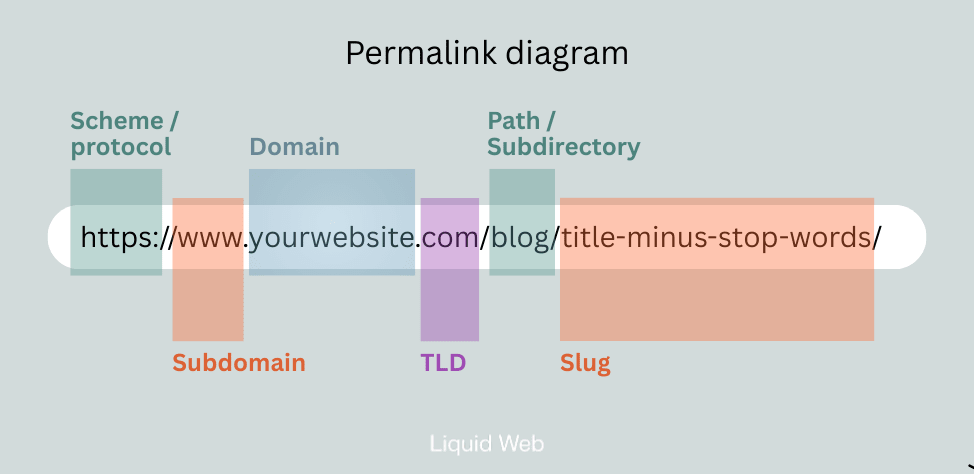
A permalink is the permanent URL for a post or page. There are several factors that determine what a whole permalink looks like—including how you organize content on the site and how you structure slugs.
Why it matters: Clean URLs with keywords are easier for search engines and users to understand. Long or random URLs can confuse both.
How to do it: First, go to Settings > Permalinks, choose the “Post name” option. You do NOT want blog posts showing the date or a random string of numbers.
Then, for individual posts and pages, edit the slug to read as a shortened version of the title. Leave out “stop words” like “a,” “the, “an,” etc.
7. Write compelling titles and meta descriptions
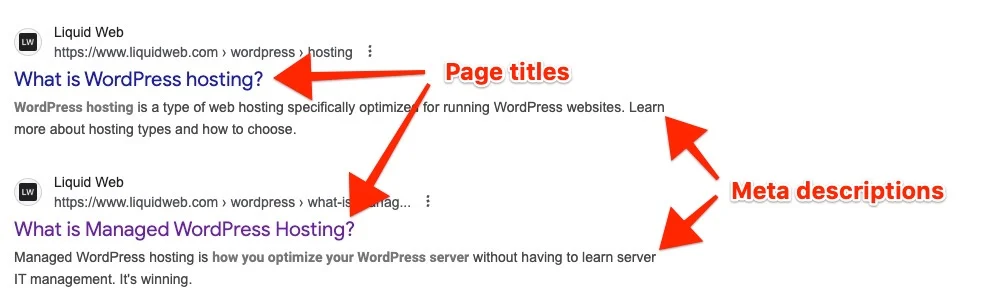
The title tag and meta description are what appear in search results. The title tag is also known as an “SEO title” or sometimes just a “page title.” The meta description is the short (usually one sentence) description.
Why it matters: This is your first impression in search. Clear, descriptive titles and meta descriptions, that use keywords naturally but strategically, help algorithms present your content ot the right searchers. They also entice users to click.
How to do it: Use your SEO plugin’s editor under each post to write a unique title and description. Keep titles under 60 characters and descriptions under 160.
8. Use categories and tags strategically
WordPress categories are a built-in way to organize posts into broad topics, making it easier for visitors and search engines to understand your site’s main themes. WordPress tags are optional labels that describe specific details or subtopics of a post, helping connect related content across different categories.
Why it matters: Proper use of categories and tags, together, creates a logical site structure, improves internal linking, and prevents duplicate content. Misuse creates thin, duplicate pages, and site structures that don’t get crawled well.
How to do it: Assign each post to one category, then use tags sparingly for recurring subtopics. Avoid creating dozens of unused or overlapping tags.
Learn more: How to implement Schema in WordPress →
9. Optimize images for SEO
You’re surely using images to improve engagement and UX, but did you know those images present several SEO opportunities? If not, your forfeiting valuable potential.
Why it matters: The text behind the image—alt text, file names, and captions—are used to understand and communicate images. Image files are also larger than text alone, and can slow down a site if not handled properly.
How to do it: First, make sure you’re compressing images and/or using web-friendly file formats like .webp. Then, make the most of those text fields:
- Rename files descriptively before uploading (blue-running-shoes.jpg).
- Add alt text in the Media Library describing the image naturally (and strategically).
- If using captions, think about incorporating keywords (without being annoying).
Learn more: How to add alt tags to images in WordPress →
10. Strengthen internal linking
Internal linking is the practice of adding hyperlinks that connect one page or post on your WordPress site to another. These might appear in menus, sidebars, footers, and throughout your content.
Why it matters: Internal links guide users to related content and help search engines understand which pages are most important. Orphaned pages with no links are often ignored.
How to do it: Add links to related posts within your content using descriptive anchor text. Create pillar posts that link to supporting articles for a topic cluster effect.
Learn more: Internal linking guide for WordPress →
11. Use semantic keywords and entities
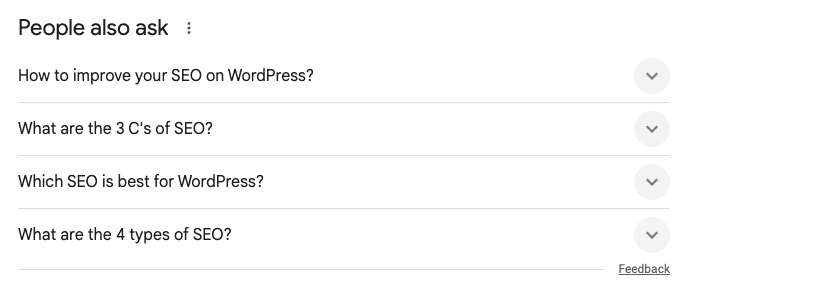
Semantic keywords are words and phrases related to your main keyword that help search engines understand the broader context of your content—for example, a post about “WordPress SEO” might also include terms like “meta descriptions,” “sitemaps,” and “search rankings.”
Entities go a step further by representing specific people, places, brands, or concepts that Google recognizes in its knowledge graph, such as “Yoast SEO” (a plugin) or “Google Search Console” (a tool).
Why it matters: Covering related terms and concepts increases your authority on a subject and improves rankings for long-tail searches.
How to do it: Use tools like Google’s “People Also Ask” or Ahrefs to find related questions and terms. Include synonyms and relevant entities naturally throughout your content.
Site performance and technical SEO
Technical SEO ensures your site is fast, mobile-friendly, and easy for search engines to crawl.
12. Use a mobile-first responsive theme
A responsive theme is a WordPress theme designed to automatically adjust its layout, images, and text so your site looks and functions properly on any device—desktop, tablet, or smartphone. Instead of forcing visitors to pinch, zoom, or scroll awkwardly, a responsive theme ensures smooth navigation and readability.
Why it matters: Google ranks based on mobile usability first. A site that looks broken on phones will struggle in search.
How to do it: Choose a responsive theme and test it on different devices. Avoid themes with heavy sliders or outdated code.
13. Improve Core Web Vitals
Core Web Vitals are a set of performance metrics Google uses to measure user experience on a website. They focus on three key areas:
- How quickly the main content loads (Largest Contentful Paint)
- How soon the site responds to user interaction (First Input Delay)
- How stable the layout is while loading (Cumulative Layout Shift).
Why it matters: Google uses these metrics as ranking signals, and poor scores drive users away.
How to do it: Test your site with PageSpeed Insights or Site Kit. Fix issues like large images, unoptimized fonts, or excessive JavaScript.
14. Enable caching and minification
Caching is the process of storing a static version of your website’s pages and files so they load faster for visitors instead of regenerating content from scratch each time.
Minification is the process of removing unnecessary characters—like spaces, line breaks, and comments—from code files (CSS, JavaScript, HTML) to make them smaller and load faster.
Why it matters: Both improve speed and reduce server load, helping rankings.
How to do it: Use a caching plugin like W3 Total Cache or WP Super Cache. Enable minification for CSS, JavaScript, and HTML in plugin settings.
Learn more: 7 best WordPress cache plugins →
15. Secure your site with HTTPS
HTTPS (Hypertext Transfer Protocol Secure) is the secure version of HTTP that encrypts data between a visitor’s browser and your WordPress site, protecting information and boosting trust and SEO rankings.
Why it matters: It’s a confirmed ranking factor, and visitors trust secure sites. Browsers now flag non-HTTPS sites as unsafe.
How to do it: Install a free SSL certificate from Let’s Encrypt (usually included with hosting). Update your WordPress and plugin settings to force HTTPS.
Learn more: How to force HTTPS in WordPress →
16. Manage redirects and canonical URLs
Redirects are instructions that automatically send visitors and search engines from one URL to another, often used when a page is moved, renamed, or deleted to preserve traffic and SEO value. The most common type of redirection is a permanent redirect, or a 301 redirect.
A canonical URL is the “official” version of a page that you tell search engines to index when multiple pages have similar or duplicate content, preventing ranking dilution and confusion.
Why it matters: Duplicate pages confuse search engines and split ranking power
How to do it: If you only need one version of a page or post, use a 301 redirect to point the old version to the new one. If you need both for any reason, your SEO plugin can set canonical URLs so Google knows which version of a page is primary.
Learn more: How to set up redirects in WordPress →
Ongoing maintenance
SEO doesn’t end after setup. It requires consistent care to stay competitive.
17. Audit your site regularly
A site audit is a thorough review of your website’s SEO, performance, and technical health that identifies issues like broken links, duplicate content, crawl errors, and speed problems. It helps you understand what’s holding your site back in search rankings and provides a roadmap for improvements.
Why it matters: An SEO site audit helps uncover hidden issues that hurt rankings and user experience, so you can fix them and improve your site’s visibility in search. Broken links, duplicate content, and crawl errors creep in over time.
How to do it: There are several good tools that can help you run an SEO site audit, including:
- Google Search Console
- Screaming Frog
- Ahrefs
- BrightEdge
- Moz Pro Site Crawl
18. Update old posts for freshness
As your site grows and time passes, some of that amazing content gets old. Then it gets outdated and incorrect. Updating, correcting, and re-optimizing old content is just as valuable (arguable more so, because it’s more efficient) for SEO as creating new.
Why it matters: Refreshing old posts can trigger ranking boosts without writing new articles.
How to do it: Export a list of posts or URLs from 12 months ago and evaluate each one for relevance, accuracy, and performance. The content that is outdated, under-performing, or no longer accurate should all be scheduled for updating.
19. Monitor broken links

Broken links are hyperlinks on your site that lead to pages that no longer exist or can’t be found, usually showing a 404 error. They happen when you delete or rename a page without setting up a redirect, link to an external site that has removed content, or make a typo in the URL.
Why it matters: Search engines downgrade sites with lots of dead links. Without a great 404 page, they create a frustrating user experience.
How to do it: Use a plugin like Broken Link Checker or run periodic audits. Update or remove broken links quickly.
Learn more: Fixing 404 errors in WordPress: 7 simple solutions →
Bonus: Create a great 404 page. Broken links are going to happen, and having a few isn’t bad (Google even said so). You can turn a bad UX into a great UX, though, with a good 404 page.
20. Keep WordPress updated
WordPress periodically releases updates to improve speed, security, and performance.
Why it matters: Outdated code can introduce vulnerabilities and slow performance, both of which hurt SEO.
How to do it: Update WordPress core, plugins, and themes regularly. Use staging environments to test updates safely.
Learn more: How to install a WordPress update: Manually and automated →
Unique insights and pro strategies
Beyond the fundamentals, these advanced techniques give you an edge.
21. Customize SEO with hooks and filters
A WordPress hook is a piece of code that lets you insert custom functions or modify default behavior without editing core files. There are two main types: actions, which let you add new functionality at specific points (like sending an email when a post is published), and filters, which let you change or filter existing content (like customizing post titles before they’re displayed).
WordPress hooks let you insert custom SEO rules into templates.
Why it matters: You can automate structured data or metadata for custom post types beyond what plugins allow.
How to do it: Use filters like wpseo_title or wpseo_metadesc to adjust titles and descriptions programmatically.
Learn more: Guide to WordPress hooks for site customization →
22. A/B test meta titles for higher CTR
You wrote a great page title and meta description … but did you write the best page title and meta description? Test some variations and see what gets the most engagement.
Why it matters: Even if you rank well, low CTR tells Google your result isn’t attractive.
How to do it: Test variations of titles using tools like Split Hero. Track which version drives more clicks and update permanently.
24. Build content clusters for authority
Clusters group content around a central “pillar” topic. If you offer several products or services, or focus on a few different industry verticals, pick one to start with. Create content to answer every need or question a target persona might have.
Why it matters: Google and AI search engines reward sites that demonstrate authority on a subject rather than scattershot content.
How to do it: Create a long, comprehensive guide as your pillar, then publish related posts that link back to it.
Fresh WordPress SEO tips for the age of AI search engines
AI-powered search tools like Google’s AI Overview, ChatGPT, and Perplexity are reshaping how people find answers. Optimizing for these systems requires going beyond traditional SEO and focusing on authority, clarity, and structure.
25. Create clear, answer-focused content
This is especially helpful if you’re updating and refreshing old content: make sure you’re thinking about AI search tools now.
Why it matters: The SEO metrics that matter are shifting, and impressions/citations are gold. If your content directly addresses queries, it’s more likely to be quoted in AI-generated answers.
How to do it: Use question-based headings (H2s and H3s), write clear definitions, and provide context in short, digestible paragraphs.
26. Add structured data and schema for context
Structured data is a standardized way of adding extra information to your content (using code like schema markup) so search engines and AI systems can better understand and display it.
Why it matters: LLMs rely on structured data to identify authoritative information, like product specs, reviews, or FAQs.
How to do it: Use your SEO plugin or tools like Schema Pro to add FAQ, HowTo, and Article schema where relevant.
27. Include verifiable references and citations
LLMs are more likely to surface content that can be fact-checked or tied to reputable sources.
Why it matters: Linking to credible external sources improves trust and increases the chance of your page being used as a citation.
How to do it: Add links to studies, industry reports, or official documentation where appropriate.
28. Publish original insights and data
AI models seem to prioritize unique content over repetitive material. If you and all your competitors are posting about “Benefits,” the AI doesn’t need you. But if you’re the only one being honest about the “Challenges,” it has to cite you, because no one else is talking about that.
Why it matters: Original research, surveys, or case studies are more likely to get cited than generic SEO text.
How to do it: Share your own stats, experiences, or WordPress case studies, and highlight them in a way that’s easy for AI to extract.
29. Get listed by other publishers
Industry publications often post articles like, “Top 10 _ Providers for 2026,” etc.
Why it matters: AI search tools pull from those third-party sources to provide lists of products, solutions, or providers relevant to a user’s query. Getting named in AI results usually starts by getting on other publishers’ lists.
How to do it: You can look up and get in touch with their writers, content teams, and/or affiliate marketing teams to get on those lists. The line between PR and SEO is blurring.
WordPress SEO FAQs
Next steps for WordPress SEO tips
SEO is one of the most powerful ways to grow a WordPress site. From permalinks to schema markup, every optimization builds a stronger presence in search.
Start by choosing one tip—like refreshing old content or improving site speed—and apply it today. Over time, these small changes compound into lasting rankings and traffic growth.
Ready to upgrade your WordPress experience? Professional hosting improves speeds, security, and reliability for a website and a brand that people find engaging and trustworthy. Liquid Web’s WordPress hosting options configure business-class servers and support plans specifically for WordPress websites.
Don’t want to deal with server management and maintenance? Our fully managed hosting for WordPress is the best in the industry. Our team are not only server IT experts, but WordPress hosting experts as well. Your server couldn’t be in better hands.
Click through below to explore all of our hosting for WordPress options, or chat with a WordPress expert right now to get answers and advice.
Additional resources
Comprehensive guide to securing WordPress with ModSecurity
→
This guide provides a comprehensive overview of how to use ModSecurity to enhance the security of your WordPress site.
5 best SEO plugins for WordPress →
In this post, we’re comparing the top SEO plugins for WordPress, so you can learn how to best optimize your site for search engines.
Why security matters for WordPress enterprise hosting
→
Use the blog as your guide to attacks to watch out for, security best practices, and steps to improve the WordPress protection you already have.

Alexis Wisniewski is an Organic SEO Manager at Liquid Web. She has been leading SEO, primarily for technology brands, since 2013, specializing in SEO content and strategy. When she’s not reading and writing online, she’s usually reading and writing offline, or spending time with her family in the Chicagoland suburbs.