◦ Comprehensive security
◦ 24/7 support
WordPress Guide → SEO → Server Response Time
Reducing server response time (TTFB) in WordPress

No one likes to wait. And that’s especially true when it comes to your website.
It’s important to have a fast website for a number of reasons. It improves the user experience. It reduces bounce rate. And it helps your site rank higher.
TTFB, also known as time to first byte, is one way to measure your website’s performance. This blog will explain how to reduce server response time (TTFB) and provide WordPress plugin recommendations.
Get fast, reliable hosting for WordPress
Power your site with the industry’s fastest, most optimized WordPress hosting
What is TTFB?
Time to First Byte (TTFB) is the total amount of time from the start of the request to when the first byte is received back from the response.
Why is TTFB important?
You probably already are aware of the importance of website performance. TTFB is also important because it contributes to the overall performance and speed of your site. If your site has slow TTFB, then it will cause users to have a less than ideal experience of the site. No one likes to wait.
Determining your TTFB
The easiest way to find out the TTFB of your site is by using online testing tools, such as GTmetrix or WebPageTest.
When testing the site in GTmetrix, click on the performance tab and then scroll down to the browser timings section. If testing the site using WebPageTest, click on the first-byte section and it will show the TTFB of the site.
TTFB from GTmetrix

TTFB from WebPageTest
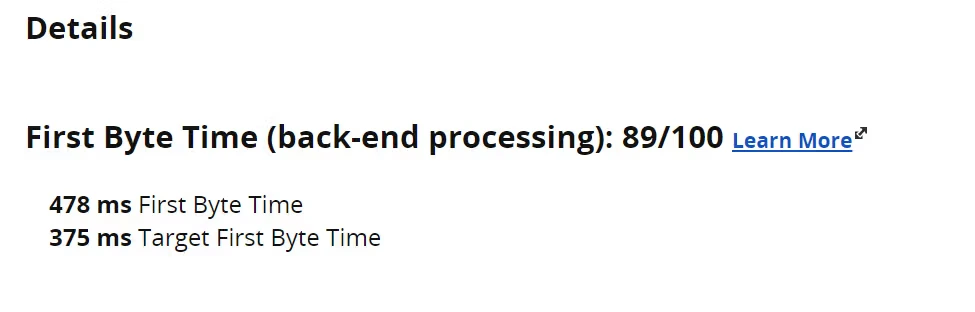
Another way to find TTFB
Another great way to find out the TTFB without any plugins, images, or themes affecting the TTFB is to test using readme.html. This can be found in the public_html folder of the site from WordPress.
The URL to test with to get the readme.html TTFB result would be:
Example URL: https://sitedomain.com/readme.html
Testing the HTML file will give you an accurate TTFB when plugin assets (CSS and JavaScript files), image assets, and any theme assets (CSS and JavaScript files) along with third party external requests are loading on your site.
Cons Of A High TTFB
High TTFB on your site will cause site users to have a degraded, slow experience. This means that pages on your site will be slow to load for users. The slow speed can end up causing users to drop off. In the case of ecommerce sites, it will cause customers to abandon carts on the site and hurt your sales.
High TTFB would be anything which is slower than 600ms. A more common range would be 300-500ms. Typically on sites hosted on Liquid Web, the TTFB will be well under 300ms.
| Server Response Times (TTFB) | Speed |
|---|---|
| High TTFB | Over 600ms |
| Average TTFB | 300-500ms |
| Good TTFB | Under 300ms |
How to reduce server response times in WordPress (TTFB)
After you have tested the site using GTmetrix or WebPageTest, look in the waterfall. See if you find any slow responses, or any slow third party external scripts that are running on your site.
See if the slow responses are being caused by your active theme or if they are from frontend requests being made by active plugins on your site.
Slow admin-ajax.php requests being made by active plugins on the site can increase the server response time. Also, admin-ajax.php requests are not going to be helped by any caching that might be running on your sites, such as a full page cache or Redis object caching.
Admin-ajax.php frontend requests can be cached and are commonly caused by plugins using it for updating a feature on the site or a popup plugin that is using it for tracking analytics.
Reduce server response times with WordPress plugins
Plugins that can help improve TTFB would be any full-page caching plugins, such as:
WordPress plugins to host web fonts locally
You can locally host web fonts using plugins such as Flying Fonts or OMGF. If you are using Google Analytics, you can locally host those using plugins such as Flying Analytics or CAOS.
If you’re hosting web fonts or third party scripts locally, then you can control those with browser caching rules in place on the site’s .htaccess file.
With third party external requests, you have no control over how long those requests will take. Since those are not being served locally, then you can not control those. 500 server errors will not help your site load time if the site can not be loaded correctly.
Additionally, redirects in your site’s waterfall set of requests can create a slower site. Those should be reduced to as minimal an amount as possible.
If you can find specific site assets which should not be loading on the homepage — examples would be payment scripts or form scripts — then those can be disabled, which will help optimize the site to be faster, since the fewer sites requests the faster it will load.
Getting started with reducing server response time (TTFB) in WordPress
Liquid Web has been leading the industry in WordPress hosting for decades. And if you select managed WordPress hosting, our team of experts will manage server IT for you — so you can focus on growing your brand.
Click below to explore options or start a chat with one of our WordPress hosting experts now to get answers to your questions and further guidance.
Additional resources
Comprehensive guide to securing WordPress with ModSecurity
→
This guide provides a comprehensive overview of how to use ModSecurity to enhance the security of your WordPress site.
Common bottlenecks that slow down WordPress sites →
In this guide, I’ll walk you through the most common bottlenecks that slow down WordPress and present a solution to each one.
Why security matters for WordPress enterprise hosting
→
Use the blog as your guide to attacks to watch out for, security best practices, and steps to improve the WordPress protection you already have.

Luke Cavanagh, Strategic Support & Accelerant at Liquid Web, is one of the company’s most seasoned subject matter experts, focusing on web hosting, digital marketing, and ecommerce. Graduating from the University of Brighton with a Business and Technology Education Council (BTEC) Higher National Diploma (HND) in 2D & 3D Design, Luke’s credentials prepared him well in both web development and design.