◦ Comprehensive security
◦ 24/7 support
WordPress Guide → Security → WordPress Attack
Stopping an XML-RPC WordPress attack for admins

Keep your site safe from XML-RPC WordPress attacks! Learn how they happen and how to prevent them with insights for admins regarding the XML-RPC protocol.
Get fast, reliable hosting for WordPress
Power your site with the industry’s fastest, most optimized WordPress hosting
Stopping an XML-RPC WordPress attack
XML-RPC attacks are among the most common attacks on various WordPress websites. Here you’ll learn what XML-RPC protocol is, what it is used for, what these attacks are, how they happen and how to prevent them.
What is XML-RPC?
XML-RPC is a remote procedure call protocol that uses HTTP as a transport mechanism and encodes its calls using XML. XML is a language that defines rules for encoding documents and is both human-readable and machine-readable. RPC is a way for a call from one location (device) to trigger the execution of a routine or a function in another location (server). It was created in 1998 and allowed for sending and receiving of encoded, potentially complex, or nested data structures via HTTP requests.
XML-RPC and its role within WordPress installations
XML-RPC is one of the core WordPress features which allows remote access to otherwise inaccessible sections of the WordPress dashboard. For example, if you wanted to post to your site from a mobile device since your computer wasn’t nearby, you could do that using various third-party applications (Windows Live Writer was one of them). XML-RPC is a protocol that would allow the connection between a remote third-party application and the WordPress installed on your website. There was an option to disable XML-RPC in earlier WordPress versions, but with the release of WordPress mobile applications, this option’s been enabled by default (since WordPress version 3.5). There isn’t a built-in functionality that would allow you to disable XML-RPC.
XML-RPC is a remote procedure call protocol that uses HTTP as a transport mechanism and encodes its calls using XML. XML is a language that defines rules for encoding documents and is both human-readable and machine-readable. RPC is a way for a call from one location (device) to trigger the execution of a routine or a function in another location (server). It was created in 1998 and allowed for sending and receiving of encoded, potentially complex, or nested data structures via HTTP requests.
Problematic nature of XML-RPC in WordPress
In the past, some RPCs have been exploited. One of the examples would be a massive Microsoft virus known as MSBlast or W32.Blaster.Worm which caused significant chaos on Windows computers, from August 2003. Nowadays, it presents a security risk for XML-RPC attacks on WordPress sites. Randomized passwords and usernames that aren’t the default “admin” user are still a good security practice, but they will not do much good against XML-RPC attacks. Namely, there are two main weaknesses that have been exploited in the past.
Malicious visitors would use the xmlrpc.php file for brute force attacks that might allow them access to your site. A single command can be effectively used to test hundreds of different passwords. Usually, the primary user that would be exploited is the administrator user with the username “admin”. The xmlrpc.php file allows hackers to bypass the usual security measures to prevent brute force attacks towards the main wp-login.php file. For other ways to avoid compromises on your site, see How can I prevent my site from being compromised?
The second weakness was bringing sites down through a DDoS attack. The pingback WordPress feature allows hackers to simultaneously send pingbacks to thousands of sites. This weakness is a feature of xmlrpc.php that gives hackers an endless supply of different IP addresses to distribute the DDoS attack over.
How to check if XML-RPC is enabled on your site
How to stop XML-RPC attacks
The easiest and quickest way to stop XML-RPC attacks on your website is to entirely block access to the xmlrpc.php file. That can be achieved using various plugins or adding a block directly to the site’s htaccess file. It can also be achieved by deleting the file itself, but any future core update would recreate the file, and you’d need to delete it over and over again. More articles about security features and possible modifications can be found here. Since WordPress is a very popular content management system, it is necessary to take additional precautions regarding its security.
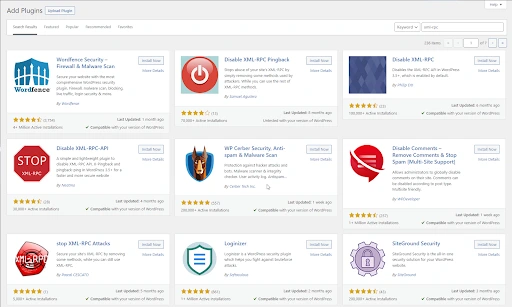
There are plenty of different plugins available that should help with this. Still, before installing any, we’d suggest checking if it’s compatible with the version of WordPress your website is running.
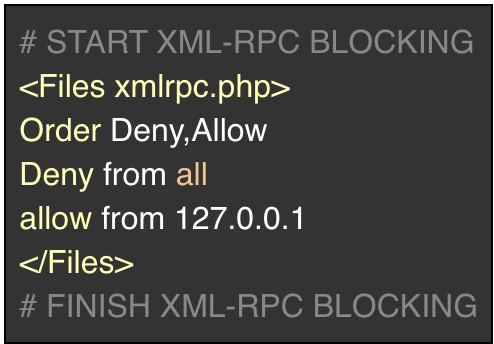
Should you wish to stop XML-RPC attacks by making changes to the .htaccess file directly, you’ll need to log in via SSH or FTP, locate the .htaccess file and paste the following at the top of it:
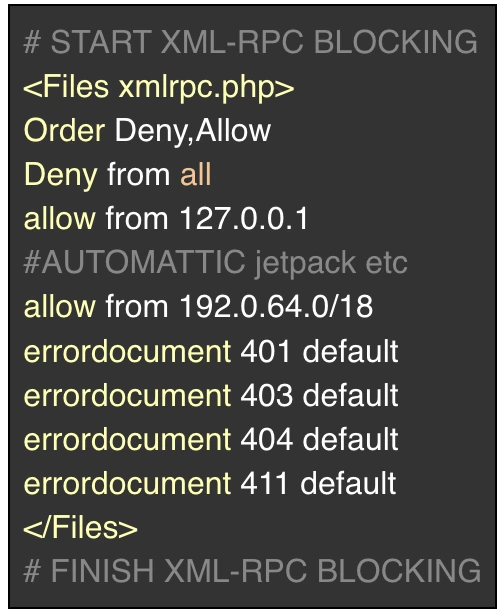
In case your site is using Jetpack, you’ll need to whitelist its IP addresses so the plugin can function as intended:
If you’re unsure how to proceed regarding these instructions, our support team will be happy to assist you!
If the XML-RPC is enabled, you’ll be able to run plugins like Jetpack or apps that allow remote access to your WordPress site’s backend, like mobile apps. If you’re not using any of those plugins or apps, it’s still possible XML-RPC is enabled on your website, and as such, presents a vulnerability. There are a couple of ways to check this, but these are two of the easiest ways to check:
- You can visit a XML-RPC validating website:
- Once there, you can paste in your website’s URL, such as https://example.com/xmlrpc.com.
- Do not enter any credentials.
- If you’ve got the message “Congratulations! Your site passed the first check.” it means XML-RPC is enabled on your site. It is active, visible, working, and a possible vulnerability on your site.
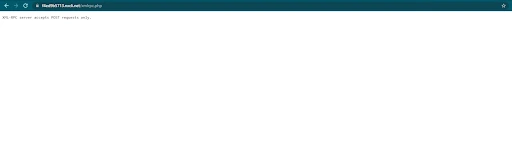
- You can go to the xmlrpc.php page on your website. If you see the “XML-RPC server accepts POST requests only.” message, XML-RPC is enabled on your website:
Next steps
Liquid Web has been leading the industry in WordPress hosting for decades. And if you select managed WordPress hosting, our team of experts will manage server IT for you — so you can focus on growing your brand.
Click below to explore options or start a chat with one of our WordPress hosting experts now to get answers to your questions and further guidance.
Additional resources
Comprehensive guide to securing WordPress with ModSecurity
→
This guide provides a comprehensive overview of how to use ModSecurity to enhance the security of your WordPress site.
How to Use the WP Toolkit to Secure and Update WordPress →
You will find your site’s WP Toolkit from within the logged-in control panel, either cPanel or Plesk.
Why security matters for WordPress enterprise hosting
→
Use the blog as your guide to attacks to watch out for, security best practices, and steps to improve the WordPress protection you already have.

Amy Myers is a leader of one of the Linux support teams with Liquid Web with expertise in customer service and Linux support. She considers expanding upon and sharing knowledge as one of life’s top priorities. She is an avid technology and art fan.