◦ Comprehensive security
◦ 24/7 support
WordPress Guide → Plugins → Best News
6 WordPress news plugins compared

Whether you’re a news publisher, a businesses or an independent developer, there are advantages to having a news section on your site. It can help you to publish news on successes and events, and keep your followers up to date on recent changes.
Regardless of who you are, a news section can add value to your site. The question is, how can you integrate it into your site in the best way possible.
WordPress offers a number of plugins to help improve click-through and reduce bounce rate on news items. Most of these come in the form of sliders, grids, carousels, and tickers.
We checked several different news plugins from the WordPress plugin directory to find out which work best. Keep reading to see a narrowed down list of the top six.
Get fast, reliable hosting for WordPress
Power your site with the industry’s fastest, most optimized WordPress hosting
1. WP News and Scrolling Widgets

The first plugin on our list, WP News and Scrolling Widgets, is one of the more powerful and well known WordPress news plugins. It allows sites to create, manage, and display news content through widgets, sliders, and grids, in addition to being a news management tool separate from WordPress pages and posts.
Once installed, the plugin adds a News tab to the WordPress admin panel. In this tab, users can easily add, edit, and manage news content. The news editor itself is very similar to the standard editing interface you’ll find with WordPress posts and pages. It allows you to create content, set an excerpt and feature image, and select what categories and tags should apply.
Once you’ve created content, a range of shortcodes are available for site owners to make customized news widgets. The news widgets can filter content based on category, date, and type. Customizations can also be made to how content is displayed. A guide on managing this process can be found in the How It Works subheading.
By default, WP News does not offer a huge number of features, and its only real benefit is the management section. For customization, you’ll find just four shortcodes for displaying content in either grid or list views. If you pay and upgrade to pro, your options increase significantly.
Pro offers over 120 designs, along with 6 shortcodes, Visual Composer page builder support, a recent news display type, 100% multi language support, the ability to add custom CSS, and drag and drop ordering for content organization.
Pricing for pro starts at $149 for a personal, lifetime license. If news is a big part of your site, it may be worth paying for the added functionality. If you don’t want to spend anything, it’s probably better to stick with something else on this list.
Pros:
- Incredible customization options
- 120+ different layouts and the ability to use Google Fonts
- Integration with social media
- Custom CSS
Cons:
- Requires premium to get the most out of it
2. WP News
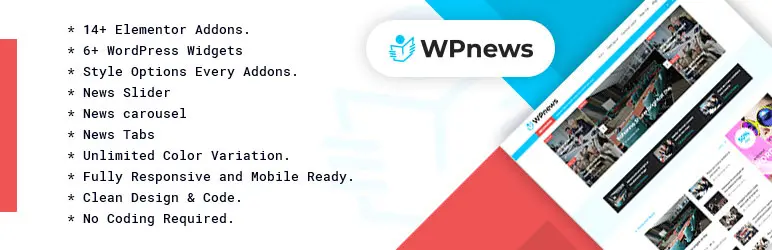
WP News is a stable, easy to use news plugin that allows for news sites to create and display customizable sliders, carousels, and news tabs.
As far as news plugins go, WP News offers a no-frills, easy to manage news curation experience. By default, you’ll find six different WordPress widgets included, with each including its own style options. The customization here is limited, as can be seen by one of the features being “Unlimited Color Variation”.
Despite this lack of customization, the plugin itself is very lightweight and requires fewer server resources when compared with alternatives. Moreover, WP News comes with a unique feature you won’t find elsewhere on this list: it is an Elementor Addon.
Elementor is a custom WordPress page builder. Used by over 2 million sites, it provides users with a drag and drop interface for creating new content and optimizing old.
The WP News addon for Elementor means improved integration, so site builders can create complex user experiences more easily, while also implementing a lightweight news plugin for news curation.
WP News is available for free from the WordPress plugin directory.
Pros:
- Simple, easy to use news plugin
- Support for sliders, carousels, and tabs
- Is an Elementor addon
Cons:
- Lacks some of the functionality of alternatives
- Limited support
- Requires Elementor to work
3. Ditty

One of the best news tickers available, Ditty News Ticker lets site owners create customized news tickers across their site. An unlimited number of ticks can be added, with the ability to edit content, links, and destination (new or same tab).
From a design perspective, Ditty News Ticker also allows you to edit how the ticker appears in pages. You can change dimensions, speed, display type, and more. Once you decide on the ticker settings, you can easily insert into pages, posts, and widgets with either shortcode or a direct php function.
The ability to add unique ticker content is something you don’t find with several other news tickers, and means you can optimize content based around your goals, instead of just settling on the default.
Pros:
- Great customization options compared with other tickers
- Ability to add custom shortcode easily
Cons:
- Somewhat difficult to navigate
4. PJ News Ticker
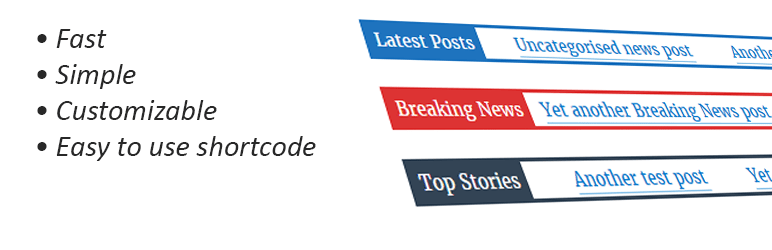
More lightweight than Ditty, PJ is a news ticker that does what it says on the package and little else.
Edits to the look and feel of the PJ News Ticker must be performed through the settings section of the WordPress interface. From here, it’s possible to edit the header, color scheme, speed, font size, and content.
Once you’ve decided on what you want the ticker to look like, you can easily insert it into your site with shortcode. This allows you to select custom post types, categories, or the 5 most recent posts.
PJ won’t give you the same level of customization as Ditty, but it does provide a solid, easy to manage news ticker capable of automatically delivering your most recent content.
Pros:
- Easy to use interface
- Lightweight plugin that requires few resources
Cons:
- Shortcode customization can be troublesome
- Lacks the customization options of other news tickers
Getting started with a WordPress news plugin
Evaluate what’s most important for you in a news plugin, and try out the one that seems like the best fit. Then, watch your site metrics to see if the addition improves metrics like dwell time and pages per session.
And when you’re ready to take your WordPress site to the next level, it might be time to upgrade your web hosting. Premium hosting services are the foundation of a fast, reliable site, and that’s where Liquid Web comes in.
Liquid Web has been leading the industry in WordPress hosting for decades. And if you select managed WordPress hosting, our team of experts will manage server IT for you — so you can focus on growing your brand.
Click below to explore options or start a chat with one of our WordPress hosting experts now to get answers to your questions and further guidance.
Additional resources
What is a WordPress plugin? →
A complete beginner’s guide to WordPress plugins and how to manage them
WordPress speed optimization 101 →
Learn how to use performance tuning to fix five common problems and speed up your site.
How to check if a plugin is safe →
Simple steps to evaluating a plugin before you install and activate it