

How to use the Cache Enabler plugin on your site

Cache Enabler is an easy to use page caching plugin which will help improve the loading time of your site. The plugin will create static HTML files of pages and posts on the site, which will improve loading time of the site.
Get fast, reliable hosting for WordPress
Power your site with the industry’s fastest, most optimized WordPress hosting
Using Cache Enabler
To change the settings for the Cache Enabler plugin in wp-admin; Settings > Cache Enabler
You can change the cache expiry time to a value like 10 or 24 which means the site cache would expire after 10 hours or 24 hours. Again this depends on what type of content or site you have.
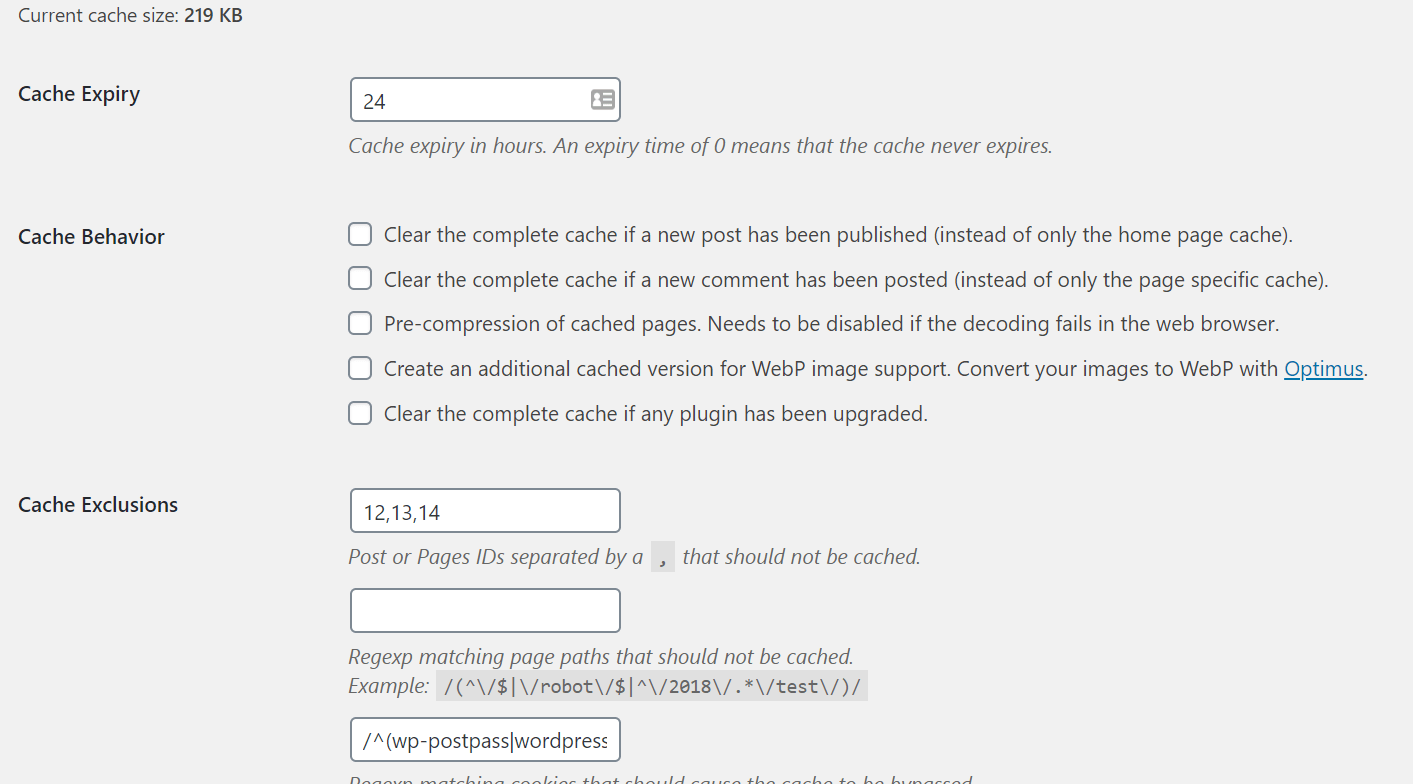
It is possible to exclude cache by post ID, so if you have specific pages that you want to exclude from Cache Enabler plugin from caching then if you go to edit that page it will show the ID in wp-admin. Then copy the post ID into the settings.
It is also possible to exclude caching by cookie or using regex to exclude by URLs.
Example to exclude by cookies.
/^(wp-postpass|wordpress_logged_in|comment_author|wp-settings-|wp-resetpass- |(woocommerce_|wp_woocommerce_session)_?)/
Example to exclude by URLs.
/(^/store/cart/my-account/checkout/addons/administrator/resetpass/register /login/mepr/account/thank-you/ref/page/ref*/?ref*/?add-to-cart*/?wc-api* /?wc-ajax=get_refreshed_fragments*/?preview=true*/?s=*/)/
Other options that Cache Enabler you can clear the total cache and not just the cache for the homepage when a new post is published on the site.

By default the Cache Enabler plugin will not make any changes to the sites .htaccess file, the following code can be added into the beginner of the sites .htaccess file.
You will need to generate SSH credentials from the portal of your website so that you can edit the sites .htaccess file. An alternative would be to use a plugin like WP File Manager on your website. This would allow you to edit the sites .htaccess file directly to include the changes needed for Cache Enabler seen below:


(We should note if you are running a sub-directory multi-site, it will take the permissions from the parent directory, which may cause issues with specific setups.)
Additional resources
Comparing how to keep plugins updated in WordPress →
Discover plugin management tips to keep your site organized and running smoothly.
5 best seo plugins for WordPress →
Learn how to change seo plugins while protecting your rankings and site settings.
How to send reliable emails →
Find transactional email plugins to help keep customer messages reliable.
