◦ Comprehensive security
◦ 24/7 support
WordPress Guide → Plugins → Whatsapp
Best WhatsApp plugins for WordPress (2026)

WhatsApp is one of the most popular messaging apps in the world—and adding it to your WordPress site can instantly boost customer engagement. Whether you’re running an online store or a service-based business, WhatsApp plugins let visitors chat with you in just one click.
Let’s look at the best WhatsApp plugins for WordPress and how they can improve your site’s communication and conversion rates.
Get fast, reliable hosting for WordPress
Power your site with the industry’s fastest, most optimized WordPress hosting
What does a WhatsApp plugin do?
A WhatsApp plugin makes it easy for visitors to start a conversation with you directly from your WordPress site. Most plugins do this by adding a floating button, contact box, or embedded link that opens a WhatsApp chat.
Key features usually include:
- A direct link to your WhatsApp or WhatsApp Business number
- Floating or embedded chat buttons
- Pre-filled messages that users can send with one tap
- Options to customize the look and placement of the button
- Integration with WooCommerce, Elementor, or Google Analytics
These plugins make WhatsApp feel like a natural part of your site’s interface, and remove the friction that usually comes with contact forms or email links.
Benefits of using WhatsApp on your WordPress website
Adding WhatsApp to your WordPress site is more than a convenience—it’s a strategic move that helps improve communication, trust, and conversions.
Here’s why it works:
- Instant communication builds trust. Visitors get real-time answers instead of waiting for an email reply, which builds confidence in your service or product.
- Higher conversion rates. WhatsApp lowers the barrier for action. Shoppers are more likely to ask questions and make a purchase when a quick chat option is visible.
- Mobile-friendly by default. Since most users are already on WhatsApp, clicking the button on mobile opens their app instantly—no extra setup needed.
- Support without extra software. You don’t need to manage another helpdesk system or chatbot. WhatsApp works with the tools you already use.
- Better team workflows. With WhatsApp Business, you can assign chats, use quick replies, and track customer messages across multiple devices.
Whether you’re a freelancer, online store owner, or agency, WhatsApp gives your site the feel of live support without needing complex infrastructure.
Comparison table: WhatsApp WordPress plugins at a glance
| Plugin | Floating Widget | Multiple Agents | Custom Messages | WooCommerce Ready | Free Version |
|---|---|---|---|---|---|
| Chaty (Floating Chat Widget) | ✅ | ❌ | ✅ | ✅ | ✅ |
| Social Chat | ✅ | ✅ | ✅ | ✅ | ✅ |
| WP Chat App | ✅ | ✅ | ✅ | ✅ | ✅ |
| Click to Chat | ✅ | ❌ | ✅ | ✅ | ✅ |
1. Floating Chat Widget by Chaty

Floating Chat Widget is a multi-channel floating widget that lets you connect WhatsApp, Messenger, Telegram, and other platforms in one sleek interface.
Key features:
- Fully customizable button with size, shape, and icon options
- Supports WhatsApp Web, mobile, and desktop
- Add multiple channels like Facebook, Viber, and email
- Page-level targeting and display rules
- Google Analytics and Google Tag Manager integration
Best for: Site owners who want to offer WhatsApp alongside other messaging platforms.
3. WP Chat App

WP Chat App provides everything you need to manage WhatsApp chats for one or more team members, with excellent WooCommerce support.
Key features:
- Unlimited agent profiles with schedules and availability toggles
- Target different pages or categories with different chat buttons
- WooCommerce-ready with product-linked messages
- Customize the widget look with branded colors and icons
Best for: WooCommerce shops and multilingual sites that need flexible team support.
4. Click to Chat
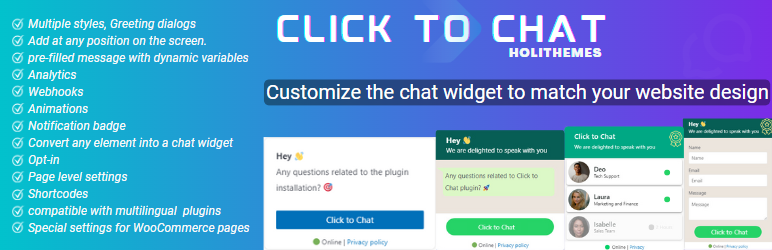
Click to Chat is a streamlined plugin designed for one-click WhatsApp messaging, with useful integrations and pre-filled message options.
Key features:
- Choose from 8 button styles or use custom shortcodes
- Add custom pre-filled messages with dynamic values (like product names)
- Track events with Google Analytics and Facebook Pixel
- Supports WooCommerce product pages and Elementor widgets
Best for: Solopreneurs and content creators who want lightweight chat features.
What to consider when choosing a WhatsApp plugin
Not all WhatsApp plugins are the same, so here’s what to look for based on your site’s needs:
- Do you need multiple agents? Some plugins (like WP Chat App or Social Chat) support routing to different team members.
- Want a simple floating button? Chaty or Click to Chat are fast and lightweight.
- Running WooCommerce? Choose a plugin with product-level integration and tracking.
- Need other channels too? Chaty supports Messenger, Viber, and more in one floating widget.
- Looking for analytics? Social Chat and Click to Chat offer built-in tracking tools.
Match the plugin’s strengths to your site’s goals—whether that’s customer support, lead generation, or product inquiries.
How to install and set up a WhatsApp plugin
All of these plugins are available for free in the WordPress plugin directory.
Here’s how to install one:
- In your WordPress admin, go to Plugins > Add New.
- Type the plugin name (e.g. “WP Chat App”) in the search bar.
- Click Install Now, then click Activate.
- Find the plugin settings panel, usually under Settings or its own menu.
- Enter your WhatsApp number, customize the button, and set rules for display or availability.
- Save your changes and preview the chat button on your site.
Some plugins offer shortcodes or widgets for manual placement, but most work out of the box once activated.
WhatsApp Business vs Personal: Which one should you use?
Both work with these plugins, but they serve different use cases.
- WhatsApp Personal: Best for solo creators or small businesses who want a direct line to their personal phone.
- WhatsApp Business: Ideal for growing businesses that want auto-replies, branded business profiles, and multi-device support.
If you need quick replies, greeting messages, and chat routing, the Business version is the way to go.
Next steps for choosing the best WhatsApp plugin
Adding WhatsApp to your WordPress site is a fast and effective way to increase engagement, answer questions, and convert visitors into customers. Each plugin above offers a unique blend of features—from floating widgets to team routing—so you can choose what fits your brand best.
Start by testing one of the free versions and checking how it feels across desktop and mobile. You’ll be able to make real-time connections with your audience in minutes.
Ready to upgrade your WordPress experience? Professional hosting improves speeds, security, and reliability for a website and a brand that people find engaging and trustworthy.
Don’t want to deal with server management and maintenance either? Our fully managed hosting for WordPress is the best in the industry. Our team are not only server IT experts, but WordPress hosting experts as well. Your server couldn’t be in better hands.
Click through below to explore all of our hosting for WordPress options, or chat with a WordPress expert right now to get answers and advice.
Additional resources
What is a WordPress plugin? →
A complete beginner’s guide to WordPress plugins and how to manage them
Floating Google reviews plugin for WordPress →
Showcase social proof and build trust by displaying floating Google reviews on your website.
How to check if a plugin is safe →
Simple steps to evaluating a plugin before you install and activate it
2. Social Chat (formerly WP Social Chat)
Social Chat is perfect for businesses that want to display multiple WhatsApp contacts or support agents, complete with schedules and labels.
Key features:
Best for: Teams and ecommerce sites with multiple support agents.