◦ Comprehensive security
◦ 24/7 support
WordPress Guide → Plugins → Audio
8 best audio plugins for WordPress [2026]

The digital world is constantly evolving, and enhancing your WordPress site with the right audio plugins is crucial for captivating your audience. Whether you’re a podcaster, musician, or content creator, choosing the best audio plugins in 2025 can elevate your content to new heights. Below, we explore the 9 best audio plugins for WordPress that excel in performance, ease of use, and versatility, ensuring your site becomes an audio powerhouse.
Get fast, reliable hosting for WordPress
Power your site with the industry’s fastest, most optimized WordPress hosting
8 best audio plugins
Selecting the right audio plugin can provide a seamless experience for your WordPress site. Here’s a comparison of the 9 best audio plugins for WordPress that can enhance your website’s audio capabilities:
| Plugin | Key Features |
|---|---|
| Seriously Simple Podcasting | User-friendly interface, customizable options, integrated analytics. |
| AudiIgniter | Responsive design, unlimited playlists and tracks available. |
| PowerPress by Blubrry | All-in-one podcast management, SEO tools, mobile-responsive. |
| Compact WP Audio Player | Lightweight audio player, supports MP3 and OGG formats. |
| Audio Album | Display audio files in an album format, responsive design. |
| Sonaar MP3 Music Player | Highly customizable, multiple player skins, playlist support. |
| WavePlayer | Elegant waveform display, extensive customization features. |
| ZoomSounds | Contemporary design, autoplay option, playlist functionality. |
Each plugin offers unique features tailored to different audio needs. Ensuring your audio content is delivered with speed and reliability starts with choosing the right plugin for your site.
Incorporating audio functionalities into your WordPress website can significantly elevate the user experience, transforming a standard site into a dynamic platform. Below is an extensive overview of the 9 most exceptional audio plugins available for WordPress, each one tailored to meet diverse audio requirements, spanning from podcasting to seamless music playback. These plugins come equipped with distinctive features specifically crafted to enhance the auditory experience on your site, making it not only more captivating for your visitors but also improving overall engagement and interaction among users.
1. Seriously Simple Podcasting

Seriously Simple Podcasting is an invaluable tool that streamlines the management of podcast content, allowing users to effortlessly publish new episodes, monitor download statistics, and connect with numerous podcast directories. The intuitive and user-friendly interface is designed to accommodate both novices and seasoned podcasters alike, enabling them to devote their energy to content creation without getting bogged down by technical complexities.
Strengths: Quick and straightforward setup process, comprehensive podcasting functionalities, and exceptional customer support.
Challenges: May offer limited customization options which can be a drawback for more advanced users looking for extensive personalization.
Pricing: Available at no cost, with premium add-ons that can be purchased for enhanced features.
2. AudioIgniter

AudioIgniter presents a modern and elegant solution for music playback, empowering users to create and manage playlists with remarkable ease. Its responsive design guarantees smooth operation across all devices, ensuring that listeners enjoy a seamless and uninterrupted experience whether they are using a desktop computer or a mobile device.
Strengths: Fast performance, user-friendly interface, and highly responsive design ideal for playlist management.
Challenges: Basic functionalities may not meet the demands of users with more intricate audio requirements.
Pricing: Offered for free, with an option to upgrade to a premium version for additional features.
3. PowerPress by Blubrry

PowerPress by Blubrry stands out as a robust and comprehensive podcasting plugin that encompasses advanced features for search engine optimization (SEO) and detailed analytics, specifically designed for dedicated podcasters who require in-depth statistics and significant customization options. This powerful tool empowers users to effectively optimize their podcast content for maximum reach and engagement.
Strengths: Outstanding capabilities for search engine optimization, coupled with advanced analytics for tracking performance.
Challenges: The extensive array of features can be daunting for those who are new to podcasting.
Pricing: Free to use, with additional premium options for those seeking more advanced features.
4. Compact WP Audio Player

Compact WP Audio Player provides a simple and straightforward solution for embedding audio files directly into your website, making it particularly suitable for users with basic audio playback needs who do not require complex functionalities.
Strengths: Lightweight design and ease of use, making it accessible for everyone.
Challenges: Offers limited customization options, which may not suffice for users looking for more robust player features.
Pricing: Available at no cost, making it an attractive option for budget-conscious users.
5. Audio Album

Audio Album enables users to effortlessly create audio albums, making it an excellent choice for musicians and audio producers who wish to showcase their work in a visually appealing and organized manner.
Strengths: Ideal for organizing a collection of multiple tracks efficiently.
Challenges: Basic player design may not appeal to users seeking a more modern aesthetic.
Pricing: Offered for free, providing great value for users.
6. Sonaar MP3 Music Player

Sonaar MP3 Music Player serves as an excellent option for streaming MP3 music, featuring a highly customizable and visually attractive interface that enhances the overall look and feel of your site.
Strengths: Stylish design that integrates well with various themes, along with versatile support for multiple audio formats.
Challenges: Some of the more advanced features may require a paid pro version to access.
Pricing: Free to use, with premium options available for those who desire additional features.
7. WavePlayer
WavePlayer is focused on delivering a modern and aesthetically pleasing design while providing functionality, allowing users to enjoy a customizable audio player that significantly enhances the overall user experience on the site.
Strengths: Attractive design complemented by a variety of customizable player options to suit individual preferences.
Challenges: The interface may present some complexity that could be overwhelming for certain users.
Pricing: Available for free, with premium add-ons that can be purchased for additional features.
8. ZoomSounds
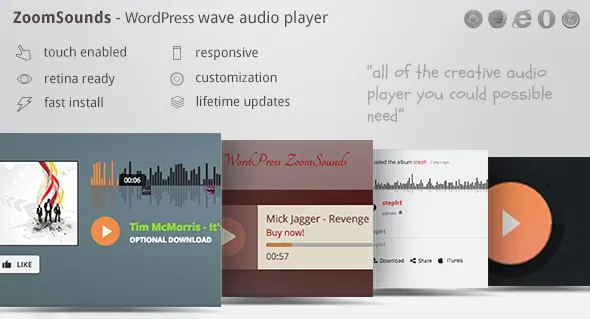
ZoomSounds is an ideal choice for musicians and bands looking to showcase their audio tracks, featuring a visually appealing player that comes packed with extensive functionalities designed to promote user engagement and interaction with the audio content.
Strengths: Exceptional visual appeal, along with a rich set of features that enhance the listening experience.
Challenges: Users may need to invest some time in learning how to fully utilize all available features for maximum benefit.
Pricing: Offered exclusively as a premium option, reflecting its advanced capabilities.
How to choose an audio plugin for WordPress
When selecting an audio plugin for your WordPress site, it’s important to consider several key factors:
- Ensure compatibility with your current WordPress theme and other plugins to prevent conflicts and ensure a seamless user experience.
- Look for functionalities that meet your specific audio needs, such as customizable audio players, support for various audio formats, and integration with popular audio sources like SoundCloud or Spotify.
- Opt for a plugin with an intuitive interface that allows for easy management of audio files. Comprehensive documentation and customer support are also valuable.
- Choose a plugin that is lightweight and optimized for speed. A high-performing audio plugin will improve your site’s loading times and overall user experience.
- Consider reviews and ratings from other users to gauge the plugin’s reliability and effectiveness.
By keeping these considerations in mind, you can confidently select an audio plugin that meets your requirements and enhances your WordPress site.
How to integrate audio plugins with your WordPress site
Integrating audio plugins with your WordPress site can significantly enhance the user experience. Follow this structured installation process:
- Navigate to your WordPress dashboard, go to the ‘Plugins’ section, and click on ‘Add New.’
- Use the search bar to find your desired audio plugin. Once located, click ‘Install Now,’ and after installation, activate the plugin to enable its features.
Once activated, embedding audio files is straightforward. Upload your audio file via the plugin interface or link to an external file, then use the provided shortcode or block to place the audio player within your posts or pages.
To optimize audio for better performance, consider compressing your audio files to reduce loading times. Additionally, leverage caching solutions and Content Delivery Networks (CDNs) to enhance playback speed and reliability. Managed hosting solutions can further streamline your site’s performance, ensuring that your audio content is delivered seamlessly.
Upgrade your WordPress hosting
Choosing the right audio plugins for your WordPress site is crucial, but equally important is the foundation on which your website runs. Upgrading to a managed WordPress hosting solution can significantly enhance your site’s performance, reliability, and security. Hosting services optimized for WordPress ensure that your audio plugins function seamlessly and efficiently.
Ready to take the training wheels off your WordPress site? Upgrade to professional hosting and see how better speeds, security, and reliability provide a foundation for a website and a brand that people find engaging and trustworthy. Liquid Web’s WordPress hosting options configure business-class servers and support plans specifically for WordPress websites.
Liquid Web has been leading the industry in WordPress hosting for decades. And if you select managed WordPress hosting, our team of experts will manage server IT for you — so you can focus on growing your brand.
Click below to explore options or start a chat with one of our WordPress hosting experts now to get answers to your questions and further guidance.
Additional resources
What is a WordPress plugin? →
A complete beginner’s guide to WordPress plugins and how to manage them
Best music themes for WordPress →
Because you need a site that instantly communicates your aesthetic
Best podcast themes for WordPress →
Get your podcast site set up easily with a tailored theme