◦ Comprehensive security
◦ 24/7 support
WordPress Guide → PHP → Unit Testing
PHP unit testing: How to write your first test for WordPress

Testing is a routine part of life. We test everything before and after buying to ensure we’re getting the full functionality of a product. If you have a WordPress website, you probably check to make sure it’s functioning as it should. And that includes PHP, WordPress’ scripting language.
Testing is essential to verify that code is working correctly, and in PHP, this usually entails unit testing. Keep reading to learn about PHP unit testing, how to write and incorporate these tests, and why it’s important.
Get fast, reliable hosting for WordPress
Power your site with the industry’s fastest, most optimized WordPress hosting
What is unit testing?
Unit testing refers to a level of software testing where individual units or components of code are tested in isolation. This gives us the ability to check if each unit of code performs as expected. A single unit can be a line of code, a phrase, a function, or a class. In PHP and WordPress, typically a unit is a function or a class.
Although units can come in all sizes, as a rule, smaller tests are better. By using smaller tests, you can obtain a more granular view of your software’s performance. Plus, if you use tests for smaller units, you will be able to run thousands of tests in one second because small tests can be run very quickly.
We mentioned that unit tests are tests run in isolation, so what does that mean? Testing in isolation means that we test only one unit at a time. Almost all types of testing require some sort of isolation, but in PHP unit testing this is particularly important. We isolate our test because if a test fails, it will be easier to know which part of the code is not working properly.
Is PHP unit testing worth the time and effort?
Unit testing indeed takes a lot of time and effort to write, but it saves you considerable time you would have spent fixing unexpected bugs. Writing unit tests maximizes the performance of your program by making it high quality and bug-free.
The confidence that comes from depending on your code’s functionality makes unit testing definitely worth your time. Not only can you be sure that your code does what it was designed to do, but you can rest easy knowing that adding new functionality later on will not sabotage your existing project.
When you incorporate unit testing in your software, you will inevitably start using code that is easy to test. Having easily testable code is a necessity for unit testing because it ensures smaller and more focused functions provide a single operation.
Furthermore, if you write well-tested code, you can prevent breaking your software’s functionality if you incorporate future changes. Since you are testing your code as you are adding functions to it, you will eventually have a series of tests that will help you address code failures as they happen.
Additionally, poorly written code can make your website susceptible to hacking, and you should make sure that you are hosting your WordPress website on a secure server.
Why is unit testing important?
Unit testing helps us make sure that for any function and given set of units, we can ascertain if the unit is returning the proper values. It also assures us that if invalid input is provided, the code can identify and handle the failures. Thus, it helps us identify bugs in our algorithms, which will enhance the quality of our code.
As you write more tests, eventually you will create a series of tests that can be run continually to establish the caliber of your work.
When you incorporate unit testing in your software, you will inevitably start using code that is easy to test. Having easily testable code is a necessity for unit testing because it ensures smaller and more focused functions provide a single operation.
Furthermore, if you write well-tested code, you can prevent breaking your software’s functionality if you incorporate future changes. Since you are testing your code as you are adding functions to it, you will eventually have a series of tests that will help you address code failures as they happen.
Additionally, poorly written code can make your website susceptible to hacking, and you should make sure that you are hosting your WordPress website on a secure server.
Things to consider when writing PHP unit tests
There are two ways that you can go about writing unit tests. Either you write the tests first and then write code to make those tests pass, or you can write the code and then test how that code is performing.
It is generally better to write tests first if you are starting a project from scratch. That’s because it is harder to design tests for an application that you already wrote and know how it works. If you write the tests first, you will document how the application is supposed to work, and that will immediately catch a failure when the code isn’t working as it should.
Nevertheless, it is unrealistic to expect that you will write unit tests for all your code in the beginning because that will take dozens of hours. Instead, you can be pragmatic about it.
One way to go about it is to create unit tests for every bug that you stumble upon. That’s because bugs are usually small mistakes in your code, making it easier to create a test for it. This approach will also help you better understand the function of unit tests because you see firsthand how the test is identifying a bug and helping you fix it.
Another thing you can do is write unit tests for new features that you want to add to your software. This is a good idea because the code for a feature will usually be specific to it, making it ideal for unit testing. This practice will also train you to be mindful of the code you are writing because you will be forced to write code that is easy to test, which is always a good practice.
How to write unit test cases in PHP
To Install PHPUnit you need to have a few prerequisites:
- Use the latest version of PHP.
- PHPUnit requires dom, JSON, PCRE, reflection, and SPL extensions, which are enabled by default.
Installation (Command-Line Interface)
Download PHP Archive (PHAR) to obtain PHPUnit. To install PHAR globally, we can use the following commands in the command line.
$ wget https://phar.phpunit.de/phpunit-6.5.phar
$ chmod +x phpunit-6.5.phar
$ sudo mv phpunit-6.5.phar /usr/local/bin/phpunit
$ phpunit –version
Via composer
If you have installed composer in your system you can download it by using the single command.
composer require –dev phpunit/phpunit
Test your phpunit work by typing
./vendor/bin/phpunit
in Windows
vendor\bin\phpunit
Then you should Init your PHP unit configuration:
By typing:./vendor/bin/phpunit –generate-configuration
Or in windows machines: vendor\bin\phpunit –generate-configuration
There will appear three questions, just type enter and the files will be auto-generated.
Bootstrap script (relative to the path shown above; default: vendor/autoload.php):
Tests directory (relative to path shown above; default: tests):
Source directory (relative to path shown above; default: src):
Cache directory (relative to path shown above; default: .phpunit.cache):
Generated phpunit.xml in /php_test.
You should exclude the .phpunit.cache directory from version control.
Let’s start our first unit test
First create a file and name it. For this example, we will name it HelloworldTest.php
mkdir src tests
code tests/HelloworldTest.php
This will open Visual Studio code in your file. Then, write the following code:
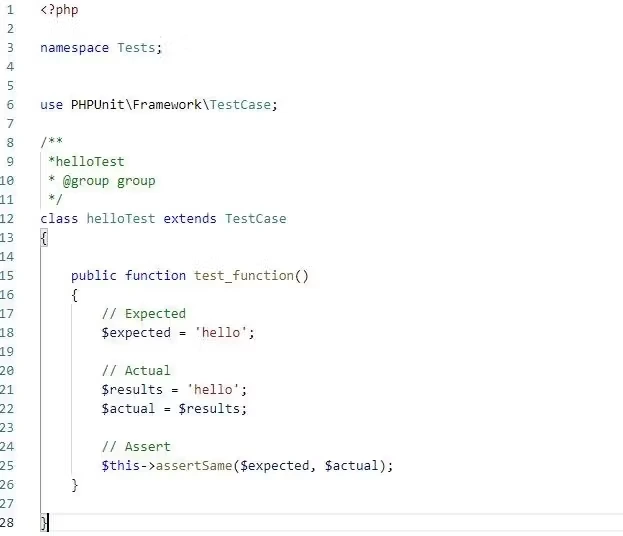
Run the following command on your command line to start the unit test
./vendor/bin/phpunit
In Windows Machines :vendor\bin\phpunit
Here is the output for the run test:
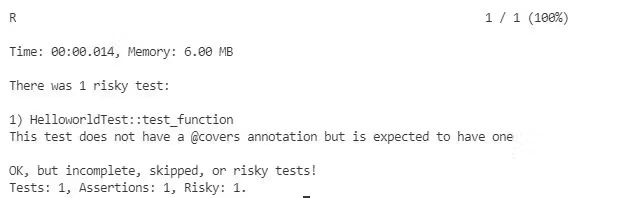
Now, let’s try testing a class
First, create the file in the src/ folder and name it Hello.php and set the namespace App.
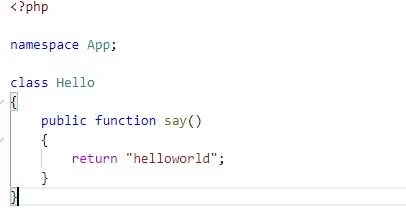
Then we should require the following file like documented in the photo below:
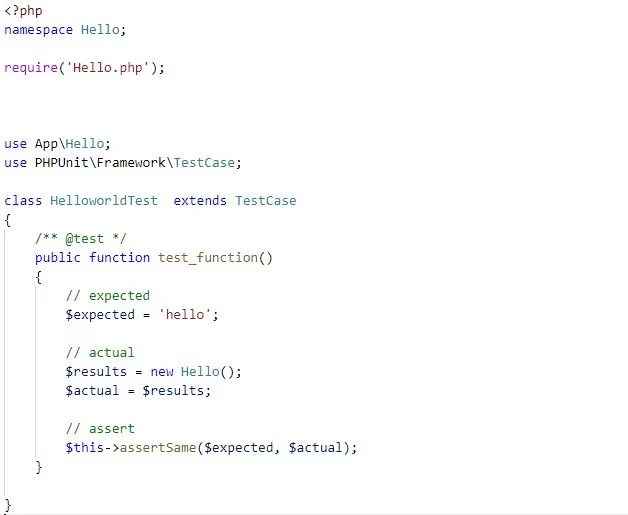
Let us run a test and see the results.
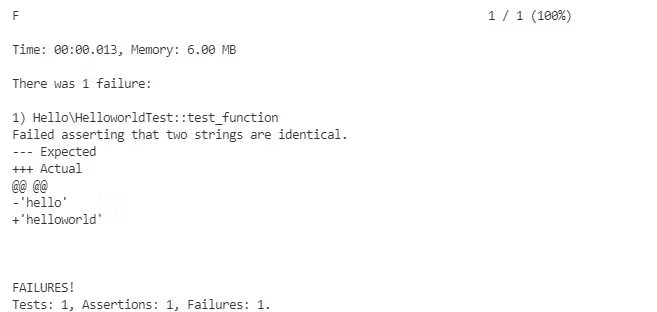
As the image says, assert is failing because the two strings are identical. We can make the expected variable to helloworld again and get the assert true like in the following example:
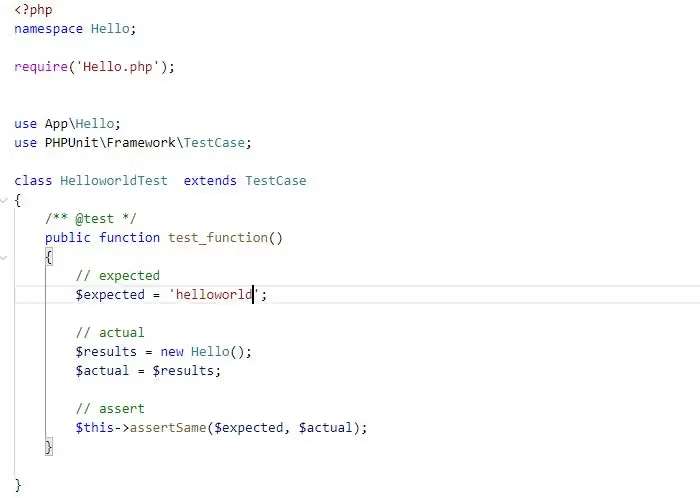
Let’s see the result of the tests.
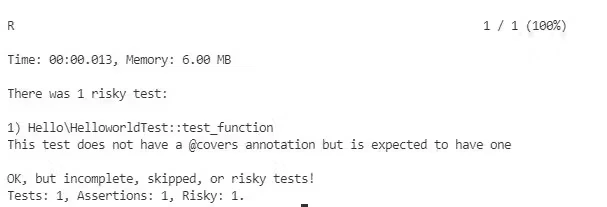
As we can see from the image, we now have an assertion.
Getting started with unit testing
Testing is essential when we want to verify if our code is working correctly. Unit testing is a level of software testing where individual units or components of our code are tested in isolation.
When you unit test WordPress, it is important to test in isolation because if a unit test fails, it will be easier to know which part of the code is not working properly.
Unit testing is a lengthy process but it is essential to a high-performing site.
If you’re interested, the next step is to find a reliable WordPress hosting provider or set up a local WordPress environment on your machine.
When you’re ready for hosting, Liquid Web can help. We’ve been offering the premium WordPress hosting for decades—with the fastest speeds, best uptime guarantees, and most robust security features. Click below to explore options or start a chat to connect with one of our WordPress hosting experts right now.
Additional resources
What is WordPress? →
A complete beginner’s guide—from use cases, to basics, to how to get started
What Is a PHP Handler? →
For Liquid Web’s managed Linux server users, PHP is integral to their LAMP stack for dynamic web pages. Different PHP handlers are explored in this article.
How to embed iframe code in WordPress →
Benefits, limitations, and step by step guidance