◦ Comprehensive security
◦ 24/7 support
WordPress Guide → Build → Excerpt Length
WordPress excerpt length: What it is, how to change it

WordPress excerpts are short summaries of your posts, giving readers a quick overview of your content before they decide to delve deeper. By default, WordPress sets the excerpt length to 55 words.
Thankfully, modifying the WordPress excerpt length is straightforward and can significantly improve your content’s visibility and engagement. In this guide, we explore what the WordPress excerpt length is and how to change it to suit your preferences.
Get fast, reliable hosting for WordPress
Power your site with the industry’s fastest, most optimized WordPress hosting
How to change the WordPress excerpt length
Altering the WordPress excerpt length is a simple task that can enhance your site’s readability and overall user experience. Follow these steps to make the changes:
- Access your WordPress dashboard: Start by logging into your WordPress admin panel, typically found at yourdomain.com/wp-admin. Make sure to use the correct credentials to ensure a smooth login process.
- Navigate to the theme editor: From the dashboard, hover over ‘Appearance’ in the left-hand menu and select ‘Theme Editor.’ This will open the theme files used by your current WordPress theme, allowing you to modify them as needed.
- Locate the functions.php file: In the Theme Editor, find the ‘functions.php’ file in the list of theme files on the right side. This file is crucial for adding custom functions and enhancing your theme’s functionality.
- Add custom code: At the end of the functions.php file, add the following code snippet: function custom_excerpt_length($length) %7B return 20; %7D add_filter(‘excerpt_length’, ‘custom_excerpt_length’); This code sets the excerpt length to 20 words, but you can easily modify the number to fit your specific needs or preferences.
- Save your changes: After adding the code, click the ‘Update File’ button to save your changes. Be cautious to avoid any syntax errors, as these could cause issues with your site. It’s advisable to create a backup before making significant changes.
- Check your website: Visit your site to see the new excerpt length in action. If it doesn’t display as expected, clear your browser cache or refresh your page to ensure you’re seeing the latest updates.
Excerpt length plugins
Using a plugin to manage your WordPress excerpt length can greatly enhance your website’s functionality and user experience. Plugins offer a user-friendly way to customize your excerpts without needing to delve into complex coding. They provide flexibility and options that can be tailored to fit your specific needs, allowing you to maintain control over how your content is presented to readers.
There are several popular plugin options available, but many have not been tested with newer versions of WordPress. Look out for this warning on a plugin page:
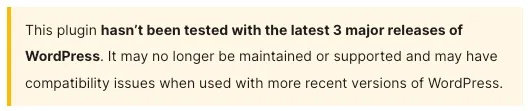
Easy Custom Auto Excerpt is still updated, though. It’s a flexible plugin that lets you automatically trim post content and display custom excerpts on your homepage, archives, or category pages. You can set excerpt length by word or character count, choose where to apply the excerpts, and customize the “Read More” link. It also supports styling options, making it easy to match excerpts with your theme design.
Upgrade your WordPress experience
Enhancing your WordPress site can significantly improve user experience and engagement. A key aspect of this enhancement is understanding and adjusting your post excerpt length.
To change the excerpt length in WordPress, you have several options. If you’re comfortable with coding, you can modify your theme’s functions.php file by adding a simple filter. This approach gives you the flexibility to set the exact character count that best suits your content style.
Ready to upgrade your WordPress experience? Professional hosting improves speeds, security, and reliability for a website and a brand that people find engaging and trustworthy. Liquid Web’s WordPress hosting options configure business-class servers and support plans specifically for WordPress websites.
Don’t want to deal with server management and maintenance? Our fully managed WordPress hosting is the best in the industry. Our team are not only server IT experts, but WordPress hosting experts as well. Your server couldn’t be in better hands.
You can avoid site speed problems when you’re with Nexcess Fully Managed WordPress or Liquid Web’s suite of WordPress hosting solutions.
Additional resources
How to build a WordPress site →
A complete beginner’s guide that covers 9 key steps to a successful launch
WordPress private page (or post): What, why, and how →
Learn how to create a private page in WordPress to restrict content access to specific users.
How to use WordPress Gutenberg blocks →
A complete beginner’s guide to Gutenberg blocks