Student guide: How to build a portfolio website
Explore the student guide
In today’s competitive job market, having a well-crafted design portfolio or student portfolio is key to standing out. Whether you’re a designer, developer, or any other creative professional, building a portfolio website offers a unique way to show your skills and impress your target audience – especially potential employers.
With platforms like WordPress offering flexible customization options, students can create a digital presence that highlights their strengths and creativity. This guide walks you through the step-by-step process of building a portfolio website that reflects your thought processes and makes a lasting impression.
Choosing the right website platform
The first step in creating your portfolio website is selecting the right platform. This choice will likely depend on your technical skills, budget, and desired level of customization. Here are some popular options.
Website builders
Website builders offer a simple, user-friendly option for beginners. They typically provide templates and drag-and-drop interfaces that make it easy for you to create a professional-looking site without coding knowledge. Some popular website builders include:
- WordPress.com. Not to be confused with the self-hosted WordPress.org, WordPress.com has a range of free and paid plans. Building websites with WordPress offers flexibility and an extensive plugin ecosystem.
- Wix. With its intuitive interface and multiple templates, Wix is an excellent choice for beginners. It offers both free and paid plans, with the free option including Wix branding.
- Squarespace. Renowned for its sleek, modern templates, Squarespace is popular among creatives. While it doesn’t offer a free plan, its paid options are reasonably priced and include custom domains.
- Canva. While it’s mainly a graphic design tool, Canva also offers website-building capabilities. It’s a good option if you want to create a visually striking portfolio with minimal effort.
Custom websites
For students with coding experience or those wanting more control over their site’s design and functionality, building a custom website might be the way to go. This approach typically involves:
- HTML / CSS. They are the foundation of web development, allowing you to create a fully customized site from scratch.
- WordPress.org. The self-hosted version of WordPress offers unlimited customization options and is free to use (though you’ll need to pay for WordPress hosting).
- Static site generators. Tools like Jekyll or Hugo allow you to create fast, secure websites with more control than website builders but less complexity than full content management systems.
Ultimately, the best choice depends on your skill level, available time, and specific needs. For most students, especially those without coding experience, a website builder will be the most practical option.
Essential elements of a portfolio website
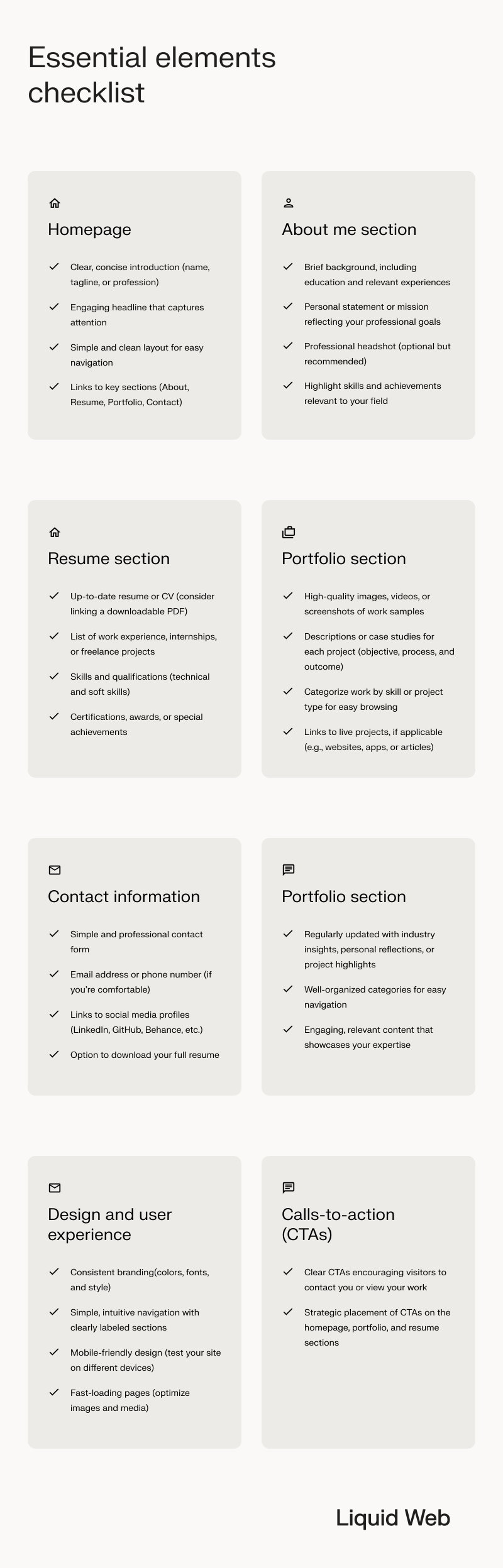
Regardless of the platform you choose, there are several key elements that every effective portfolio website should include. Let’s explore each of these in detail.
Designing the homepage
Your homepage is the first thing visitors see when they land on your site, so it’s crucial to make a strong first impression. Here’s what to include:
- Clear, concise introduction. Start with your name and a brief tagline or description of your profession or area of study.
- Engaging headline. Capture attention with a compelling statement about your skills or career aspirations.
- Simple and clean layout. Make sure your site has a clear menu structure, so it’s easy for users to navigate.
- Links to key sections. Provide easy access to your About, Resume, Portfolio, and Contact pages.
About me section
The About Me page is where you can share your story and give potential employers insight into your personality and motivations. Include:
- Brief background. Share your education, relevant experiences, and career goals.
- Personal statement. Reflect on your professional aspirations and what drives you.
- Professional headshot. While optional, a high-quality photo can help make your site more personable.
- Highlight key skills. List your most relevant skills and competencies.
Resume section
Your online resume should be comprehensive yet easy to scan. Consider including:
- Work experience. List your jobs, internships, and freelance projects, with brief descriptions of your responsibilities and achievements.
- Education. Detail your academic background, including any relevant coursework or academic projects.
- Skills and qualifications. Emphasize both your technical abilities and soft skills that are relevant to your industry.
- Certifications and awards. Include any professional certifications or academic honors you’ve received.
Don’t forget the contact information
Including clear and functioning contact information makes it easy for potential employers to reach you. Consider adding the following to your website:
- Contact form. A simple form for visitors to fill out and send you a message directly through your site.
- Email address. Consider using a professional email address (e.g., [email protected]).
- Social media links. Add links to professional social media profiles, especially LinkedIn. These will showcase your online presence and personality.
- Download option. Provide a way for visitors to download your full resume as a PDF.
Blog
While not essential, a blog can help showcase your expertise and thought leadership in your field. If you choose to include a blog:
- Keep it updated. Regularly post industry insights, reflections on your work, or updates on your projects.
- Use categories. Organize your posts for easy navigation.
- Keep it professional. Ensure your content is relevant to your career goals and presents you in a positive light.
How to design a portfolio for impact
A well-designed website can significantly enhance the impression you make on potential employers. It demonstrates your ability to communicate effectively and highlights your unique skills.
A polished website also shows that you’re tech-savvy, which is increasingly valued in many fields, and can help you stand out in a competitive job market.
Here are some key design principles to keep in mind:
Consistency in personal branding
Maintain a cohesive look throughout your site.
- Color scheme. Choose 2-3 main colors and use them consistently across your site.
- Typography. Only use 1-2 fonts that are easy to read on screen. Include headings and subheadings to break up the text and improve readability.
- Logo. If you have a personal logo, use it consistently across your site and other professional materials.
User-friendly layout
Make it easy for potential employers to find the information they’re looking for:
- Clear navigation. Use a simple, easy-to-use menu structure. It helps visitors find what they’re looking for quickly without overwhelming them with options.
- Logical flow. Organize your content in a way that makes sense, guiding visitors through your site.
- White space. Don’t overcrowd your pages. Use white space to make your content easier to read and navigate.
Mobile optimization
With more people browsing on mobile devices, your site should be able to look good and function well on smaller screens:
- Responsive design. Ensure your site adjusts automatically to different screen sizes.
- Touch-friendly. Make buttons and links large enough to be easily tapped on a touchscreen.
- Test on multiple devices. See how your site looks on various smartphones and tablets.
Showcasing your work effectively
Your portfolio is the heart of your site. Being strategic when presenting your work is a key way to catch an employer’s eye. Here’s how to make it shine.
Visualize
Use professional-quality images or screenshots of your work.
Describe
Be descriptive about the challenge, your approach, and the results of a project.
Vary
Show a range of skills and project types if possible.
These strategies will help you present your work in a way that represents not only your achievements, but your professional growth.
Call-to-actions (CTAs)
Encourage visitors to take meaningful actions on your site by strategically placing clear, compelling CTAs throughout.
- Clear and prominent. Make your CTAs stand out visually.
- Specific language. Use action-oriented text like “Download My Resume” or “Contact Me” or “Freelance Request”
- Strategic placement. Include CTAs on your homepage, throughout the copy where it makes sense, and at the end of your portfolio pages.
Hosting and domain options
Once you’ve built your site, you need to make it accessible online. This involves choosing a hosting provider and selecting a domain name.
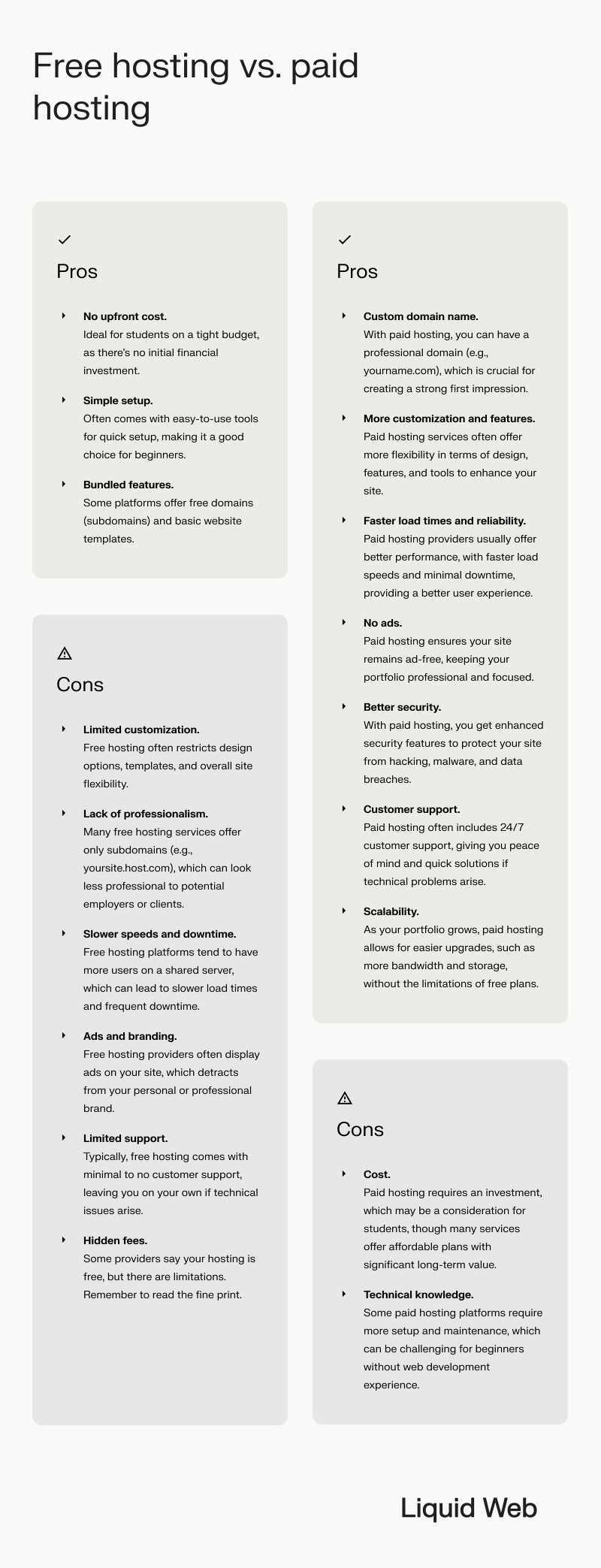
While free hosting can be tempting for students on a budget, it often comes with limitations.
For a professional-looking portfolio site, paid hosting is generally worth the investment. Many hosting providers offer student discounts, so be sure to shop around.
Choosing a domain name
A domain name is your address on the web. Here are some tips for choosing a good one:
- Use your name: If possible, try to get your full name as your domain (e.g., janedoe.com).
- Keep it simple: Avoid numbers, hyphens, or unusual spellings that could be confusing.
- Consider your field: If your name isn’t available, you might include your profession (e.g., janedoedesign.com).
- Think long-term: Choose a domain you’ll be happy with for years to come.
Many website builders include domain registration with their paid plans, which can simplify the process. And you can search available domains for free.
Search engine optimization (SEO) basics
To increase the chances of your portfolio being seen by potential employers, it’s important to make it easy to find. Basic SEO can help your site appear in search engine results when employers search for candidates with your skills.
Optimizing your site for search engines
Here are some key SEO strategies:
- Use relevant keywords. Include terms related to your skills and profession throughout your site. You can use a keyword research tool to find these terms, such as Ubersuggest, Keyword Surfer, Ahrefs, SEMrush, and Advanced Web Ranking.
- Create quality content. Regularly update your site with relevant, high-quality content.
- Optimize images. Use descriptive file names and alt text for all images.
- Build links. Share your portfolio on your LinkedIn profile and other professional networks to build backlinks.
Best practices for search engine results
- Title tags. Each page should have a unique, descriptive title that includes relevant keywords. Don’t exceed 60 characters to ensure your CTA doesn’t get truncated.
- Meta descriptions. Write compelling summaries of each page’s content for search engines to display in the result snippets.
- Alt text. Provide descriptive alternative text that describes your images to improve accessibility and SEO.
If you’re building your portfolio website on WordPress, there are free SEO plugins that make implementing these strategies easier.
Keyword strategy
- Research relevant keywords. Use tools like Google Keyword Planner to find terms related to your skills and industry. An example of a keyword would be “web designer”.
- Use keywords naturally. Incorporate these terms into your content, headers, and meta information without overstuffing.
- Long-tail keywords. Consider using more specific, longer phrases that might have less competition. This can include using your location, such as “web designer in Philadelphia.”
Building and showcasing a strong portfolio
Your portfolio is the centerpiece of your online resume. Here’s how to make it stand out.
Selecting projects to highlight
Wondering what you should feature on your website? Here are three clear ways to identify portfolio-worthy pieces.
Quality
Choose your best work, not everything you’ve ever done.
Range
Show different skills and types of projects if possible.
Timely
Focus on work that’s relevant to the jobs you’re seeking.
Writing case studies
For each major project, consider including:
- Overview. Brief description of the project and your role.
- Challenge. What problem were you trying to solve?
- Process. How did you approach the project? What tools or methods did you use?
- Outcome. What were the results? Include metrics if possible.
- Reflection. What did you learn? How would you approach it differently now?
If you don’t have a professional project to share, you can use class projects, personal projects, job experiences, or club activities where you took the lead. Even real-life applications of academic study can fit here.
Keeping your portfolio up to date
- Regular updates. Add new projects as you complete them.
- Remove outdated work. As you grow, replace older projects with your best current work.
- Reflect growth. Show how your skills have developed over time.
Maintenance and continuous improvement
Creating your digital portfolio is just the beginning. To make the most of it, you need to keep it current and continuously improve it based on feedback and performance.
Regular updates
- Add new work. Whenever you complete a significant project, add it to your portfolio.
- Update your resume. Keep your work experience and skills current.
- Refresh content. Periodically review and update your About Me section and other static content.
Tracking performance
Use analytics tools like the following to understand how visitors interact with your site:
- Google Analytics. This free tool provides insights into visitor behavior, popular pages, and traffic sources.
- Heat mapping tools. These can show you where visitors click and how far they scroll on your pages.
- Conversion tracking. Set up goals to track how many visitors take desired actions (like downloading your resume or contacting you).
Making adjustments based on feedback
- Seek input. Ask mentors, peers, and industry professionals to review your site and provide feedback.
- User testing. If possible, observe how people navigate your site and ask for their impressions.
- Iterate. Continuously make small improvements based on the feedback and data you gather.
Your digital showcase, Ready, set, impress
Building a portfolio website is an essential step in your professional journey. From selecting the right platform to curating your design portfolio, each decision shapes how you present your skillset to hiring managers.
A well-designed portfolio offers 24/7 access to your achievements, demonstrating your creativity, expertise, and personal milestones in a way that a traditional resume simply can’t match.
By ensuring a smooth user experience and optimizing your landing page for your target audience, you’re positioning yourself ahead in the competitive job search landscape.
By ensuring a smooth user experience and optimizing your landing page for your target audience, you’re positioning yourself ahead in the competitive job search landscape.
That’s where Liquid Web can support your journey. With reliable hosting solutions and customizable features, Liquid Web ensures your digital portfolio is always live, offering 99.999% uptime.
Whether you’re looking for affordable WordPress hosting or need advanced performance with VPS hosting, Liquid Web has the flexibility and scalability to meet your needs.
Ready to elevate your professional presence and impress future employers with a standout portfolio website? Start building with Liquid Web today and take your career to the next level!
Build your portfolio on WordPress
Get started with free templates, page-building plugins, and 24/7 support from WordPress experts.
Fair use statement
Feel free to share this guide about building a website portfolio, but please credit this page with a dofollow link as the original source.
Share this content
<a href="https://www.liquidweb.com/white-papers/how-to-build-a-portfolio-website/" rel="dofollow">Read the student guide to building a website portfolio.</a>
