What is Web Hosting → Noisy Neighbor

What is a “noisy neighbor” in web hosting?

If your website suddenly feels slow or unresponsive even though you haven’t changed anything it might be your neighbor’s fault. Not your real-world neighbor, but a “noisy neighbor” on your server.

Ready to get started?

Get started with premium web hosting services for every platform and purpose—from WordPress to Magento, reseller to enterprise domains.

What does “noisy neighbor” mean in web hosting?

In web hosting, a noisy neighbor is another website or application on the same server that uses too many resources—like CPU, memory, disk, or bandwidth—causing slowdowns or outages for other users on that server.

This is most common in shared hosting environments, where dozens or even hundreds of websites share the same physical hardware. If one site gets a sudden traffic spike or runs a resource-heavy script, it can consume a disproportionate share of the server’s resources. 

Everyone else feels the impact, even though you’re not doing anything wrong.

Noisy neighbors are especially frustrating because you often can’t see or control what’s causing the problem. And unless you’re monitoring your own performance carefully, it may not be obvious that someone else is to blame.

Shared resources and how contention begins

To understand noisy neighbors, it helps to know how shared hosting works.

In shared hosting, multiple websites are placed on the same server—sort of like renting a bed in a hostel. Everyone gets a slice of the server’s:

These resources are not hard-capped. That means if one website uses more CPU or memory than expected, it can take away from others. Like the guy at the hostel who likes long showers and doesn’t leave enough hot water for anyone else.

The server keeps trying to serve everyone, but performance often suffers when one tenant overuses resources. This kind of resource contention is a core cause of noisy neighbor problems.

Noisy behavior: common causes and triggers

Most noisy neighbor problems come down to excessive or unpredictable resource use. Here are some common triggers:

Even legitimate business activity—like syncing inventory, uploading product images, or running an ad campaign—can cause a noisy neighbor issue if the site isn’t properly optimized.

Impact of noisy neighbors on hosting performance

When a noisy neighbor hogs resources, you may notice:

These issues may come and go without warning, depending on when the noisy neighbor acts up. And because shared hosts don’t typically reveal what’s happening behind the scenes, you might spend hours debugging your own site without realizing the problem isn’t yours.

Examples of noisy neighbor issues in action

Let’s say your site is a WooCommerce store on shared hosting. One of your neighbors is a travel blog that suddenly goes viral thanks to a Reddit post. The surge in traffic causes the server’s CPU and RAM usage to spike.

Even though your store traffic is normal, your product pages now take 5–10 seconds to load. Checkout stalls or throws an error. Customers leave before completing their orders. That’s a classic noisy neighbor effect.

Another example: your neighbor is running a WordPress site with poor coding. A plugin they use triggers a full-site scan every 30 minutes. Each time it runs, your admin panel slows to a crawl and your error logs fill up with “timeout” messages.

These scenarios aren’t hypothetical: they happen daily on overloaded shared servers.

How hosting providers detect and manage noisy neighbors

Most quality web hosts monitor their servers around the clock. Here’s how they identify noisy neighbors:

More advanced hosts use software like CloudLinux or virtualization platforms like KVM or VMware to create per-user “resource cages” that isolate users from each other. This helps reduce the impact when one user misbehaves.

It’s a good measure to take, but it’s often too late for the innocent neighbors whose websites have already suffered.

In some cases, hosts may migrate a noisy user to a different server or recommend they upgrade to VPS or dedicated hosting.

How users can prevent being a noisy neighbor

Even if your site doesn’t get much traffic, it’s possible to become a noisy neighbor. Here’s how to avoid it:

If you’re not sure whether your site is consuming too many resources, ask your host for a performance report or install a monitoring plugin like Query Monitor or New Relic APM.

Bare-metal and VPS: when noisy neighbors go away

You can eliminate or drastically reduce noisy neighbor problems by upgrading your hosting environment.

VPS hosting: strong isolation at a fair price

A VPS (virtual private server) gives you an isolated slice of a physical server. While multiple VPS instances may live on the same machine, each one has dedicated access to a portion of the server’s resources. That means:

If shared hosting is like a hostel; VPS hosting is like townhomes. 
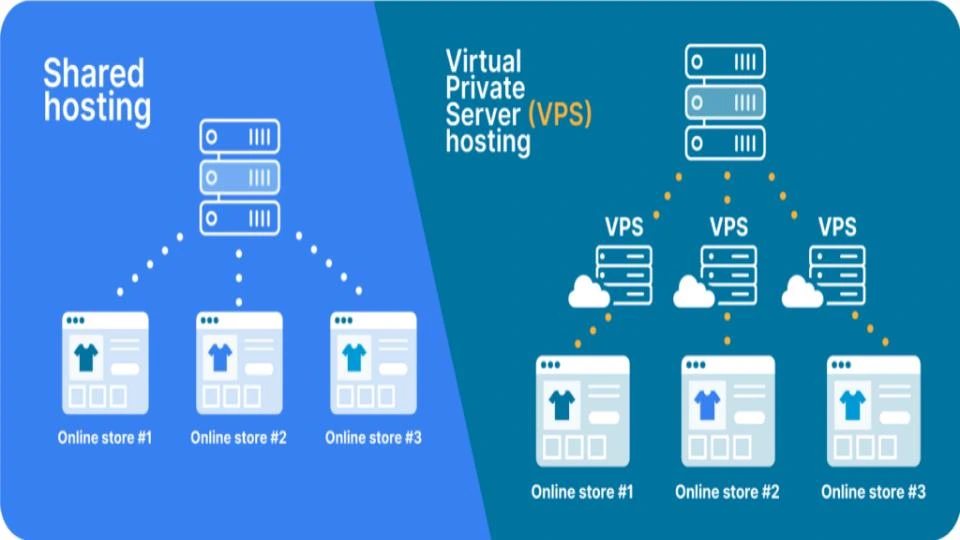
It’s worth noting that VPS hosting can (technically) still suffer from noisy neighbor effects if the host oversells the server or if disk I/O isn’t properly isolated. But with quality providers, these issues are rare.

VPS offers a good middle-ground between low-cost shared hosting and high-end bare-metal servers—and it’s usually very affordable, starting at around $5/month.

Bare-metal hosting: physical isolation with no compromise

Bare-metal dedicated hosting means your site (or application) runs on its own physical server. There’s no sharing with anyone else. It’s a house on 10 acres, and it’s the most powerful and predictable hosting environment you can get.

Because you’re the only tenant:

Bare metal is ideal for high-traffic ecommerce stores, custom applications, and businesses with strict performance or compliance needs. It does cost more, but for mission-critical workloads, it’s often worth it.

Noisy neighbors beyond hosting: SaaS and APIs

The noisy neighbor problem isn’t limited to web hosting. It also shows up in:

This broader view is important for developers and startups. Choosing the right architecture—from isolated worker queues to multi-region deployment—can prevent your app from either being a noisy neighbor or being affected by one.

Noisy neighbor FAQs

In cloud computing, a noisy neighbor is a tenant (user or application) that overuses shared resources—like CPU, memory, or bandwidth—within a virtualized environment. Because cloud infrastructure often places multiple users on the same hardware, one tenant’s activity can degrade performance for others.

You can’t directly stop other tenants on a shared server, but you can:

There’s no single algorithm, but hosting providers and cloud platforms use resource monitoring tools and load-balancing strategies to detect and mitigate noisy neighbor activity. Some systems use heuristics or machine learning to identify abnormal usage patterns and automatically throttle or migrate users.

In AWS, noisy neighbor issues can occur on EC2 instances or EBS volumes where multiple customers share physical resources. AWS mitigates this with services like Dedicated Hosts and Nitro-based instances that isolate tenants more effectively. Still, performance variability can occur on low-cost or burstable instances.

Next steps for understanding noisy neighbors in web hosting

Noisy neighbors are one of the most common (and most frustrating) issues in shared hosting. They can slow down your site, hurt your user experience, and even impact your revenue.

The best way to prevent them is to choose a hosting environment with resource isolation and proactive monitoring, and that’s where Liquid Web comes in. We offer the industry’s fastest and most secure VPS and dedicated servers—for Windows or Linux, unmanaged or fully managed.

Click below to explore options or start a chat with one of our hosting experts now.

Ready to get started?

Get started with premium web hosting services for every platform and purpose—from WordPress to Magento, reseller to enterprise domains.

Aaron Tevlowitz is a Partner Team Manager at Liquid Web, where he helps build and maintain strong partner relationships. Aaron has been helping business leaders design hosting solutions and drive growth for their companies since 2022. Aaron enjoys spending time with his family, staying active, and all things sports related. 

Trust us to help you choose the ideal hosting solution

Loading form…