

◦ Comprehensive security
◦ Support
VPS → Ubuntu VPS
What is Ubuntu VPS? Uses, benefits, and how it works
Key takeaways:
- An Ubuntu VPS is a virtual private server that runs the Ubuntu operating system.
- Ubuntu VPS hosting gives you dedicated resources, root access, and more control than shared hosting.
- Ubuntu is popular for VPS hosting because it is open-source, stable, widely supported, and compatible with common server software.
- Ubuntu VPS hosting is commonly used for websites, applications, databases, Docker, VPNs, development environments, and game servers.
An Ubuntu VPS gives you a virtual server environment that runs on Ubuntu, one of the most widely used Linux operating systems for server workloads.
For developers, agencies, ecommerce teams, and growing businesses, Ubuntu VPS hosting can be a practical step between basic hosting and a full dedicated server. The right hosting environment gives your project room to grow.
What is an Ubuntu VPS?
An Ubuntu VPS (virtual private server) is a virtualized server environment that runs on Ubuntu, a free and open-source Linux operating system.
With an Ubuntu VPS, you get complete control over your server environment, giving you the flexibility and performance to host websites, applications, and services without the cost or complexity of managing physical hardware.
Ubuntu VPS environments typically run Ubuntu Server, a streamlined operating system designed for command-line administration, efficient resource usage, and complete system-level control. Server management is generally handled through SSH rather than a traditional desktop-style interface.
How an Ubuntu VPS works
There are several key parts of an Ubuntu VPS that make it flexible, cost-effective, and approachable.
Virtualization
Virtualization is what makes a VPS possible. A hypervisor, such as KVM or VMware, divides a physical server into separate, isolated virtual environments. Each environment operates independently, with its own allocated CPU, RAM, storage, and operating system.
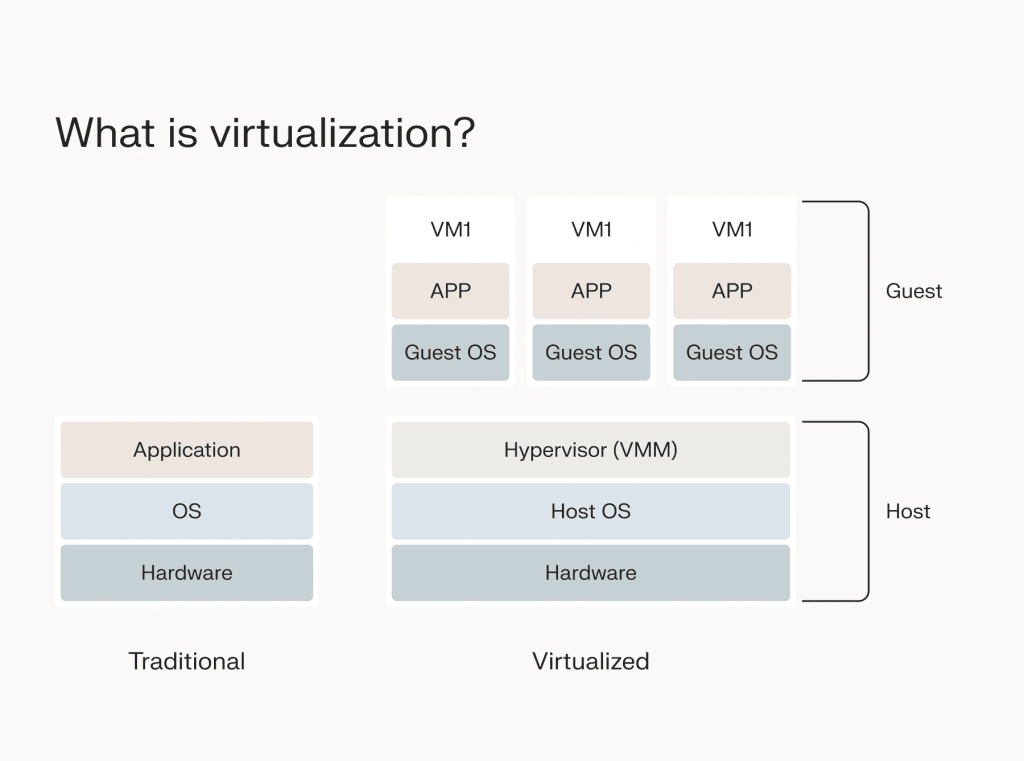
On an Ubuntu VPS, Ubuntu runs inside one of those virtual environments. Your VPS stays separate from other virtual servers on the same physical machine, providing greater privacy, control, and resource consistency compared to shared hosting.
Ubuntu operating system
Ubuntu is one of the most popular Linux distributions, known for its stability, security, and ease of use. It’s a top choice for server environments because it supports a wide range of software, is backed by a massive community, and offers predictable release cycles.
Ubuntu is also popular because it works with common web servers, databases, runtimes, development tools, and container platforms. That makes it a strong fit for users who need a flexible Linux server environment.
With an Ubuntu VPS, you’re not locked into a proprietary OS. You’re running a system designed for customization and control.
Server resources
An Ubuntu VPS gives you access to virtualized server resources, including CPU, RAM, storage, and bandwidth. These resources can be used to run websites, applications, databases, containers, and other server workloads.
The right resource mix depends on what you plan to run. A small website may need fewer resources than a database-heavy application, a Docker environment, or a game server.
What is Ubuntu VPS used for?
An Ubuntu VPS is flexible enough for a wide range of projects.
Some of the most common use cases include:
- Web hosting: Run high-performance websites or client projects with a stack like LAMP, LEMP, or Node.js.
- App development and staging: Build, test, and deploy apps in a clean, isolated environment.
- Cloud storage: Set up your own private cloud using tools like Nextcloud or ownCloud.
- VPN server: Enhance your online privacy by hosting your own secure VPN service.
- Game servers: Host game servers for Minecraft, CS:GO, or other multiplayer platforms.
- Self-hosted tools: Run your own email server, analytics platform, or project management tools.
Ubuntu VPS hosting can also support databases, APIs, background services, Docker containers, and internal business tools, depending on the resources and management level you choose.
Why choose an Ubuntu VPS? 5 key benefits
Ubuntu VPS hosting hits a great balance between control, cost, and convenience.
1. Root access and control
Full administrative access means you can install, configure, and run the software your server needs, from web servers to database stacks.
This flexibility is useful when you need custom packages, server-level configuration, or software that shared hosting does not support.
2. Scalability
Easily upgrade your server resources as your traffic or application demands grow, without switching platforms.
This makes Ubuntu VPS hosting a flexible choice for websites, applications, and development projects that need more capacity over time.
3. Community support
Ubuntu has a large user community and extensive documentation, making it easy to find tutorials, solutions, and best practices.
That support is valuable when configuring web servers, managing databases, using Docker, troubleshooting packages, or learning Linux server administration.
4. Security updates
Ubuntu regularly releases security updates, especially for Long-Term Support (LTS) versions that are maintained for five years.
That maintenance window helps teams plan server updates and reduce uncertainty around long-running workloads.
5. Software compatibility
Ubuntu’s package manager (APT) gives you access to thousands of pre-vetted open-source applications and tools.
Ubuntu works with many common server tools, including NGINX, Apache, MySQL, PostgreSQL, PHP, Node.js, Python, Docker, Kubernetes, monitoring tools, and backup utilities.
Ubuntu VPS vs dedicated server
An Ubuntu VPS gives you an isolated virtual server environment on a shared physical machine. A dedicated server gives you the entire physical server.
VPS hosting usually costs less than dedicated hosting and can be easier to scale for many growing websites, applications, and development projects. Dedicated hosting can make sense when you need full physical server resources, more isolation, or more predictable capacity for high-demand workloads.
For many businesses, Ubuntu VPS hosting provides enough speed, flexibility, and control before a dedicated server becomes necessary.
Ubuntu Server vs Ubuntu Desktop
Ubuntu Server and Ubuntu Desktop share the same Ubuntu base, but they are built for different uses.
| Feature | Ubuntu Server | Ubuntu Desktop |
|---|---|---|
| Default interface | Command line | Graphical desktop |
| Best for | Websites, apps, databases, services, and remote administration | Local workstation use |
| Resource use | Lower by default | Higher because of desktop components |
| Common VPS fit | Yes | Usually no |
For most Ubuntu VPS hosting, Ubuntu Server is the preferred choice because it uses fewer resources and is built for remote administration.
A desktop interface can be installed in some cases, but it requires additional resources. Most server management tasks are handled more efficiently through the command line.
Ubuntu VPS requirements and resource planning
Ubuntu Server can run on modest system resources, but real workloads need more than the operating system alone.
| Workload | Starting resource considerations |
|---|---|
| Small website or test server | Lower CPU and RAM may be enough for light use |
| Growing website or CMS | More RAM, SSD storage, and bandwidth help support traffic |
| Web app or API | CPU, RAM, runtime needs, and database placement affect requirements |
| Database workload | RAM, storage speed, backups, and monitoring are important |
| Docker or containers | Plan for each container, background process, and log growth |
| Game server | Check Linux support, CPU needs, RAM, and expected player count |
Minimum requirements only cover the base operating system. Real projects also need resources for web servers, databases, logs, backups, security tools, traffic, and updates.
Is Ubuntu VPS secure?
Ubuntu VPS hosting can be secure when the server is configured and maintained properly.
Ubuntu LTS releases, security updates, package management, and a large support community all help, but the operating system doesn’t secure every part of the environment by itself. Your server still needs proper access controls, firewall rules, software updates, monitoring, and backups.
A good Ubuntu VPS security baseline includes:
- Keeping packages updated
- Using SSH keys where possible
- Configuring a firewall
- Disabling unnecessary services
- Creating non-root users
- Monitoring logs and resource use
- Backing up important data
With managed VPS hosting, your provider handles more of the server maintenance and administration. With self-managed VPS hosting, your team owns more of that responsibility.
Managed vs unmanaged Ubuntu VPS
Ubuntu VPS hosting can be managed or unmanaged.
Unmanaged Ubuntu VPS hosting gives you more responsibility for server setup, updates, software installation, security, monitoring, backups, and troubleshooting. It can work well for developers, sysadmins, and technical teams that want full control.
Managed Ubuntu VPS hosting gives you more help with server-level tasks, depending on the provider’s scope. It can make more sense for businesses that want Ubuntu’s flexibility but don’t want to handle every part of server maintenance themselves.
The right choice depends on your technical comfort level, workload, support expectations, and how much time your team can spend managing the server.
How to choose an Ubuntu VPS hosting provider
When you’re ready to set up an Ubuntu VPS, make sure your provider checks these boxes:
- Performance: Look for SSD storage, modern CPUs, and reliable RAM allocation.
- Uptime guarantee: Aim for a provider that offers at least 99.99% uptime.
- Root access and OS options: You should be able to choose your version of Ubuntu and have full control over your environment.
- Scalability: Can you upgrade resources without migrating?
- Support: Is 24/7 support available? Does the team know Linux?
- Backups and snapshots: Look for automated backup options and on-demand snapshots.
- Data center location: Choose a region close to your audience for better performance.
Choosing a VPS provider involves more than simply finding one that offers Ubuntu. Your provider can also affect uptime, support, storage performance, backups, security, scaling, and your ability to move to larger VPS or dedicated hosting as your needs grow.
Ubuntu VPS FAQs
Next steps
An Ubuntu VPS combines Ubuntu’s Linux operating system with VPS hosting resources, giving users a flexible environment for websites, apps, databases, development projects, and self-hosted tools.
Start by listing the workload you want to run, the software stack you need, your expected traffic, your support needs, and your comfort level with server administration.
Liquid Web VPS hosting gives businesses the performance, control, and flexibility to run Ubuntu-based workloads with room to grow. Explore Liquid Web Ubuntu VPS hosting to compare plans and choose the right environment for your next project.
Additional resources
VPS: A Beginner’s Guide →
A complete beginner’s guide to virtual private servers
Managed VPS vs self-managed VPS hosting →
What’s the difference and which is right for you?
First 5 tasks a new Ubuntu server →
Secure and optimize your new Ubuntu server with these five simple steps