

How to enable CAPTCHA for user creation in Magento 1.x
Key takeaways
- Enabling CAPTCHA for user creation can help reduce spam and malicious account attempts.
- Adding CAPTCHA to password retrieval can help prevent abuse that leads to bounce-back emails.
- Magento 1.x CAPTCHA settings can be updated from the Admin Panel under Customer Configuration.
We recommend enabling CAPTCHA for user creation and password retrieval to help prevent malicious attempts that can generate spam.
If your store is already receiving high numbers of bounce-back emails or has been blacklisted by mail servers, enabling CAPTCHA will help prevent future occurrences.
Read How to Improve the Security of Your Magento Store.
Host Magento at full throttle.
Get secure, reliable Magento hosting so you can scale faster.
Before you begin
Enabling CAPTCHA in Magento 1.x can help reduce automated account creation and password reset abuse. Before making changes, log in to the Admin Panel and confirm you have permission to update customer configuration settings.
Method
- From the Admin Panel, select System > Configuration.
- Select CUSTOMERS > Customer Configuration.

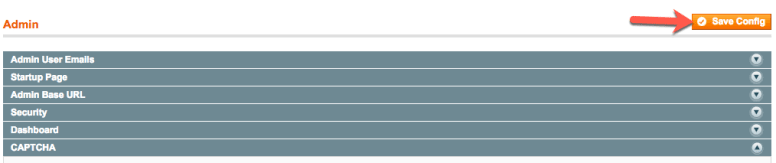
- Click CAPTCHA.

- From the Enable CAPTCHA on Frontend drop-down menu, click Yes.

- In the Forms field, use Ctrl-Click or Cmd-Click to select Create user and Forget password.

- In the Number of Unsuccessful Attempts to Login field, enter “0”.
- Leave all other default settings and click Save Config.
For 24-hour assistance any day of the year, contact our support team by email or through your Client Portal.
Ready to get started?
Get the fastest, most secure Magento hosting on the market
Additional resources
Magento 2 CAPTCHA: setup guide →
Protect your Magento store from bots and spam with CAPTCHA security
How to backup my cms tables on Magento 2 →
Back up Magento cms tables to protect important store content and data.
Magento extensions vs plugins →
Understand the difference between extensions and plugins to customize your store effectively.