

Magento 2 scripts: useful CLI commands and automation basics
Key takeaways
- Magento 2 scripts help developers run common store tasks from the command line.
- The main Magento 2 command-line tool is bin/magento.
- Scripts can save time, but they need testing before use on a live store.
- Backups, permissions, staging tests, and rollback plans matter before automation.
Magento 2 stores use scripts and command-line tools for cache management, indexing, deployment, cron, modules, setup tasks, and custom development work. The most common starting point is php bin/magento, which runs Magento’s built-in CLI commands from the Magento root directory.
Host Magento at full throttle.
Get secure, reliable Magento hosting so you can scale faster.
What are Magento 2 scripts?
Magento 2 scripts are command-line tasks or repeatable files that help developers manage, maintain, or automate Magento work.
In Magento 2, scripts can refer to several types of tasks:
- One-time Magento CLI commands
- Bash scripts that run several commands in order
- Cron jobs that run tasks on a schedule
- Custom Magento console commands inside modules
- Setup scripts, data patches, or schema patches used during module setup
Most store owners and developers interact with Magento 2 scripts through:

Run this command from the Magento root directory to see available command groups:

Before you run Magento 2 scripts
Before running scripts, confirm your environment and the task you want to perform. Magento scripts can affect cache, indexing, generated files, modules, deployment, and storefront behavior.
Review these items first:
- Run commands from the Magento root directory
- Use the correct server user
- Confirm SSH access
- Test in staging when possible
- Back up files and the database before major changes
- Avoid peak traffic windows for heavy tasks
- Use maintenance mode when the task can affect shoppers
- Know how to roll back changes
Scripts can affect live store behavior, so test them before running them in production.
Useful Magento 2 CLI commands
You don’t need to automate every command right away. Start by understanding the commands your team runs most often.
Cache commands
Use cache commands when you need to clean, flush, or check Magento cache.

cache:clean clears enabled Magento cache types. cache:flush clears the cache storage Magento uses. Start with cache:clean when you do not need a broader cache reset.
Indexer commands
Use indexer commands to check index status or rebuild Magento indexes.

Reindexing can use significant server resources. Avoid full reindexing during peak traffic unless the issue is urgent.
Setup and deployment commands
These commands often appear in deployment workflows.

Use setup and deployment commands carefully on production stores. Test them in staging first, especially when modules, themes, generated files, or static content change.
Module commands
Use module commands to check, enable, or disable Magento modules.

After enabling or disabling modules, you may need to run setup:upgrade, compile dependency injection, clear cache, and test the storefront.
Cron commands
Magento cron runs scheduled tasks such as indexing, emails, catalog updates, and background processing.

Check cron when scheduled Magento tasks stop running or when indexers, emails, or catalog rules do not update as expected.
When to turn commands into scripts
A single command works for one-time tasks. A script works better when a task needs to run the same way more than once.
Good candidates for scripts include:
- Deployment command sequences
- Cache clean and reindex workflows
- Maintenance mode routines
- Cron health checks
- Log cleanup tasks
- Backup-related command sequences
- Environment checks before deployment
Example Magento 2 maintenance script
A simple script can group routine commands in one file.
Create a file called maintenance.sh:

Make the file executable and run it:

This example checks routine items without making major production changes. Adjust scripts for your own environment and test them before using them on a live store.
Example Magento 2 deployment script
Deployment scripts often run several Magento commands in order. This simplified example shows how a deployment sequence might look:

This example may not fit every store, theme, deployment process, or hosting environment. Test deployment scripts in staging and confirm that maintenance mode, cache, generated files, and static content work as expected before using them on production.
Custom Magento 2 CLI commands
Developers can create custom CLI commands inside Magento modules when a task needs access to Magento’s framework, services, or configuration.
A custom command usually includes:
- A module registration file
- Module configuration
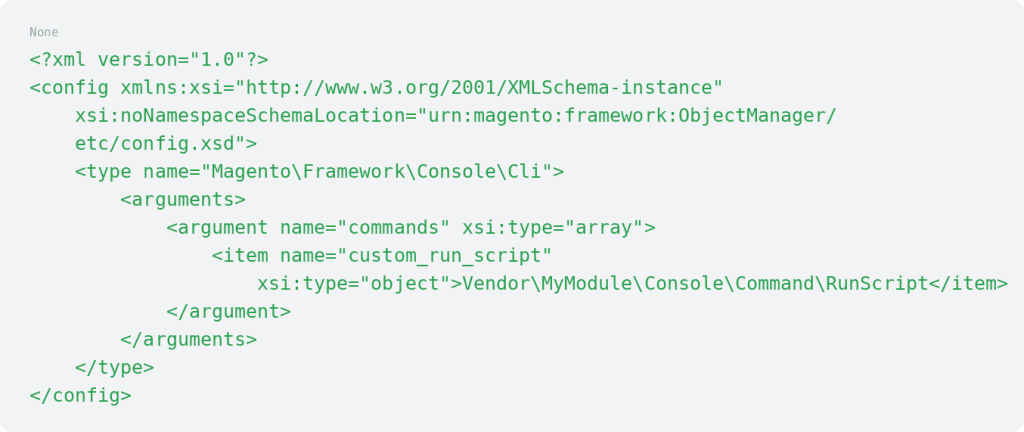
- A di.xml entry that registers the command
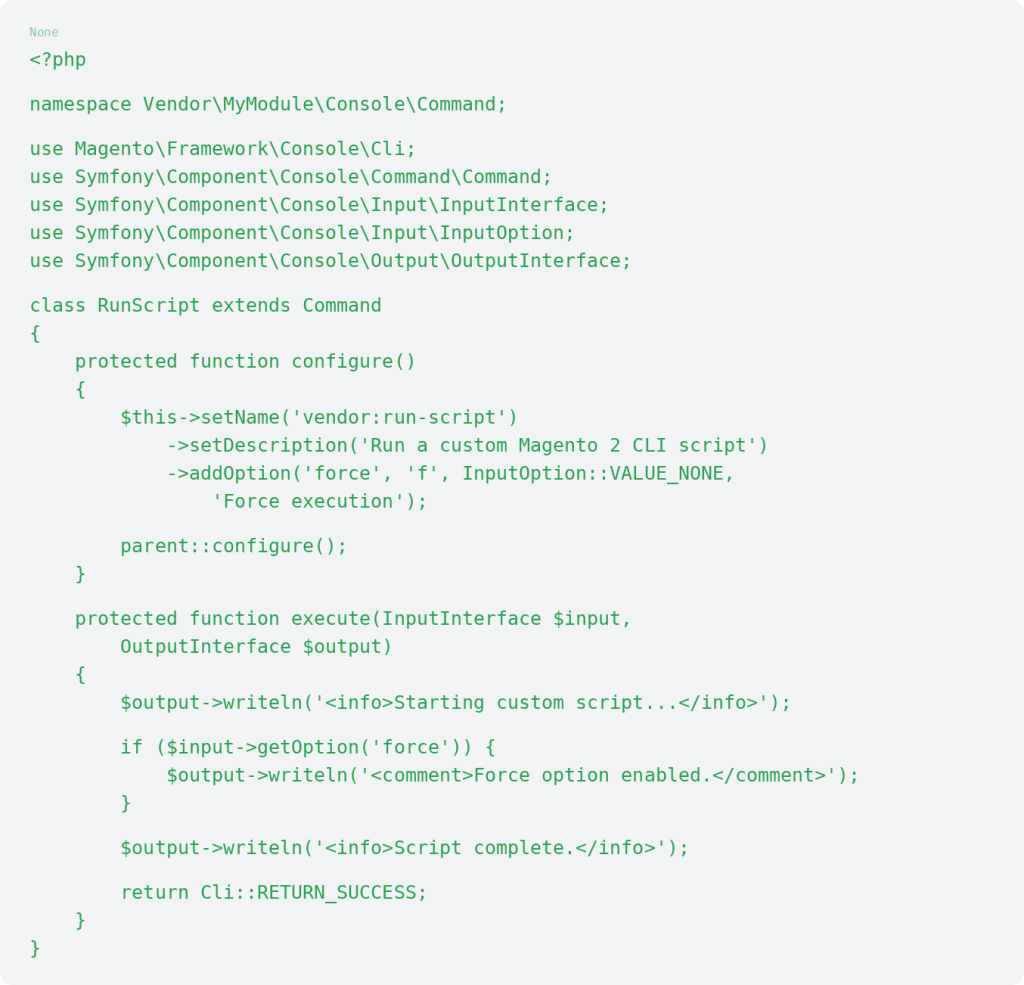
- A command class that extends Symfony Console’s base command class
- The task logic that runs when the command is called
Register the command in di.xml
A custom command can be registered in:

Example:
Create the command class
Create the command class at:

Example:
After creating the module and command, run:

Keep custom command logic specific and test it before adding it to deployment or cron workflows.
Magento 2 scripts vs. cron jobs
A cron job runs on a schedule.
Cron jobs work well for repeatable background tasks, but scheduled scripts still need guardrails. Avoid scheduling commands that create heavy load, clear broad cache storage, change modules, or affect checkout during busy periods.
Use cron for routine background work. Use manual scripts or deployment pipelines for tasks that need review before they run.
Troubleshooting Magento 2 script issues
If a Magento 2 script fails, start with the basics.
Check the Magento root path, file permissions, PHP path, PHP version, and whether the command includes php before bin/magento. Review var/log and var/report for errors. Run this command to confirm available Magento commands:

If a custom command does not appear, confirm that the module is enabled and that setup:upgrade has run. If commands fail because of memory limits or timeouts, review PHP CLI settings and server resources.
When to ask for support
Ask for support if scripts fail during deployment, reindexing slows the store, cache or generated files break the storefront, custom commands throw errors, or you are not sure which commands are safe for production.
Support can help review server resources, PHP configuration, permissions, logs, cron, and Magento command-line issues.
Magento scripts FAQs
Getting started with Magento scripts
Magento 2 scripts can make common maintenance and deployment tasks faster and more consistent, but they need the right safeguards.
Start by running php bin/magento list from the Magento root directory. Identify the commands your team uses most often before automating anything.
If deployment scripts, cron jobs, indexing, or cache commands affect a live store, explore Liquid Web Magento hosting.
For 24-hour assistance any day of the year, contact our support team by email or through your Client Portal.
Ready to get started?
Get the fastest, most secure Magento hosting on the market
Additional resources
10 Magento integrations you need to know about →
Explore integrations to connect tools and streamline store operations.
How to create a custom module in Magento 2 →
Discover how to build a custom module to add new store functionality.
8 strategies to optimize Magento 2 speeds →
Improve Magento speed to support faster performance and a smoother shopping experience.
