

How to remove index.php from your Magento site URL
Key takeaways
- You can remove index.php from Magento URLs by enabling Use Web Server Rewrites in Magento Admin.
- Apache sites need mod_rewrite enabled, while NGINX sites need rewrite rules in the server configuration.
- Clear Magento cache after changing URL settings.
- Test product, category, CMS, cart, and checkout URLs after removing index.php.
Remove the index.php string from your Magento site URL by enabling web server rewrites and confirming your server can process clean URLs. This method depends on rewrite support. Apache sites need mod_rewrite enabled, while NGINX sites need rewrite rules in the server configuration. If you are a Liquid Web client, mod_rewrite is enabled by default.
Removing index.php creates cleaner Magento URLs. For example:

instead of:

Host Magento at full throttle.
Get secure, reliable Magento hosting so you can scale faster.
Before you remove index.php from Magento URLs
Before changing URL settings, confirm whether your site uses Magento 1 or Magento 2 and whether your server runs Apache or NGINX.
If you need to edit .htaccess or web server configuration files, back them up first. Test changes in staging when possible, make sure you can access Magento Admin, and plan to clear cache after saving the configuration.
For Apache, mod_rewrite must be enabled. For NGINX, rewrite rules belong in the server configuration because NGINX does not use .htaccess.
Enable web server rewrites in Magento Admin
The main setting is Use Web Server Rewrites. In Magento 2, you can update it from the Admin configuration.
Magento 2 steps
- Go to Stores > Settings > Configuration
- Under General, select Web
- Expand Search Engine Optimization
- Set Use Web Server Rewrites to Yes
- Click Save Config
Optional secure URL setting
In the Secure section, from the Use Secure URLs in Frontend drop-down list, click Yes.
This step isn’t required to remove index.php, but it supports secure storefront URLs.
In Magento 2, this setting may appear under Base URLs (Secure) as Use Secure URLs on Storefront.
Magento 1 note
For Magento 1, use the older path: System > Configuration > Web > Search Engine Optimization > Use Web Server Rewrites.
Check Apache rewrite rules
Apache uses .htaccess rewrite rules. If enabling web server rewrites causes 404 errors, confirm that mod_rewrite is enabled and that the Magento root .htaccess file contains valid rewrite rules.
A basic Apache rewrite pattern may look like this:
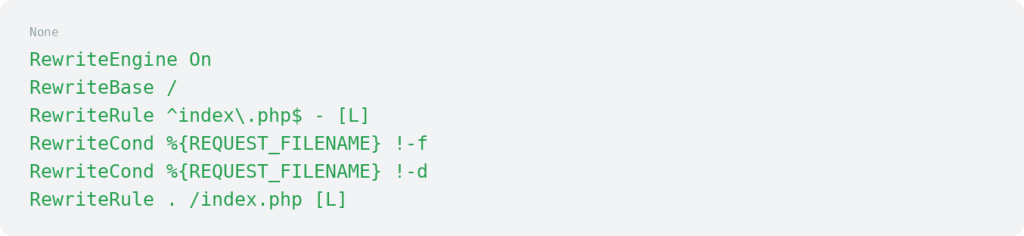
Subfolder installs may need a different RewriteBase.
Check NGINX configuration
NGINX does not use .htaccess. Rewrite handling belongs in the NGINX site configuration.
A basic NGINX location block may look like this:

Reload NGINX after changing configuration:

Clear Magento cache
After saving URL configuration changes, clear Magento cache.
In Admin, go to System > Cache Management and click Flush Magento Cache.
You can also clear cache from the command line:

You may also need to clear browser cache or CDN cache if old URLs still appear.
Test clean Magento URLs
After clearing cache, test the homepage, category URLs, product URLs, CMS pages, cart page, checkout, and Admin access.
Also test old URLs that still include index.php. They should ideally redirect to the clean version to avoid duplicate URL versions.
Common issues after removing index.php
- URLs return 404 errors. Check rewrite rules, Apache mod_rewrite, NGINX server rules, subfolder paths, and whether the Magento .htaccess file exists.
- Admin setting does not remove index.php. Clear Magento cache, verify server rewrites, and confirm the site uses the expected web server configuration.
- Clean URLs work on some pages but not others. Check custom redirects, store view base URLs, theme links, hardcoded URLs, and cache layers.
- NGINX site still uses index.php. Confirm the correct NGINX server block is active and reload NGINX after changes.
Removing index.php FAQs
Removing index.php next steps
Removing index.php from Magento URLs is usually a quick configuration change, but it depends on correct web server rewrites.
Start by enabling Use Web Server Rewrites in Magento Admin, then clear cache and test product, category, CMS, cart, and checkout URLs.
If rewrite rules, cache, redirects, or server configuration affect your Magento storefront, explore Liquid Web Magento hosting.
For 24-hour assistance any day of the year, contact our support team by email or through your Client Portal.
Ready to get started?
Get the fastest, most secure Magento hosting on the market
Additional resources
Change the Magento 2 admin login url →
Update your admin login URL to add an extra layer of security.
How to change base urls in Magento 2 →
Change base URLs to update your store’s web address and keep pages loading correctly.
How to issue a reindex in Magento 2 →
Reindex Magento 2 to refresh store data and keep pages displaying correctly.
