

◦ Comprehensive security
◦ 24/7 support
Magento Guide → Cart → Get All Products
How to get all cart items in Magento 2
Key takeaways
- Magento 2 cart items come from the active quote.
- Use getAllVisibleItems() when you want the cart items shoppers see.
- Use dependency injection instead of Object Manager when getting cart items in PHP.
- Cached, frontend, and headless use cases may need JavaScript customer-data or GraphQL.
Developers may need to retrieve every product from a Magento 2 shopping cart for checkout customizations, integrations, analytics, or cart-based rules. Magento’s quote object makes that possible.
This guide explains how to get all cart items in Magento 2, when to use getAllVisibleItems() instead of getAllItems(), and how to retrieve cart item data in PHP, frontend JavaScript, or GraphQL.
Host Magento at full throttle.
Get secure, reliable Magento hosting so you can scale faster.
What does “get all cart items” mean in Magento 2?
Magento 2 stores active cart data in the quote. The quote represents the shopping cart before Magento converts it into an order.
When developers say they need to “get all cart items,” they usually mean one of two things: every quote item Magento stores internally or only the visible cart items shoppers see in the cart.
$quote->getAllItems() returns every item in the cart, including hidden child products and deleted entries.
$quote->getAllVisibleItems() gives you only the items that should appear in the cart UI, with no deleted or child items.
Use getAllVisibleItems() for most cart display, tracking, and template use cases because it usually matches what shoppers see in the cart. Use getAllItems() only when you specifically need the full quote item structure, such as parent and child item data for configurable, bundle, or grouped products.
Backend method: get cart items with dependency injection
Use dependency injection in a block, controller, helper, or service class instead of calling Object Manager directly.
Inject the checkout session
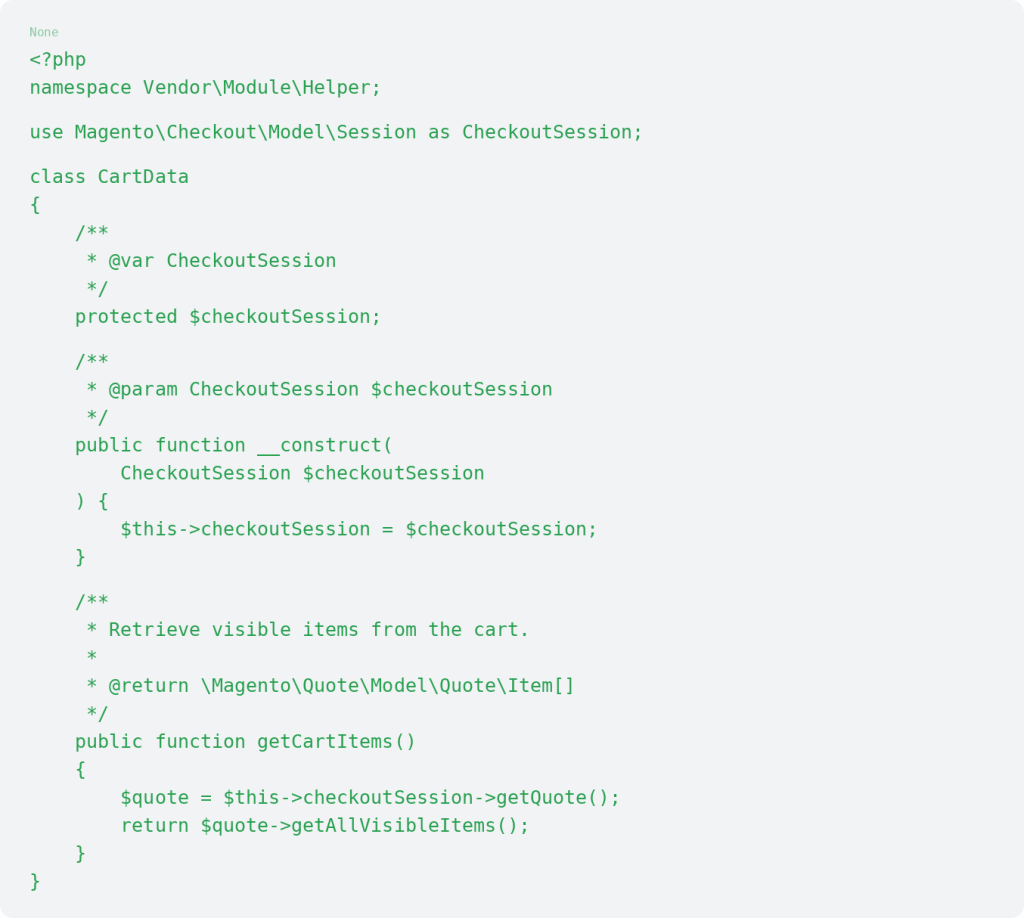
Loop through cart items in a template
You can loop through the returned cart items in a .phtml file and access fields such as product name, SKU, quantity, price, and product ID.

Avoid loading unnecessary product data inside cart item loops when possible. Extra product loads can slow down cart and checkout logic.
Get cart totals and quote data
Subtotals and totals

Billing and shipping addresses

Filter cart items by SKU or product ID

Each $item also exposes methods such as getId(), getPrice(), and getProductType().
Filtering cart items can support custom rules, notices, integrations, or conditional cart behavior.
Frontend method: use customer-data for dynamic cart items
Backend PHP can be the right choice for blocks, controllers, helpers, services, and checkout-related backend logic. For frontend widgets, popups, theme elements, or tracking scripts on cached pages, Magento’s customer-data JavaScript can be a better option.
Use Magento_Customer/js/customer-data to retrieve dynamic cart data:

This approach is useful when the page uses full page cache or when the cart data needs to update without a full page reload. Luma, custom themes, Hyvä, and PWA storefronts may handle cart data differently, so test the method in the exact theme area where you plan to use it.
Headless or PWA method: get cart items with GraphQL
Use GraphQL when a headless, PWA, or external frontend needs cart item data. You need the correct cart ID or masked cart ID for the cart context.

GraphQL is usually the better fit for headless storefronts because the frontend can request the cart fields it needs without relying on a PHP template.
Common issues when getting cart items
If cart item code doesn’t return the data you expect, check the context first.
Common issues include empty cart data on cached pages, getAllItems() returning child items, getAllVisibleItems() not returning child item data, guest carts behaving differently from logged-in customer carts, stale frontend customer-data, code running before the quote has items, or custom themes and PWA frontends using a different cart data flow.
What to test after adding cart item code
After adding cart item logic, test simple products, configurable products, bundled products, guest carts, logged-in carts, quantity updates, cart item removal, mini-cart behavior, the cart page, checkout, and cached pages.
Code that reads cart items can affect checkout, pricing, integrations, and frontend behavior, so test it carefully before using it on a live store. If issues appear, review Magento cache behavior, quote data, theme placement, JavaScript loading, logs, and hosting performance.
Magento 2 cart FAQs
Magento 2 cart next steps
The right method depends on where you need the cart data. Use PHP and the quote object for backend or template logic, customer-data for dynamic frontend theme areas, and GraphQL for headless storefronts.
Start by deciding whether the cart item data belongs in PHP, JavaScript, or a headless frontend before choosing the implementation.
If cart data, cache behavior, checkout customizations, or storefront performance affect a live store, explore Liquid Web Magento hosting.
Ready to get started?
Get the fastest, most secure Magento hosting on the market
Additional resources
What is Magento Ecommerce? →
A complete beginner’s guide to the Magento Ecommerce platform
Magento shopping cart: How to setup, optimize, and manage →
Let’s walk through everything you need to know about configuring, optimizing, and maintaining your Magento cart the right way.
Best Magento ERP extensions →
Our top 10 compared so you can decide which is best for your business