How to reset Magento 2 admin passwords – Nexcess

Learn how to reset the Magento 2 admin password through both the web interface and the command line interface (CLI).
Get fast, reliable hosting for WordPress
Power your site with the industry’s fastest, most optimized WordPress hosting
How to reset the Magento 2 admin password through both the web interface and the command line interface (CLI).
Method
Method 1 uses the Magento 2 web interface and is preferable to Method 2, which requires both SSH access and familiarity with the command line interface (CLI). For information about how to enable SSH access as a Nexcess client, see this article.
Method 1: Web interface
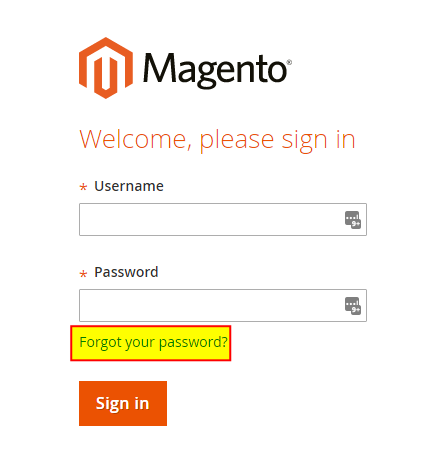
- Navigate to your admin login page.
- Click Forgot your Password?

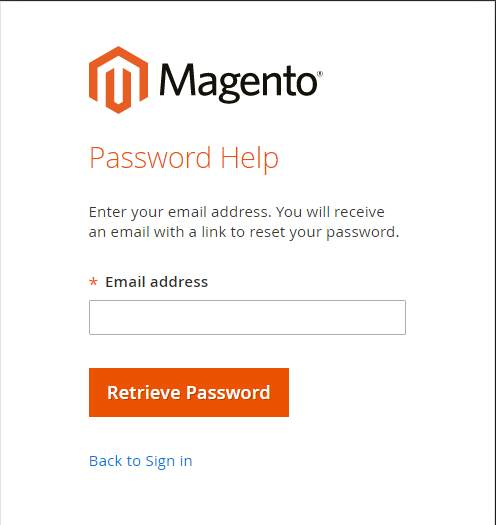
- In the Email address field, enter your email address, then click Retrieve Password.

- If the email address is correct, you will receive an email containing a link to confirm the password reset. Click this link to launch the password reset page.
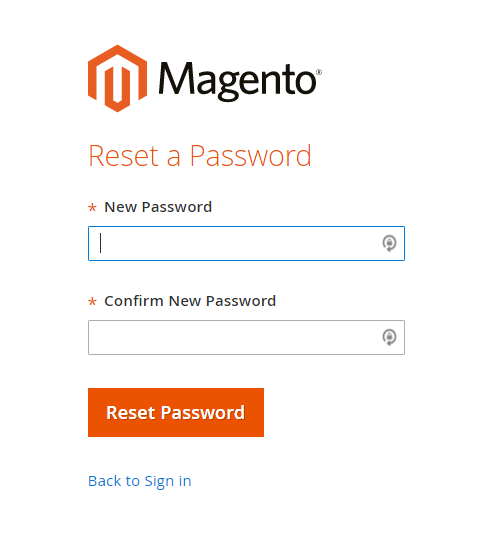
- In the New Password and Confirm New Password fields, enter the same password, then click Reset Password.

- Enter your new credentials to log in to the Magento 2 admin panel.
Method 2: CLI
You must have SSH access to your server in order to use this method. If you do not have SSH access, see How to enable SSH access for details.
- Log in to your server with SSH.
- Navigate to your Magento installation, but replace the angled brackets (<>) and everything between them with the indicated information:
cd /home/[demo]/
/html/ - Retrieve the admin user’s information from the database using the below command, but make the following adjustments:
- Replace
with your database user. - Replace
with your database name. - Within username=”
“ , replacewith the username requiring the reset. You will be prompted to for the database password before continuing. echo "select email,firstname,lastname from admin_user where username=''" | mysql -u -p
- Replace
- To reset the password of a user, execute the following, but replace the bracketed placeholders between the quotation marks with the current user’s information:
php bin/magento admin:user:create --admin-user="
" --admin-password=" " --admin-email=" " --admin-lastname=" "
For 24-hour assistance any day of the year, contact our Support Team by email or through your Client Portal.
Additional resources
What is managed WordPress hosting? →
Get details and decide if managed WordPress hosting is right for you.
Must-have web development plugins to create WordPress websites at scale →
Explore the best web development plugins to enhance functionality, improve performance, and streamline your WordPress site.
A complete guide to WordPress shortcodes →
Shortcodes make life easier. Learn how to get started!
