How to issue a reindex in Magento – Nexcess

Learn how to issue a reindex to optimize performance in Magento 1 from the admin panel or command line, which requires SSH access and some familiarity with the command line interface (CLI).
Get fast, reliable hosting for WordPress
Power your site with the industry’s fastest, most optimized WordPress hosting
Method 1: Using the Admin Panel
- Log in to Magento Admin Panel.
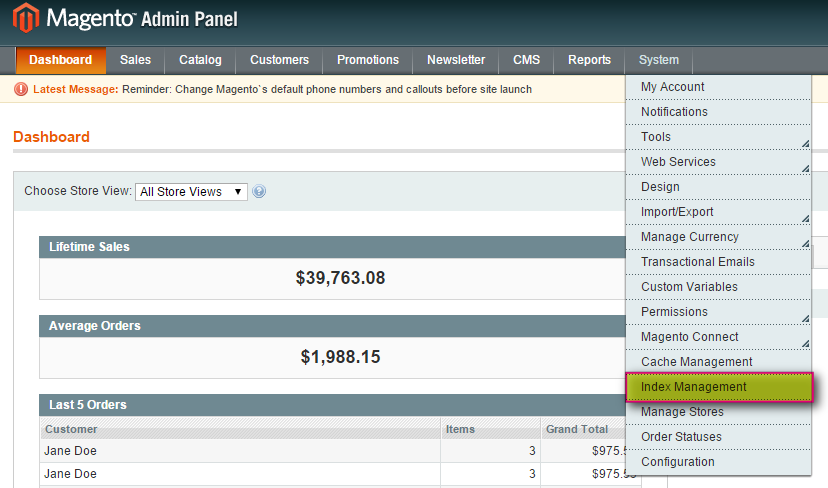
- Click System > Index Management.

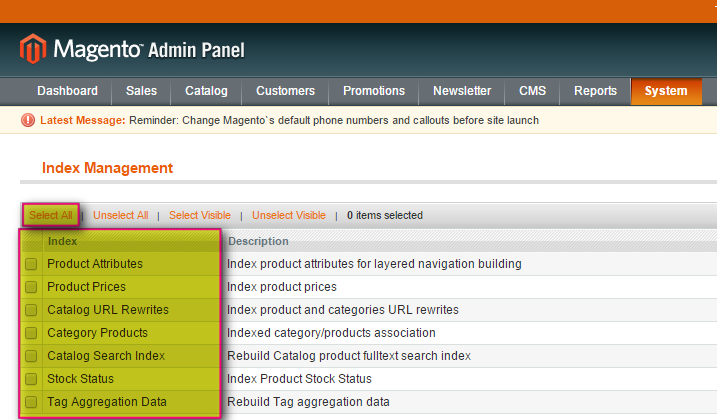
- On the left, select any or all categories to reindex. If you want to reindex all categories, click Select All.

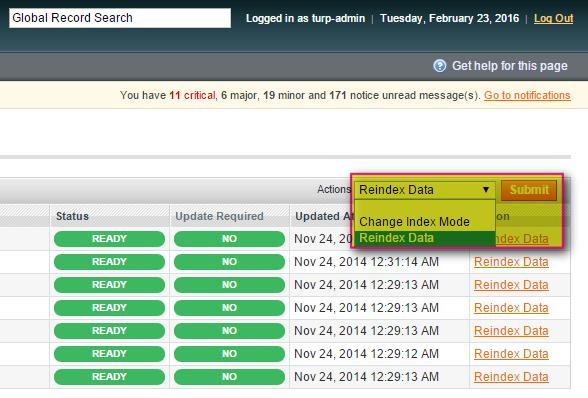
- From the Actions drop-down list, select Reindex Data and then click Submit.

- Depending on how many categories, and the amount of information that needs to be reindexed, this could take minutes or hours.
- If the reindex does not finish, proceed with Method 2 below.
- Log in to the server using the SSH credentials provided to you by our support team.
- Navigate to your Magento installation: /home/demo/demosite.com/html/
- After accessing the Magento directory, navigate to the shell directory:
cd shell
- To view the current status of the Magento indexer, enter:
php indexer.php --status
- To issue a reindex of all categories, enter:
php indexer.php --reindexall
To see a list of specific categories for reindexing, enter:php indexer.php info
Additional resources
What is managed WordPress hosting? →
Get details and decide if managed WordPress hosting is right for you.
Must-have web development plugins to create WordPress websites at scale →
Explore the best web development plugins to enhance functionality, improve performance, and streamline your WordPress site.
A complete guide to WordPress shortcodes →
Shortcodes make life easier. Learn how to get started!
