


Key takeaways
- WSGI is a Python standard that connects web servers and web applications.
- WSGI lets Django, Flask, and other frameworks communicate with servers.
- Production setups usually include a web server, WSGI server, and Python app.
- WSGI fits synchronous apps, while ASGI supports async apps and WebSockets.
WSGI helps a Python web application communicate with a web server when the app moves from local development to production. It creates a consistent connection point, so developers don’t need a custom setup for every server and framework combination.
What is WSGI?
WSGI stands for Web Server Gateway Interface. It’s a Python standard that defines how web servers communicate with Python web applications and frameworks.
WSGI is commonly used with Python frameworks such as Django, Flask, Pyramid, and other web applications that follow the WSGI standard.
Why WSGI exists
Historically, Python web applications faced deployment challenges due to the lack of standardization. Before WSGI was introduced in 2003, each Python web framework required its own integration method with web servers, creating compatibility issues and limiting flexibility. WSGI solved this by providing a universal interface that separates web servers from application frameworks.
That separation is one of WSGI’s biggest advantages. It allows Python applications to run across different server setups without rewriting application code for each environment.
How WSGI works
A WSGI setup usually divides the request process into three parts: the web server, the WSGI server, and the Python application.
Here’s the basic request flow:
- A browser sends an HTTP request.
- A web server such as Nginx or Apache receives the request.
- The web server passes the request to a WSGI server such as Gunicorn, uWSGI, or mod_wsgi.
- The WSGI server translates the request into the WSGI format.
- The Python application processes the request and returns a response.
- The response moves back through the WSGI server and web server to the browser.
The process relies on two sides of the WSGI interface:
Server-side, or WSGI server: Receives HTTP requests from the web server and converts them into a format Python applications can process. It prepares environment variables containing request details, such as URL, HTTP method, and headers, and provides a callback function.
Application-side, or WSGI application: This is your Python web application or framework that contains the structure and code to be executed. It processes the request based on defined routes and returns a response with status, headers, and body content.
What a WSGI server does
A WSGI server runs the Python application and passes requests and responses using the WSGI standard. It manages worker processes, handles communication between the web server and application, and helps the app run more reliably than a local development server.
WSGI also separates web server operations from application logic. That improves portability and gives teams more flexibility when choosing frameworks, servers, and hosting environments.
Why WSGI matters for production
Most Python frameworks include a development server for local testing. Production deployments use WSGI for more reliable traffic handling, process management, and server integration.
WSGI helps because it standardizes the connection between the Python application and the server layer. If the app follows the WSGI standard, teams can change parts of the deployment setup without rewriting the application itself.
WSGI vs web server vs Python framework
WSGI is easier to understand when each layer has a clear job.
| Layer | Example | What it does |
| Web server | Nginx, Apache | Receives HTTP requests, handles SSL, serves static files, and routes traffic |
| WSGI server | Gunicorn, uWSGI, mod_wsgi | Runs the Python app and passes requests through the WSGI interface |
| Python framework | Django, Flask, Pyramid | Handles routing, views, templates, app logic, and responses |
Common WSGI servers
Common WSGI servers include Gunicorn, uWSGI, mod_wsgi, and CherryPy. Gunicorn is one of the most common choices for Django and Flask deployments, especially when paired with Nginx. uWSGI offers more configuration options for complex production setups, while mod_wsgi is often used in Apache-based environments. CherryPy includes a built-in WSGI-compatible server and can be useful for lightweight Python applications.
Most beginners will run into Gunicorn, uWSGI, or mod_wsgi first. The right choice depends on the framework, hosting environment, traffic needs, and how much configuration control the team wants.
WSGI vs ASGI
WSGI works well for traditional synchronous Python web applications. In a synchronous model, the app handles request-response work in a more linear flow.
ASGI stands for Asynchronous Server Gateway Interface. It supports asynchronous Python applications, WebSockets, background events, and long-lived connections.
| Feature | WSGI | ASGI |
| Request model | Synchronous | Asynchronous |
| Best for | Traditional Python web apps | Async apps, WebSockets, real-time features |
| Common frameworks | Django, Flask, Pyramid | FastAPI, Starlette, async Django use cases |
| Common servers | Gunicorn, uWSGI, mod_wsgi | Uvicorn, Daphne, Hypercorn |
ASGI doesn’t make WSGI obsolete for every project. WSGI still fits many traditional Python applications, while ASGI fits apps that need async behavior or real-time connections.
Basic WSGI application example
A WSGI application is a callable object that accepts request information and returns a response.
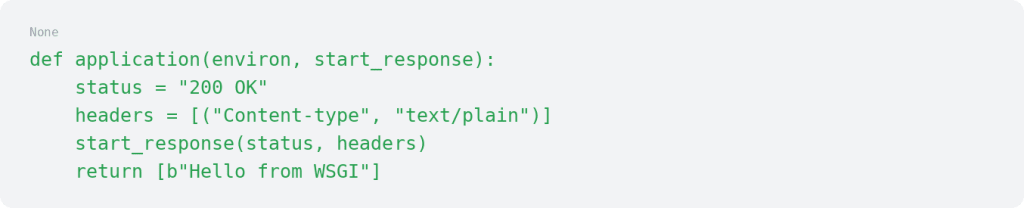
In this example, environ contains request information, start_response starts the HTTP response, and the returned value contains the response body.
Frameworks like Flask abstract this pattern behind decorators, but the same callable interface runs underneath. When a request reaches a Flask route, the framework handles the environ and start_response arguments for you.
A Flask route might look like this:

Example production setup
A common production setup looks like this:
Nginx → Gunicorn → Django or Flask app
In this setup, Nginx receives public traffic, handles SSL, serves static files, and passes application requests to Gunicorn. Gunicorn runs the Python application. Django or Flask handles routing, views, templates, and application logic.
A basic Gunicorn command might look like this:

A real production deployment needs more than one command. At minimum, teams should also configure:
- Process management: Use systemd or Supervisor to keep Gunicorn running as a background service.
- Restart behavior: Configure automatic restarts after a failure so one crashed worker doesn’t take the application offline.
- Logs: Use the –access-logfile and –error-logfile options to capture and retain request and error data.
- Environment variables: Load secrets and configuration through the hosting environment’s variable manager or a protected .env file rather than hardcoding them in the application.
- Static file handling: Configure Nginx to serve static files directly instead of routing those requests through Gunicorn.
- SSL: Terminate SSL at the Nginx layer and proxy application traffic to Gunicorn through a local socket or port.
- Monitoring: Track worker health, response times, and error rates so the team can identify problems before users report them.
Common WSGI deployment mistakes
WSGI can help Python applications run in production, but the setup still needs careful configuration.
Common mistakes include:
- Using the development server in production
- Exposing the WSGI server directly to the public internet
- Forgetting to configure static files
- Ignoring logs and process management
- Running too few or too many workers
- Mismanaging environment variables
- Skipping SSL and reverse proxy setup
- Choosing a WSGI server without considering the hosting environment
WSGI hosting requirements
A Python app using WSGI needs a hosting environment that gives developers enough control to configure the app correctly. Look for support for the right Python version, SSH access, dependency installation, process management, reverse proxy setup, static file handling, SSL configuration, logs, monitoring, and enough CPU, RAM, and storage for the app’s needs.
A strong hosting environment should also support framework-specific requirements for tools like Django, Flask, or Pyramid. WSGI is easier to manage when the hosting environment provides control, predictable resources, and support when production issues come up.
WSGI FAQs
Getting started with WSGI
WSGI gives Python web applications a standard way to communicate with web servers, which makes production deployment more portable and easier to manage.
Start by identifying your framework, expected traffic, and hosting environment, then choose a WSGI server that fits how the app needs to run.
If you need a hosting environment for a Python application, explore Liquid Web VPS or dedicated hosting to get the control, resources, and support needed for production WSGI deployments.