Transfer Your Domain to Liquid Web
Ready to transfer your domain to Liquid Web? Learn how to get your EPP code, authorize the transfer, and fulfill ICANN security requirements easily.
Your domain is the most important part of your web presence. Because of this, the Internet Corporation for Assigned Names and Numbers (ICANN) has specific requirements to keep domain transfers secure. Liquid Web will handle all the requirements for you, we just need you to complete a few steps before we can start the process.
- Login to your Liquid Web account. For more information on accessing your Liquid Web account, see Exploring Your My Liquid Web Account.
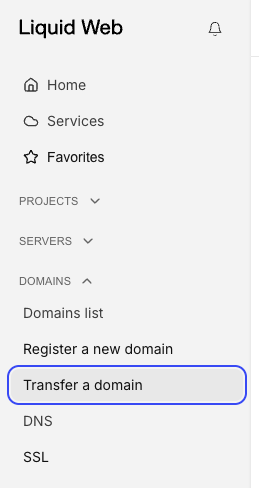
- At the left of the screen, click Transfer a domain.

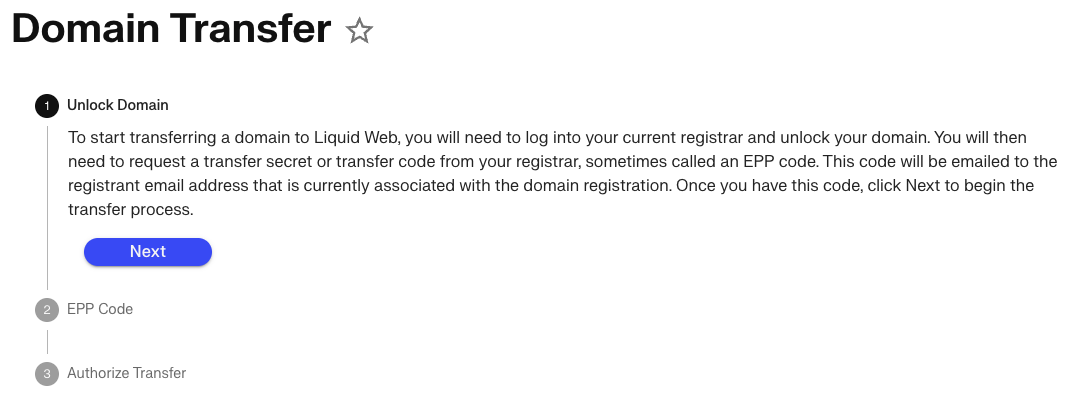
- The Domain Transfer screen explains that an EPP code from the current registrar is required to complete the domain transfer request. If you have an EPP code for the domain you want to transfer, click Next. If not, go to the current registrar for the domain and request that the domain be released for transfer and they will provide you with an EPP code.

- Enter the domain name and the EPP Code to authorize the transfer, the click Next.
- The screen will now explain that a transfer automatically extends the domain registration for a year and a charge equivalent to a one year domain registration will be charged to your account or to your credit card on file. Click Authorize Transfer to complete the transfer request.
- After the transfer is completed, our registrar will send you an email asking for confirmation of the transfer. Follow the instructions in the email to complete the transfer. (Note: all emails about domain transfers will be sent to the domain registrant email address on file with the domain registrar).