
 Matt Holtz
 How setuid, setgid, and sticky bits behave in modern environments, and how to use them safely
Linux file permissions haven’t changed much in decades, and that’s exactly why they still matter.
Even in cloud-native, automated, and containerized environments, misconfigured file permissions remain one of the most common sources of privilege escalation, lateral movement, and audit findings. When something goes wrong, permissions are often the quiet culprit.
This guide is written for administrators and engineers who already understand basic Linux permissions, but want to apply them with better judgment in today’s environments.
We’ll cover:
- How special permissions work
- Why they’re scrutinized today
- When they make sense — and when they don’t
- How modern infrastructure changes the risk profile
A quick refresher: Linux permission basics
Linux permissions control who can read, write, or execute a file or directory.
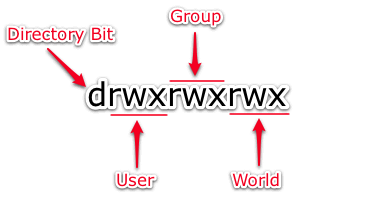
Symbolic permission notation
 --- no permission
 --x execute
 -w- write
 -wx write and execute
 r-- read
 r-x read and execute
 rw- read and write
 rwx read, write and execute
Numeric notation
The numeric notation system uses the digits 1 through 7, with each corresponding to a different symbolic permission set:
 0 --- no permission
 1 --x execute
 2 -w- write
 3 -wx write and execute
 4 r-- read
 5 r-x read and execute
 6 rw- read and write
 7 rwx read, write and execute
Permissions are applied to:
- Owner
- Group
- Others
This system is simple — but powerful enough to cause serious problems when misused.
The three special permissions (and why they’re sensitive)
Beyond basic permissions, Linux includes three special permission bits:
- setuid
- setgid
- sticky bit
These exist to solve real problems — but they also introduce elevated privilege, which is why they receive so much scrutiny.
setuid: executing as the file owner
What setuid does
When setuid is applied to an executable file, that program runs with the permissions of the file owner, not the user executing it.
The classic example is sudo.
-rwsr-xr-x 1 root root /usr/bin/sudoThat s indicates:
- The file is executable.
- It runs as root.
- Access is controlled carefully.
This allows users to perform privileged actions without logging in as root.
Modern security context: why setuid is risky
From a security perspective, setuid binaries are:
- High-value targets for attackers
- Frequently flagged in vulnerability scans
- Explicitly reviewed during audits
Why? Because if a setuid program has a flaw, it can become a full privilege escalation path.
When setuid makes sense
- Well-known, well-audited system binaries (e.g., sudo)
- Minimal attack surface
- Strict ownership and permissions
- Regular review and monitoring
When setuid is a bad idea
- Custom scripts
- Web-accessible files
- Shared or multi-tenant environments
- Containers (often disabled or restricted)
- Anything without a clear justification
Coaching mindset:
If you can’t clearly explain why this needs elevated privilege, it probably shouldn’t have it.
How to set (and understand) setuid
chmod u+s filenameIf you see a capital S instead of s, it means:
- setuid is set
- but the file is not executable
That’s often a sign of misconfiguration and something auditors notice quickly.
setgid: executing or inheriting group ownership
setgid on files
When setgid is applied to a file, the program runs with the group permissions of the file owner.
Example:
-rwxr-sr-x 1 root crontab /usr/bin/crontabThis allows controlled group-level access without full root privilege.
setgid on directories (very common, very useful)
When applied to a directory, setgid ensures that new files inherit the directory’s group, not the creator’s default group.
This is commonly used for:
- Shared project directories
- Application data directories
- Controlled collaboration
chmod g+s mydirModern context: why setgid is safer (but still needs care)
Compared to setuid, setgid is:
- Less dangerous
- Still useful in controlled environments
- Still subject to audit review
However:
- Poor group management can create lateral access.
- Overuse can blur ownership boundaries.
Coaching mindset:
setgid solves coordination problems — but it doesn’t replace access design.
The sticky bit: protecting shared directories
What the sticky bit does
When applied to a directory, the sticky bit ensures that only the file owner can delete or rename files, even if the directory is world-writable.
Classic example:
drwxrwxrwt /tmpThat trailing t is the sticky bit.
Modern relevance
The sticky bit remains:
- Common
- Well-understood
- Audit-friendly
It’s still the correct solution for shared writable directories.
Permissions in Containers and Modern Platforms
This is where many older tutorials fall short.
Containers change the model.
In containerized environments:
- setuid is often disabled or ignored
- Privilege is controlled through:
- Linux capabilities
- Namespaces
- Security contexts (Kubernetes)
- File permissions still matter on:
- Host systems
- Mounted volumes
- Persistent storage
Key takeaway:
File permissions didn’t disappear; they moved.
If you don’t understand where permissions are enforced, you don’t understand your security boundary.
Permissions and compliance: why auditors care
Auditors don’t look for:
- “Does this system work?”
They look for:
- Unexpected privilege paths
- Unjustified elevated access
- Inconsistent ownership
- Gaps between documentation and reality
Common red flags:
- Custom setuid binaries
- World-writable directories without sticky bits
- Permissions that don’t match documented controls
Coaching mindset:
If an auditor asked, “Why is this permission set this way?,” would you be comfortable answering?
Best practices that still hold up
If you remember nothing else:
- Use least privilege.
- Prefer capabilities and roles over setuid where possible.
- Review special permissions regularly.
- Document why elevated permissions exist.
- Treat permission changes as security changes, not just operational ones.
Getting started
Linux file permissions aren’t outdated; our assumptions about them are.
In modern environments, the biggest risk is setting a permission without intention or understanding.
Whether you’re managing a single server, a regulated workload, or a fleet of production systems, permissions are still one of the clearest signals of how seriously an environment is designed.
A note from Liquid Web
In regulated and high-scrutiny environments, misconfigurations rarely stay small. Liquid Web works with teams who need Linux environments that are not only performant, but explainable, auditable, and defensible.
Sometimes the most valuable support is helping you avoid issues altogether.