

Using the File Manager in cPanel
A File Manager is a utility found in cPanel or Plesk (depending on your server operating system), which can be used to access, view, modify, add, and delete files from your account. This allows you to securely edit your website files without using an FTP client.
Using a File Manager is a more secure way to interact with your website files than using a third-party software and using SSH keys to connect over the Internet. The directions in this article are for the File Manage in cPanel (Linux). For directions for Plesk (Linux or Windows), see Using the File Manager in Plesk.
The following instructions assume that you are already logged into your cPanel account. For help logging in, see our article Logging Into cPanel.
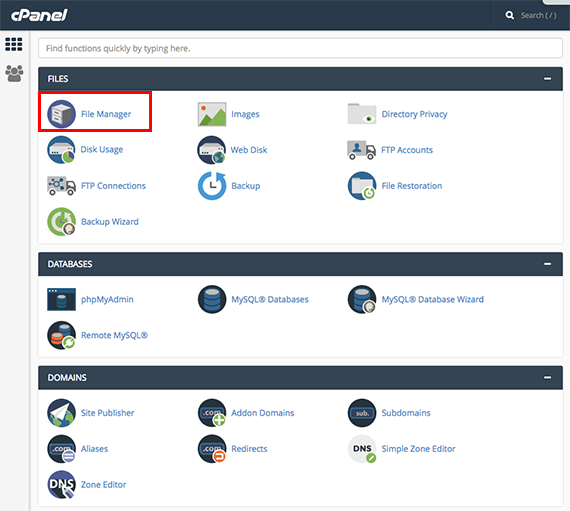
- Select the File Manager link on the home page of cPanel.

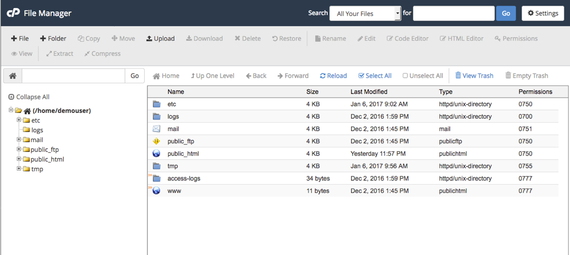
- Here you will see the File Manager home page.

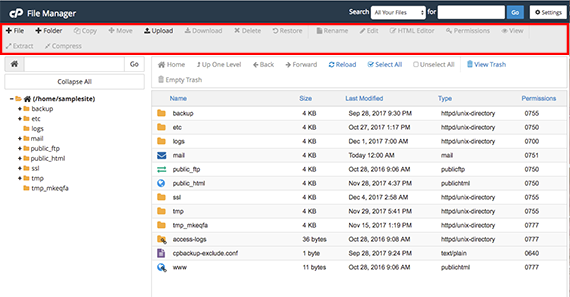
- The Task Bar at the top of the page allows you to perform basic tasks like create a new folder, add, edit, and delete files. It also allows you to change permissions on specific folders and upload new files to your site.

See our articles on performing tasks within the cPanel File Manager:
- Add Files and Folders
- Delete Files and Folders
- Edit Code and HTML
- Manage File Permissions
- Upload Files
- How to Modify a cPanel License
Liquid Web offers a variety of hosting solutions with cPanel, including cPanel VPS and dedicated servers.