Using Secure Notes for Sensitive Information
Safely share passwords and sensitive info with our Support team using Secure Notes. Find, view, or create notes under the Account tab.
Sensitive information like passwords and ssh keys are not meant to be shared. But sometimes you need to send or receive sensitive information to get help from our Support Team. When that time comes, the best way to share that information is by using Secure Notes.
Finding a Secure Note
- Log in to your Liquid Web account.
- Click on the Support tab at the top of the screen.

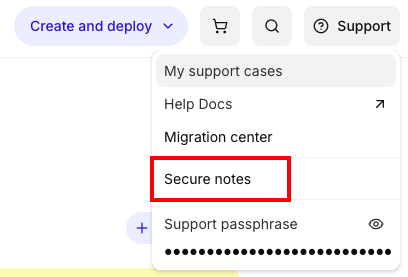
- Click on Secure Notes in the drop-down menu.

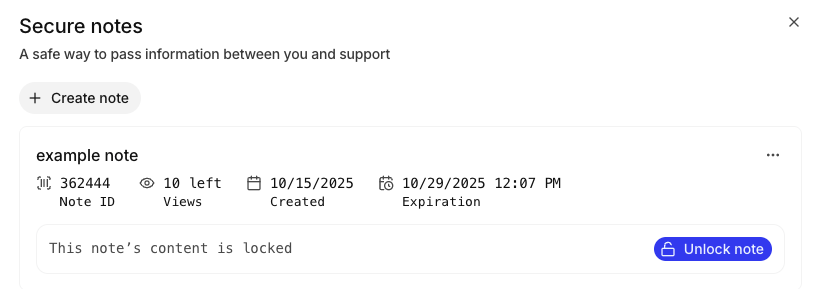
- Secure Notes are organized by date of creation. Click Unlock Note to view a secure note.


Sending a Secure Note
You can also send secure notes to the Support Team if you need to share application passwords or other sensitive data about your account or server. The process of sending a secure note is similar to viewing a secure note.
- Log in to your Liquid Web account.
- Click on the Support tab at the top of the screen.
- Click on Secure Notes in the drop-down menu.
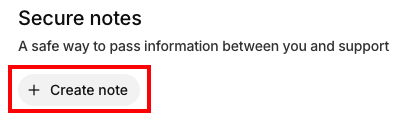
- Click Add Secure Note.

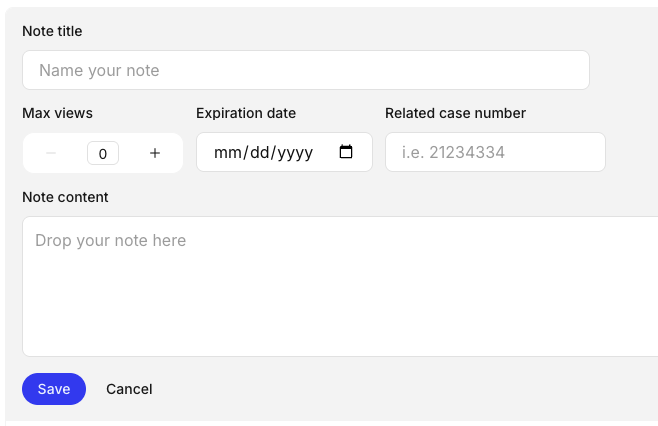
- Provide a name for the note. You can also set a maximum number of views (the default is a one time view), an expiration date, and relate the note to a case number if you want. Enter your sensitive information in the Note Content box.

- Click Save to save your secure note.