

Unblock Your WHM Server’s IP Address
Your server has a firewall to help prevent malicious attacks. This firewall looks at anything attempting to access your server and compares it to a set of rules. If it breaks the rules, your firewall doesn’t let the traffic through. Your firewall can also block certain IP addresses from connecting to your server if your firewall decides they don’t follow the rules.
Firewalls have their limitations. Sometimes, firewall rules can block legitimate IP addresses. Most firewalls have rules about password attempts. If you try to log into your server but use the wrong password too many times, your firewall will block your IP. Then, when you try to visit your website, it will look like your website is down.
If you can’t access your website, first check to see if your website is down for everyone. You can use an online tool for this. If your site is only down for you, try unblocking your IP (Linux cPanel servers only.)
- Figure out your local IP address by visiting our IP checker. This website will print your IP address in a no-nonsense format.
- Log into your Liquid Web account.
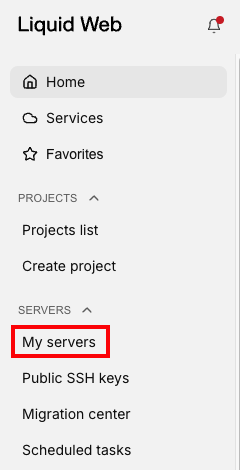
- Click My Servers from the left side menu.

- Click the name of the server hosting the website you can’t access to launch the Server details page.
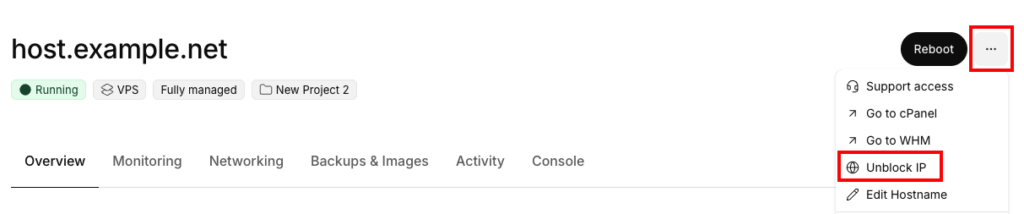
- Click the three dot menu to the right of the server name and click Unblock IP from the drop down menu.

- In the Slide out panel, you can enter the IP address you need to unblock (the system will recommend unblocking the IP that it detects). You can also choose to Whitelist the IP to prevent this from happening again. Then, click Confirm to unblock the IP.
- Try to view your website. If your website loads, you’re all set!
If you unblock your IP address and your website still won’t load, try opening a private browsing session. Caching can make it seem like your unblock didn’t work.
You can learn more about managing your firewall and permanently “whitelisting” various IP addresses in our article Whitelisting IPs in WHM