

Spam Control Features in Premium Business Email
Spam used to be annoying. Now, it’s dangerous. Currently, one out of every 291 emails contains a virus*. Email is now the leading entry point for network threats like viruses, Trojans, and worms. Lost productivity from checking and deleting spam and the expense of rallying the IT department to fix and recover lost data costs over $20 billion a year**.
Keeping the spam menace out of your organization is not an easy or cheap proposition. The software licenses alone are costly. Add to that constant maintenance to ensure protection against emerging threats.
With Liquid Web, you get exceptional support and affordable, feature-rich business email and the strongest threat detection structure in the industry. We combined the best of our threat scanning capabilities with industry leaders in spam and virus protection. Our spam and virus filtering is handled in two stages: blocked email and filtered email. Blocked email ensures you never see those messages in your mailbox. If we can’t block it, email filtering is used to identify spam and put it in your spam folder.
- Blocked Email. Premium Business Email uses several industry best practice techniques to block email spam coming from known disreputable sources. This is primarily email from sources we know are unsafe. This covers everything from compromised servers to ‘spam cannon’ services that send unsolicited spam across the internet. These techniques include the use of IP block lists provided by reputable services well known through the email industry, as well as blocking emails with attachment types known to exploit end-user computers. We also provide admins with the ability to blacklist senders at both the domain and mailbox level. Any mail matching these blacklists are blocked.
- Filtered Email. If mail passes the block checks, we apply advanced content filtering to verify whether it is considered spam. Content filtering combines many techniques to analyze email structure and content, and create key indicators that identify patterns in email. These indicators are combined with industry-wide feedback from email providers across the internet about reported spam, phishing, and viruses. The end result is an accurate, adaptive, and evolving content filtering system that is highly effective at removing spam.
Security Enhancements
At Liquid Web, we are always working to improve our systems and your user experience. We’ve recently added new security enhancements to our already strong Spam protection. The good news is that these features are enabled automatically on your account. You don’t have to do anything new except enjoy the improved and safer webmail experience that we offer.
Suspicious Email
Email that fails specific patterns in SPF, DKIM, and DMARC validation but don’t trigger a full Spam tag will be flagged with a warning in the message preview and pop-out windows. This warning may be due to a configuration problem on the sender’s server. If you confirm that the sender is legitimate, you can choose to trust the sender and suppress future warnings.
Spam Folder Behavior
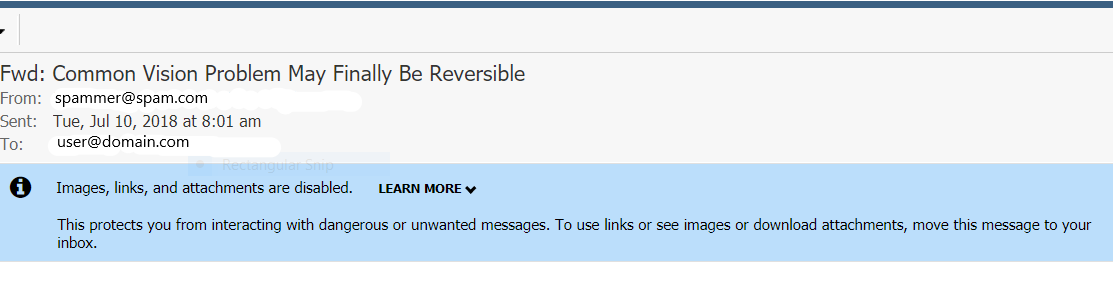
To further protect your users from potentially malicious content, messages that are in the Spam folder will be severely restricted. Users will be able to view the basic content, but images, links, and attachments are not accessible while the message is in the Spam folder. This requires users to drag the message out of the spam folder to interact with it. This behavior re-enforces the stance that messages in the Spam folder are potentially dangerous and should be handled with care.
Sender Discrepancy Information
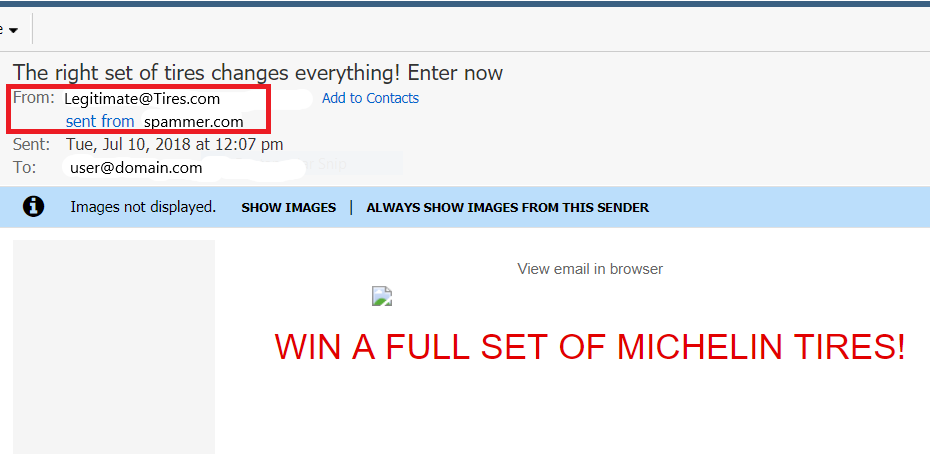
A common sign of phishing/spoofing messages is when the Friendly From email address (what users see as the message sender) does not match the Return-Path address (where the message came from). Additional information has been added to the “From” field that shows when the primary domains of these two sender addresses do not match. Also, to help end users, we added a mouse-over help bubble to explain what “sent from” means.
For information about adjusting your Spam Filter settings, see Adjusting Spam Filtering in Premium Business Email.