

Contact Support from the Portal
Learn how to reach out for product support from the customer portal.
Prerequisites
- Log in to the customer portal
How to Get Help
In the dashboard homepage, you can locate the Support section at the bottom-left corner of the screen.
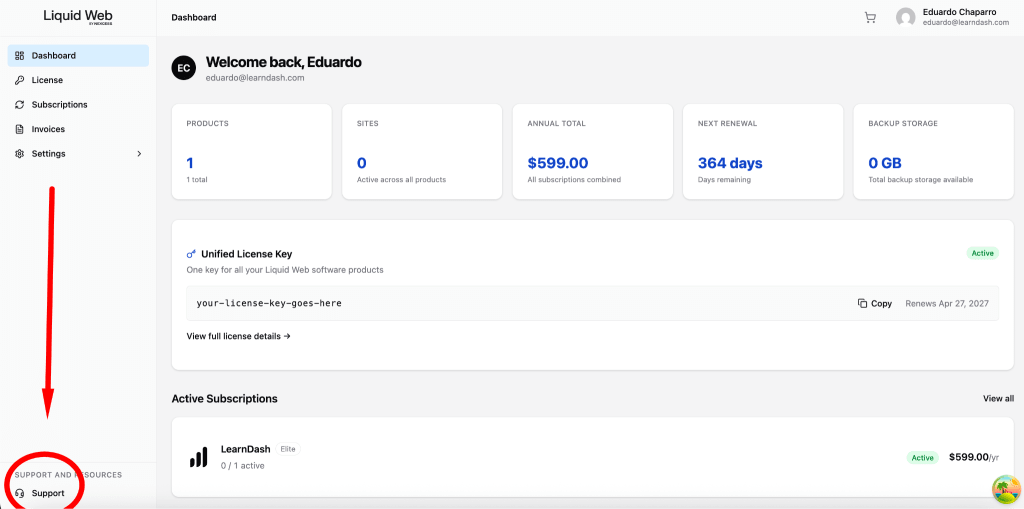
Once there, please fill in all the information requested. The more information you provide, the better for support.

What’s next?
You will receive a confirmation that your ticket was submitted. An agent will reach out soon with further steps or information about your inquiry.
Troubleshooting
I Forgot my Account Password
See Change Or Reset Your Password for instructions on restoring access to your account.
The Dashboard isn’t Loading
Try clearing your browser cache or switching to a different network connection. If the issue continues, contact Support from the portal.
Related Articles
Download An Invoice
View Your Transaction History
Upgrade Your Subscription Tier
Update Your Profile Name And Email
Change Or Reset Your Password