

Kadence Getting Started Guide
Welcome to Kadence! Whether you’re completely new to WordPress or a seasoned builder exploring Kadence, this guide is designed to help you start creating beautiful, fast, and professional websites with ease.
What is WordPress?
Before diving into Kadence, let’s clarify WordPress basics. The easiest way to think about it is like this:
- WordPress.org: A self-hosted platform offering full control over your website, with unlimited access to themes and plugins like Kadence. WordPress.org is like building and owning your own house; you have total creative freedom and control, but you’re in charge of finding a place for it (hosting).
- WordPress.com: A managed platform where hosting is provided. The WordPress Business Hosting Plan is required in order to use the Kadence plugins. WordPress.com is more like renting a beautiful apartment. The landlord (WordPress) takes care of the building for you, but you need the right plan to use your own furniture (like Kadence plugins).
Installing Kadence
Installing Kadence with the Express Plan
- Kadence Theme (Free):
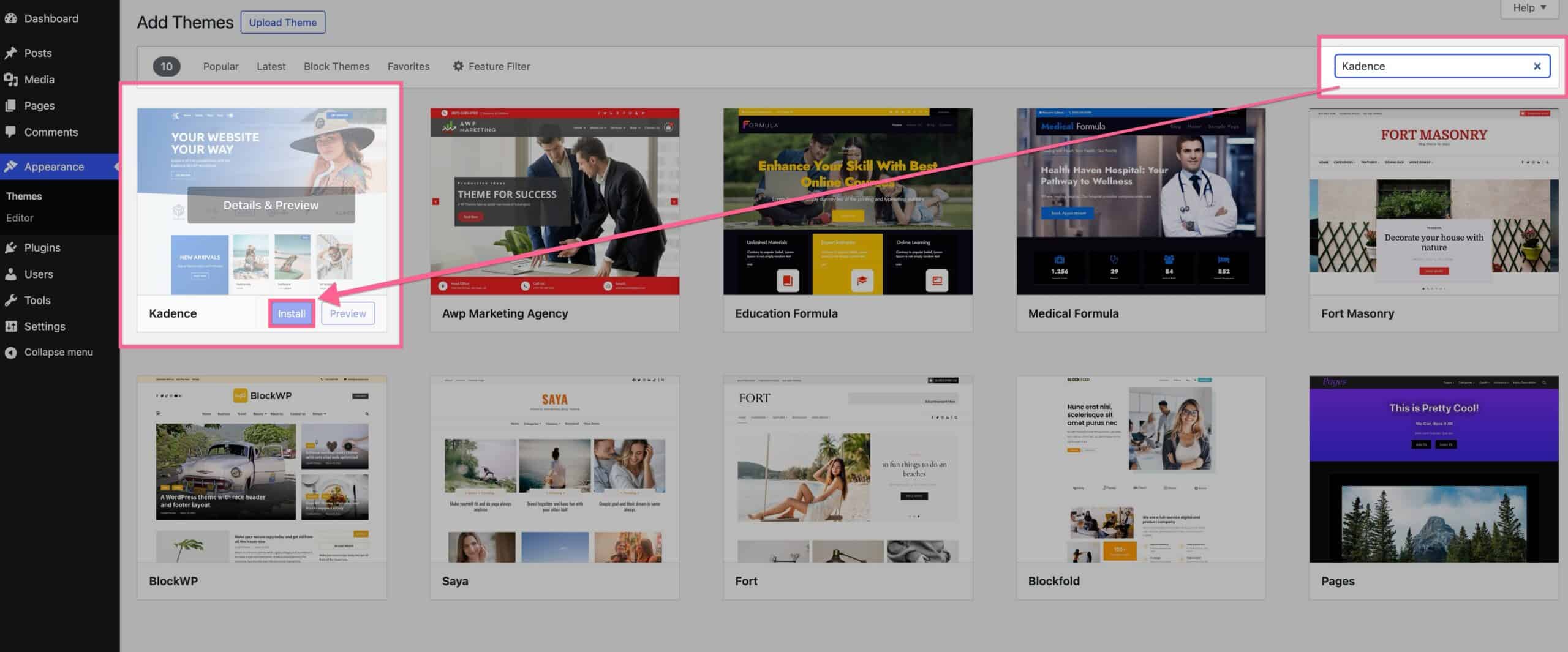
- Go to your WordPress Dashboard → Appearance → Themes → Add New.
- Search for “Kadence” and click Install → Activate.
- Kadence Blocks (Free):.
- Install Kadence Blocks from Plugins → Add New and search for “Kadence Blocks.”
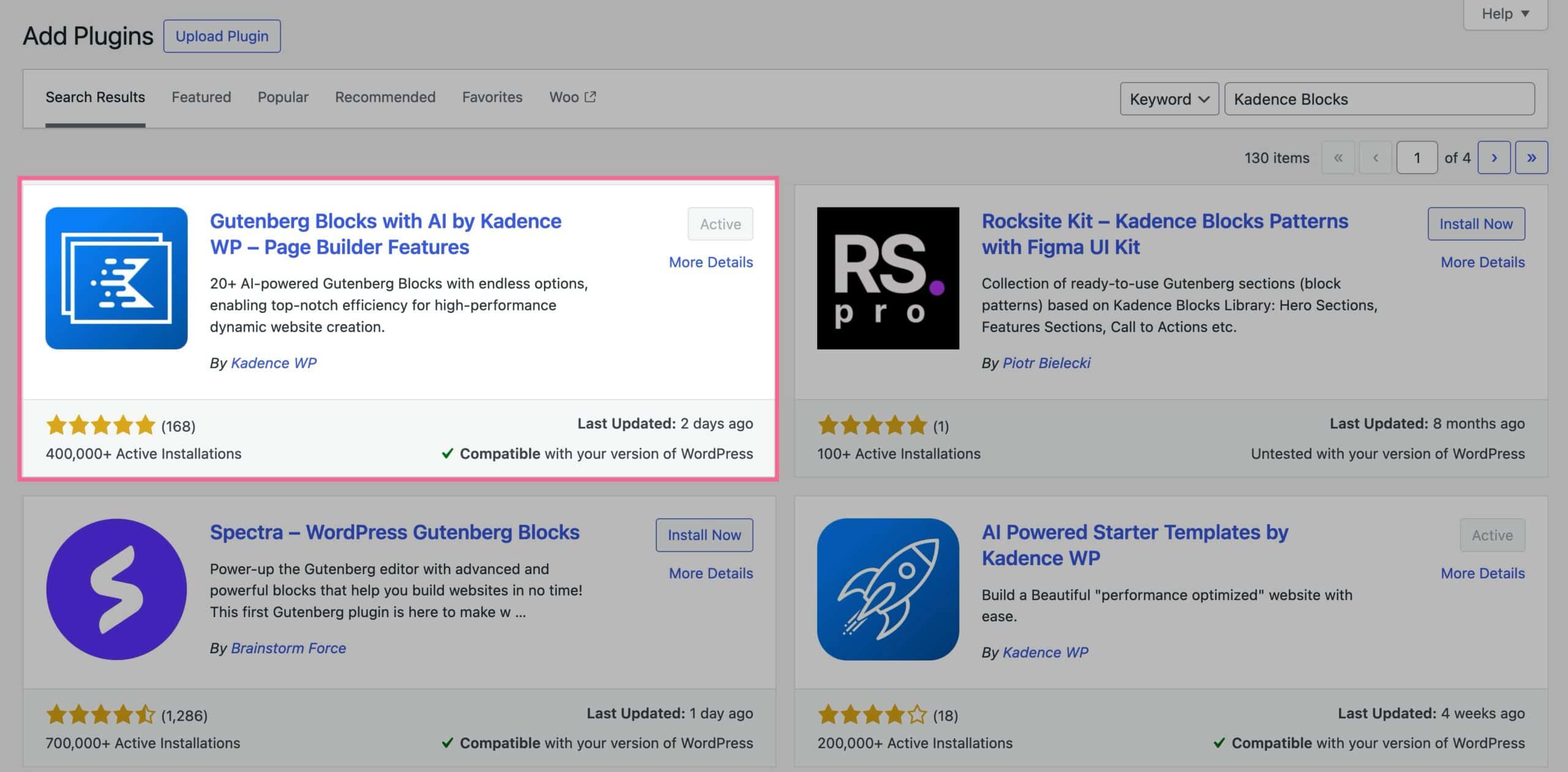
- Install Kadence Blocks from Plugins → Add New and search for “Kadence Blocks.”
- Creative Kit:
- Log into your Kadence Account to download Creative Kit (which gives you access to all Starter Templates). This video briefly walks through installing Creative Kit, using the example of the Travel Blog Template.
- Log into your Kadence Account to download Creative Kit (which gives you access to all Starter Templates). This video briefly walks through installing Creative Kit, using the example of the Travel Blog Template.
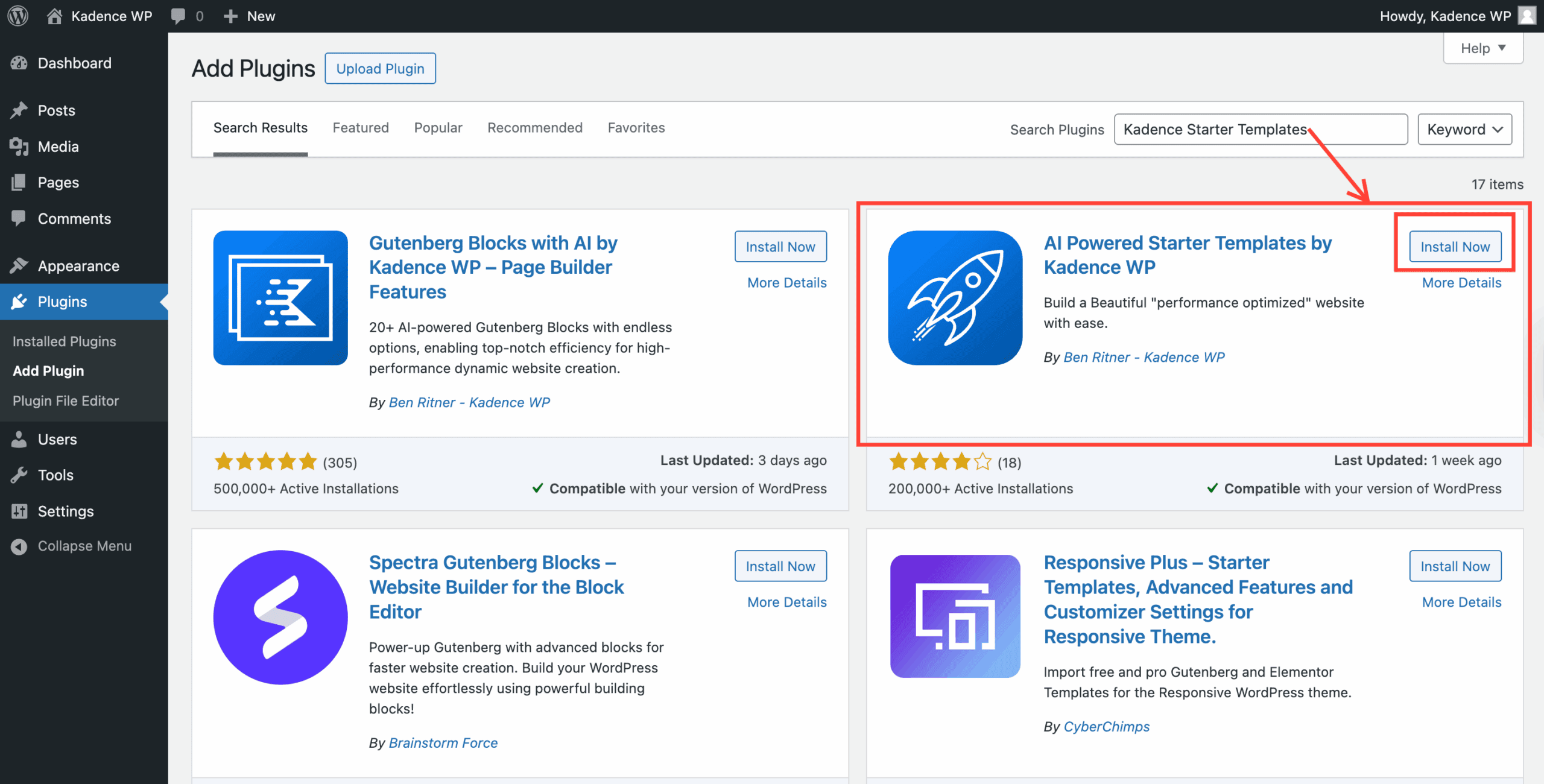
- Next, find the Starter Templates by Kadence download (Plugins → Add New) and install the plugin on your Website to ensure access to Starter Templates.
- To Access Starter Templates:
- In your WordPress dashboard navigate to Site Assist → Starter Templates. Here, you can choose to activate Kadence AI to utilize the AI tool to build your site or select a Pre-Designed Starter Template to build your site.

- In your WordPress dashboard navigate to Site Assist → Starter Templates. Here, you can choose to activate Kadence AI to utilize the AI tool to build your site or select a Pre-Designed Starter Template to build your site.
Installing Kadence Theme and Blocks (for Plus & Ultimate Plan Customers)
Follow these steps to set up Kadence and get started:
- Kadence Theme (Free):
- Go to your WordPress Dashboard → Appearance → Themes → Add New.
- Search for “Kadence” and click Install → Activate.
- Kadence Blocks (Free):
- Install Kadence Blocks from Plugins → Add New and search for “Kadence Blocks.”
- Install Kadence Blocks from Plugins → Add New and search for “Kadence Blocks.”
- Kadence Theme Kit Pro:
- Download Kadence Theme Kit Pro from your Kadence Account
- Install it as a plugin in WordPress under Plugins → Add New → Upload Plugin and then Activate.
- Kadence Blocks Pro:
- Download from your Kadence Account and installthe zip file to your site via Plugins → Add New and Activate.
- Download from your Kadence Account and installthe zip file to your site via Plugins → Add New and Activate.
- Starter Templates:
- Download from your Kadence My Account or find it in the WordPress repository.
Once you’ve installed the core and premium features of Kadence (Theme and Blocks) your foundation is set to add even more amazing tools like Kadence Insights, Conversions, Shop Kit, Galleries, and so much more.
Choose Your Kadence Adventure
Kadence offers multiple paths to creating your dream website based on your needs:
Option 1: Starter Templates
Starter Templates are pre-designed websites ready for customization.
- Pre-Designed Starter Templates: Choose a layout and customize it with your content.
Kadence Pre-Designed Starter Templates are a collection of Free and Premium website templates for blogs, e-commerce, LMS, and more. They require the Kadence Theme and essential plugins to work. Premium templates need a qualifying Kadence plan, and some may require third-party plugins like LearnDash, which are purchased separately. You can still use templates without these plugins, but some content may be limited. - AI-Powered Starter Templates: Templates with AI-generated text and images based on your business details.
👉 How to Use the Kadence AI
Use Kadence AI Starter Templates with AI-generated text and stock-free images. Simply provide business details, and AI will generate and place tailored content within pre-made templates, helping you build effective websites quickly and efficiently.
Option 2: Design Library
The Kadence Design Library lets you create custom layouts with blocks, patterns, and pages.
- Easily add pre-designed sections or generate AI content.
- Customize settings or upload your own images and text.
👉 How to Use the Design Library
Option 3: Build from Scratch with Kadence Blocks
For those who love complete creative freedom, Kadence Blocks offers the flexibility to design pixel-perfect layouts from the ground up.
- How to define a color Palette with Kadence Blocks
- Setting custom widths in multi-column Row Layout Blocks
- How to duplicate and Copy/Paste Block Styles
Video Resources
- Start-to-Finish Kadence Website Creation: Watch a step-by-step process on how to create a WordPress website from scratch with Kadence.
- Kadence AI Overview: A quick demo of AI features.
- In-depth AI Tutorial: Learn how to customize AI templates.
Premium Support
When you have an active license for premium Kadence products, you get priority access to WordPress support agents whose main goal is to help you succeed online.
Support Hours:
Response Time: Usually 1–3 business hours for the first reply; issues are typically resolved in 2–3 business days.
Technical Support: Available nearly around the clock, except for weekends (Friday 5PM to Sunday 5PM Central US time).
Customer Success & Accounts: Weekdays, 9AM–5PM Central US time.
Learn More & Get Premium Support
More Tools from Kadence
Now that you’ve got the basics set up, take your site to the next level with these powerful upgrades:
Kadence Pattern Hub – Save and sync your custom designs across multiple sites with your own personal design library.
Kadence Blocks Pro – Build stunning, high-converting pages with advanced design controls, animations, sliders, forms, and more.
Kadence Theme Kit Pro – Supercharge your customizer with sticky headers, header/footer scripts, conditional elements, and mega menus.
Kadence Insights – Test, track, and optimize your page elements directly within WordPress, and see real-time results to make confident decisions that drive higher conversions.
Kadence Conversions – Create beautiful popups, slide-ins, and banners designed to grow your email list and boost engagement.
Kadence Shop Kit – The ultimate WooCommerce upgrade: product swatches, advanced reviews, checkout manager, and more.