

How to Set up the Main Wishlists Page
Once you’ve installed Wishlists for WooCommerce, the first thing you’ll want to do is create a page for your customers to view their Wishlists on.
To do this, take the following steps:
- From your WordPress dashboard, go to Pages > Add New.
- Enter a title for the page, e.g. “Wishlists”.
- In the editor, enter the wishlists shortcode:
[iconic_ww_wishlists].
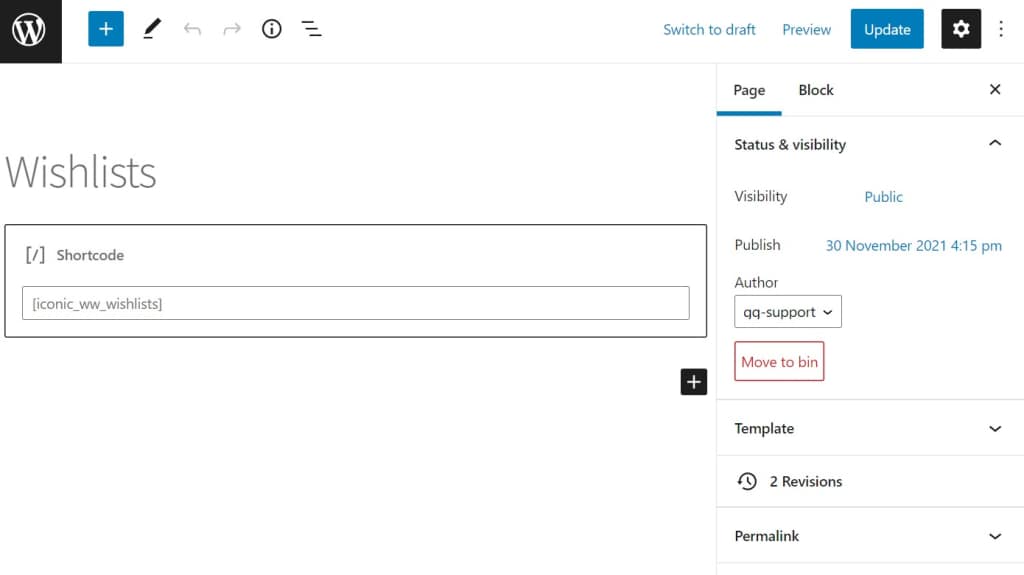
- Click Publish or Update to create the page.
- Now the page has been created, from your WordPress dashboard, go to Wishlists > Settings.
- Click the General tab.
- Select the page you just created from the Wishlist Page dropdown.

- Click Save Changes.
Now when you visit the page you created on the front end of your website you should see something similar to this:

When the user has added some wishlists, the same page will look like this:
