

How To Set Up Delivery/collection Days
No matter if you want to offer delivery or collection for your customers, setting up your delivery/collection days can be done by taking the following steps:
Note: If you’d like a more in-depth guide on offering collection/local pickup for your customers follow this guide instead.
- From your WordPress dashboard, go to WooCommerce > Delivery Slots and click the Date Settings tab.
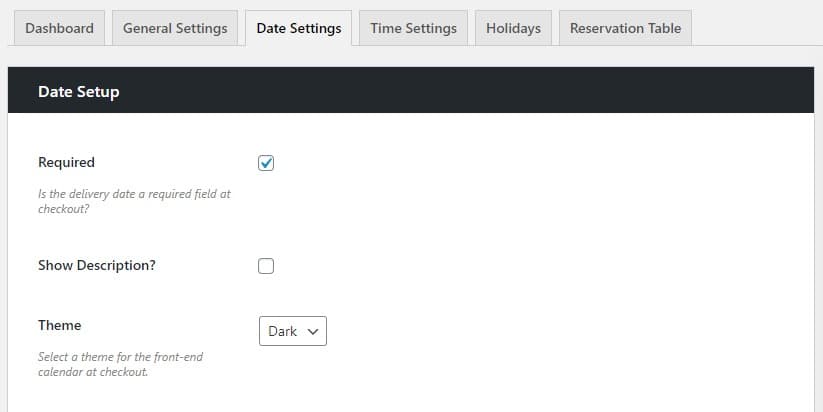
- Make sure the Required checkbox is ticked in the Date Setup section. This will require customers to select a delivery/collection date at checkout.
- Once done, scroll down to the Date Settings section where you’ll be able to select which days you want to offer delivery or collection (Delivery Days).
- Again, if you want to set this up for collection, please see our managing collection guide for more details.

- Again, if you want to set this up for collection, please see our managing collection guide for more details.
- Click the checkboxes next to each day you’d like to offer delivery/collection and once happy, scroll down to the bottom of the page and click the blue Save Changes button.