

Creating Anchor Links
Creating Anchor Links with Kadence Blocks
Anchor links let you link directly to a specific section of your page. This is useful for creating navigation menus, “back to top” buttons, or linking to detailed sections of long content. Kadence Blocks makes it simple to add and use anchor links.
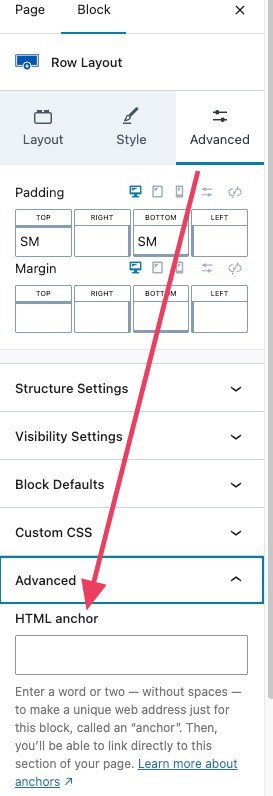
Step 1: Add an Anchor ID to a Block
- Open the page or post in the WordPress editor.
- Select the block you want to link to (for example, a Heading, Row Layout, or any section).
- In the Block Settings sidebar, expand the Advanced panel.
- Locate the HTML Anchor field.
- Enter a unique anchor ID (no spaces, only letters, numbers, hyphens, or underscores).
Example:pricing
Step 2: Create the Link to the Anchor
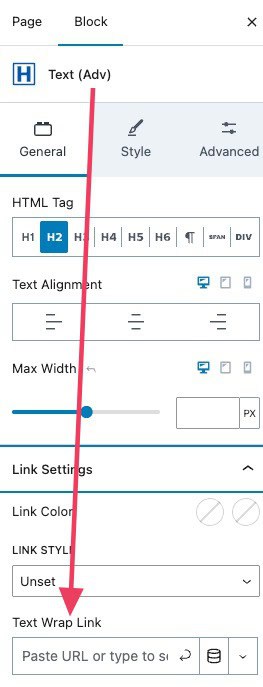
- Use the HTML Anchor ID as the link for the Text Adv block, Button Adv block, or any element that can be used as a link.
- Add a link in the format:
#your-anchor-id- Using the example above, the link would be:
#pricing
- Using the example above, the link would be:
Step 3: Test Your Anchor Link
- Save or update your page.
- Preview the page.
- Click the link. The page should scroll to the section where you added the anchor ID.