

What is a Cron?
Cron is a software utility found on Unix-like computer operating systems (Linux, Ubuntu, Fedora). It provides a time-based job scheduler that can run periodically at fixed times, dates, and intervals. It is typically used to automate system maintenance and administration, although it’s general-purpose nature makes it useful for things like downloading internet files and downloading email at regular intervals.
Understanding crontab
Cron is driven by a crontab file, this is a configuration. It is a file that specifies commands to run on a given schedule. The crontab files are stored where the lists of jobs and other instructions to the cron daemon are kept. Individual users in cPanel can have their own individual crontab files and there is often a system-wide crontab file found in /etc or a subdirectory of /etc.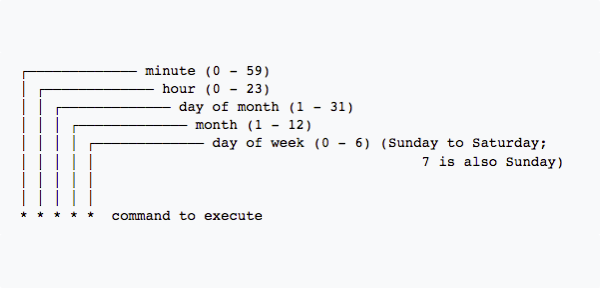
The syntax of each line of a crontab file expects an argument made of five fields, followed by a command to execute.
- Field one represents time in minutes (0-59).
- Field two represents time in hours (0-23).
- Field three represents the day of the month (1 – 31).
- Field four represents the actual month (1 – 12).
- Field five represents the day of the week (0-6) and runs Sunday to Saturday. You can also use a 7 for Sunday.
What do the characters mean in the cron expression?
There are specific characters that are needed in order to create the cron. These characters serve a purpose for determining how and when your scheduled task will run.
- Asterisk: * this indicates that the expression matches for all values of the field.
- Slash: / describes increments of ranges, for example * /5 * * * * is every 5 minutes.
- Comma: , this is used to separate items of a list, using “MON,FRI” in the 5th field (day of the week) means Mondays AND Fridays.
- Hyphen: – defines ranges, like 2013-2015 indicates every year between 2013 and 2015.
- L : this stands for “Last” and when used in the day of the week field, allows you to specify constructs such as the last friday of a given month (5L).
- W : is allowed for the day of the month field where W is used to specify the weekday nearest the given day.
- Hash: # allowed for the day of the week field and must be followed by a number between one and five to specify something like the first Monday of a given month.
Example Expressions
Below are examples of what a cron expression looks like, using the special characters and fields described above:
Example 1:
A cron which clears the Apache error log at one minute past midnight, every day, assuming that the default shell for the cron user is Bourne shell compliant:
1 0 * * * printf > /var/log/apache/error_log
Example 2:
This example runs a shell program called export_dump.sh at 23:45 (11:45PM) every Saturday:
45 23 * * 6 /home/oracle/scripts/export_dump.sh
Example 3:
You can be notified when a cron is completed by adding MAILTO=$youremailaddress at the top of your cron file. This will generate an email for every cron run within that file. If there are certain crons you do not want notifications for, you can disable having an email sent by changing the cron argument to:
6 1 * * * /usr/local/cpanel/scripts/upcp --cron > /dev/null 2>&1
The process will still run and execute the command, you will just not receive an email when it is completed.
Where are Crons Found?
Crons will be found in the following files:
- /etc/cron.d/
- /etc/cron.daily/
- /etc/cron.hourly/
- /etc/cron.monthly/
- /etc/cron.weekly/
- /var/spool/cron/$username
Crons are primarily found in the /etc folder, but user specific crons will be found in the /var folder. You can also find and create crons inside cPanel, see our article Creating a Cron Job in cPanel for information.