

How to Repair MySQL Tables
If you encounter MySQL time-out errors or unexpected restarts, the likely cause is one or more crashed database tables. Repairing the crashed tables will likely solve the issue, though this may cause the loss of some data.
If you are uncomfortable with losing data, then using a recent database dump to restore the database may mitigate this loss. However, if the date of your last database dump is not recent, it can result in greater data loss than simply repairing the table.
Repairing Crashed Tables With phpMyAdmin
You can access phpMyAdmin from your SiteWorx account:
1. Log in to your SiteWorx account.
- If you do not know your password, click Forgot your password on the login page.
2. On the left, select Hosting Features > MySQL > PhpMyAdmin.
3. Select the correct database from the list on the left.
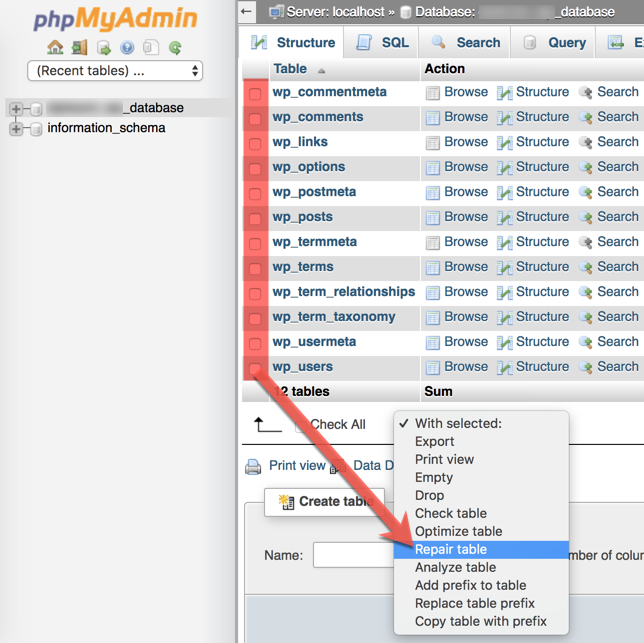
4. Select the check box corresponding to the corrupted table, and from the With selected list, click Repair table.
Repairing Crashed Tables With the MySQL CLI
Use this procedure to repair MySQL tables from the command line.
1. Log in to the server using SSH.
2. From the command line, enter this command, replacing [username] with your username and without the brackets:
mysql -u [username] -p3. Enter your password.
4. Again, without the brackets, enter the command:
use [databasename];5. Enter the command:
show tables;6. Unlike phpMyAdmin, there is no way to repair multiple tables with one command. Instead, you must issue one command per table:
To check a table for errors, enter:
check table [yourtablename];To repair a table, enter:
repair table [yourtablename];7. Type quit to return to the command prompt.
Conclusion
For the complete MySQL documentation, see the MySQL development website.