Skip to content
Nexcess.comServers.comLiquidWeb.com
Search our site for answers
Login
  • Help Docs
  • API Docs
  • liquidweb.com
  • Hosting Services
    • Cloud VPS Hosting
    • Dedicated Servers
    • GPU Hosting
    • Hosting For WordPress
    • Hosting For WooCommerce
    • Email Hosting
    • VMware Hosting
    • Add-ons
  • Security & Compliance
    • SSL Certificates
    • Firewalls
    • Cloud Hosting
    • Two Factor Authentication
    • DDoS Protection
    • Compliance
    • Malware Protection
  • Domain & DNS
    • Domain Registration
    • DNS Settings
    • Nameservers
    • Subdomains
    • Domain Forwarding
    • Email DNS Setup
  • Account & Billing
    • Account Setup
    • Payment Methods
    • Billing Cycles
    • Refunds Cancellations
    • Invoices Receipts
    • Account Security
  • Email Hosting
    • Email Setup
    • Email Forwarding
    • Spam Protection
    • Microsoft 365
    • G Suite Setup
    • Account Security
    • Email Troubleshooting
  • Performance & Optimization
    • Server Optimization
    • Caching Strategies
    • Content Delivery Network
    • Database Performance
    • Image Optimization
  • Server Administration
    • Server Setup
    • SSH Access
    • Command Line Basics
    • Database Management
    • CRON Jobs
    • Apache Nginx Setup
    • Log Analysis
  • CMS & Applications
    • WordPress
    • WooCommerce
    • Magento
    • Joomla
    • Drupal
  • Backups & Recovery
    • Backup Strategies
    • Cloud Backups
    • Disaster Recovery
    • Restoring Backups
    • Raid Configurations
  • Reseller & Partner Support
    • Reseller Program
    • White Label Hosting
    • Partner Portal
    • Client Management
  • Policies & Compliance
    • Terms Of Service
    • Privacy Policy
    • GDPR Compliance
    • Acceptable Use Policy
Help Docs Hosting Services Cloud VPS (Virtual Private Server) Resize a Cloud Server

Resize a Cloud Server

After optimizing your site and boosting traffic, consider resizing your Cloud VPS or Cloud Dedicated Server to handle the growth effortlessly. Our upgrades are simple.
Account
2 min read

Resize your Cloud VPS, Cloud Dedicated, or Cloud Metal Server to rapidly adjust your server’s resources. Quickly increase or decrease your CPU (compute), RAM (memory), and storage with the click of a few buttons.

Select Your Server

  1. Login to your Liquid Web account.
  2. Click on the My Servers link at the left of the screen.
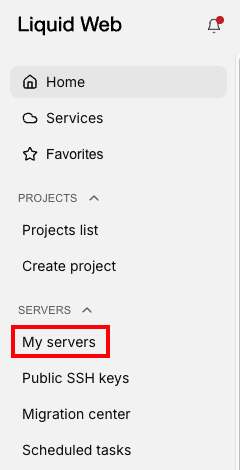
  3. From the list of servers, click on the name of the server you would like to resize to open the server dashboard page.
  4. On the server details page, click the three dot menu to the right of the servers name to display the drop down menu. Click on the “Resize” button
    Resize 3 dot menu

Select a Server Configuration

  1. Select a new server configuration based on your requirements.
  2. Click Continue to proceed.
size options displayed

Finalize and watch the Resize

Note

Finishing a server resize requires a reboot.

  1. To proceed with the resize immediately, click Resize.
  2. Check for progress in the server’s “Activity” tab.
  3. Click the Event Log associated with the resize to bring up the Event Details side panel.

Scheduling the Resize

Schedule the resize for a more convenient time, or time of lower expected activity on the server.

  1. Click Schedule for Later in the Task Scheduler dialog box.
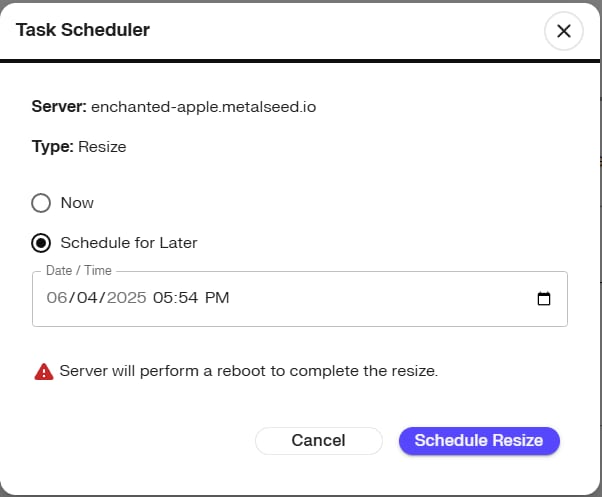
  2. Enter in your preferred date and time.
  3. Click Schedule Resize.

Review or Cancel a Scheduled Resize

Previously scheduled Resize tasks will populate your “Scheduled Tasks” list.

  • Click “Scheduled Tasks” located under the “Servers” menu or
  • Navigate to https://portal.liquidweb.com/servers/scheduled-tasks
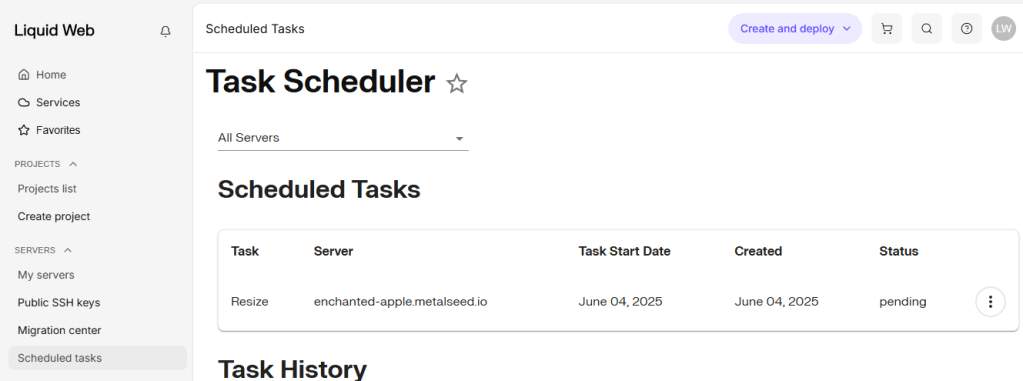
To cancel a resize:

  1. Click the three dot menu to the right of the Resize task.
  2. Select Cancel.
  3. Click Confirm to cancel the Resize task.
Was this article helpful?
Thank you for your input.
Thank you for your feedback.
Table of Contents
  • Select Your Server
  • Select a Server Configuration
  • Finalize and watch the Resize
  • Review or Cancel a Scheduled Resize
Get hosting news and tips straight to your inbox
Join our community today.
Loading form…
Essential hosting resources to help your business stay ahead
Get the guides
Related hosting content
  • WordPress Hosting
  • High-Speed Cloud Hosting Services
  • GPU Server Hosting

Solutions

Managed DedicatedCloud DedicatedManaged VPSWordPress ManagedManaged MagentoManaged WooCommerceSignature ServicesAdd-ons

Company

ContactAboutTerms of ServicePrivacy PolicyCustomer StoriesGlobal Cloud Platform

Resources

Help DocsResource CenterWeb Hosting ToolsSitemap

Partnerships

Hosting Affiliate ProgramPartner ProgramsRefer-a-Friend
HIPAA logo.
RedHat logo
cPanel and WHM certified.
SSAE-16 audit compliant hosting provider.
CCNA Cisco certified routing and switching for servers and hosting.
Microsoft Partner Silver Hosting.
AICPA service organization, SOC compliant.
2025 Best Performance and Reliability Award from HostAdvice.com.
Liquid Web reviewLiquid Web review
BBB Accredited Business logo with A+ rating.

©  Liquid Web, LLC by Nexcess Corp.

Privacy Policy

  • Solutions
  • VPS Hosting
  • Dedicated Servers
  • Managed Hosting
  • WordPress
  • GPU Hosting
  • Products
Log in
  • System status
  • Support | Get Help