

What Is the Domain Name System (DNS)?
At first, the Domain Name System (DNS) can seem complex and confusing. But you’ll be able to diagnose any DNS issues you may encounter by learning a few basic concepts.
What Does DNS Do?
DNS has one main purpose: Turn names into numbers. The numbers are IP addresses, which work just like the numbers in your home address. DNS is like an address book, turning domain names into unique numbered addresses that allow information to be sent across the internet.
Technically, you can access any website by knowing its IP address. But you are much more likely to remember liquidweb.com than a long string of numbers! DNS turns easy-to-remember URLs into exact IP addresses to make sure you see the webpage you want.
When you choose a reliable hosting provider, they ensure that your domain is correctly linked to the appropriate IP address, making your website accessible to users worldwide.
How Does DNS Work?
At the most basic level, DNS works like this:
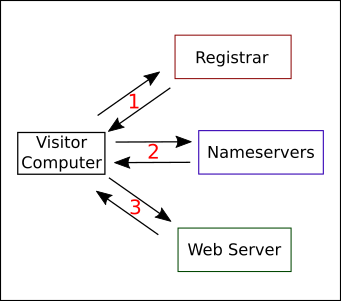
- When someone wants to visit your website, they type yourdomain.com into their web browser. The browser then asks the registrar (the authoritative source of DNS records) what nameservers to ask for your site’s IP address. This is like looking up a name in an index of address books. The registrar doesn’t know your site’s IP address, but it knows who to ask. The registrar checks its database and tells the browser to ask a specific nameserver for the IP address.
- Nameservers are special servers (or services) with long lists of domains and IP addresses. After the registrar tells the browser which nameserver to ask, that nameserver turns the domain name into an IP address and sends the result to the visitor’s browser.
- The visitor’s computer receives the IP address answer from the nameservers and connects to the IP address, requesting the web page. The web server responds and shows the web page in the browser.
While this might seem like a complicated process, your web browser handles all these steps in less than a second.
Now that you understand the basic concepts of DNS, you can continue by learning more about DNS records in the article What Are DNS Records?