

Change Your Default Server Zone
Did you know you can change where we build your servers? Liquid Web has multiple data centers in the United States and one in Europe. Customers can choose to have servers at any of our locations. Having multiple data centers has two main benefits.
First of all, you can choose to have your servers close to your website visitors, which increases your site’s performance. Your data doesn’t have to travel as far to get to website visitors’ computers, so your server may respond slightly faster. Depending on your industry, these small increases in speed might not be noticeable or they may be vital (for example, financial institutions rely upon fast connections).
Secondly, you can choose to have servers spread around the world, reducing the risk of data loss or downtime. If there’s a natural disaster where one data center is located, your servers at a different location won’t be affected. Of course, most of our data centers are located in Michigan, a state not known for its natural disasters.
When you create your first server, you choose a server zone:
- Zone A – US West
- Zone B – US Central
- Zone C – US Central
- Zone A – EU West
Each server zone corresponds with a data center location. Zone A is in Arizona, Zone B and Zone C are in Michigan, and Zone A – EU West is in the Netherlands. Every time you create a server, you can choose the zone where you’d like to create your server.
If you accidentally create a server in the wrong zone, there’s no way to change zones. You’ll have to create a whole new server and migrate all of your data. To prevent this, you might want to change the default zone used when you create a server. No matter your default zone, you can always manually select a different zone when you create a server. You can change your default zone easily in your Liquid Web account.
Selecting your default zone
- Log into your Liquid Web account.
- Click on the Account Overview menu at the top of the page.

- Click on Preferences in the menu.

- Select your preferred Default Zone from the drop down menu. Changes are automatically saved upon selection.
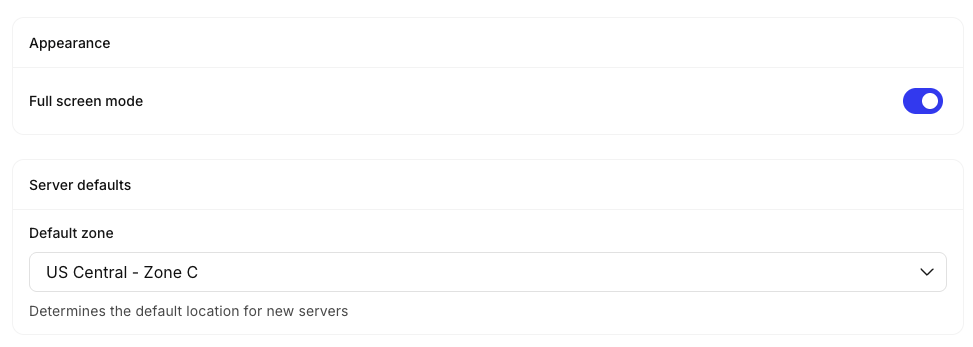
You’re all set! Remember that changing your default zone will not change the zones of your existing servers. And, you still can create a server in any zone. You just have to specify a different zone when you create the server.