

Checking Server Services with Telnet
What is Telnet?
Telnet is a useful command-line utility. For the purpose of this article, we’ll be discussing how to use telnet to connect to various services on a server. In this context, we’ll use telnet to connect to a specific domain/IP address and port number. Telnet can be used from your local computer, or from within your server when connected via SSH. For simplicity’s sake, we’d recommend you use telnet from within your server over an SSH connection to check your services. This lets you bypass any firewalls (on our end and yours) and connect to services on your server locally.
Some common ports for services include:
Port | Service |
| 21 | FTP |
| 22 | SSH/SFTP |
| 25/465 | SMTP Unencrptyed/encrypted |
| 53 | DNS |
| 80/443 | HTTP Unencrypted/encrypted |
| 110/995 | POP3 Unencrypted/encrypted |
| 143/993 | IMAP Unencrypted/encrypted |
These are just a few of the common services, others may be running on your server, which you can view with netstat, which is covered below.
Using netstat to view services and their ports on your Linux server
Netstat is a useful utility to get an overview of what services are using specific ports on your server. You can see the full list of listening services on your server by running the follow as root over SSH:
netstat -lpn
The above command will list both services listening on an IP address and port, and also services listening on a UNIX socket. To make the output a little easier to read and ONLY see services that are listening on an IP and port, you can run:
netstat -lpn -A inet
The most important column is the “Local Address” column, where it lists the IP followed by a colon (:) and the port number of the service. When viewing the local address in the netstat output, there are a few different IP addresses you might see:
| 127.0.0.1 | Localhost, only listening locally, and not directly accessible from outside the public internet |
| 0.0.0.0 | All IPs on the server |
| Any other specific IP | This means a service is listening only on a specific IP. |
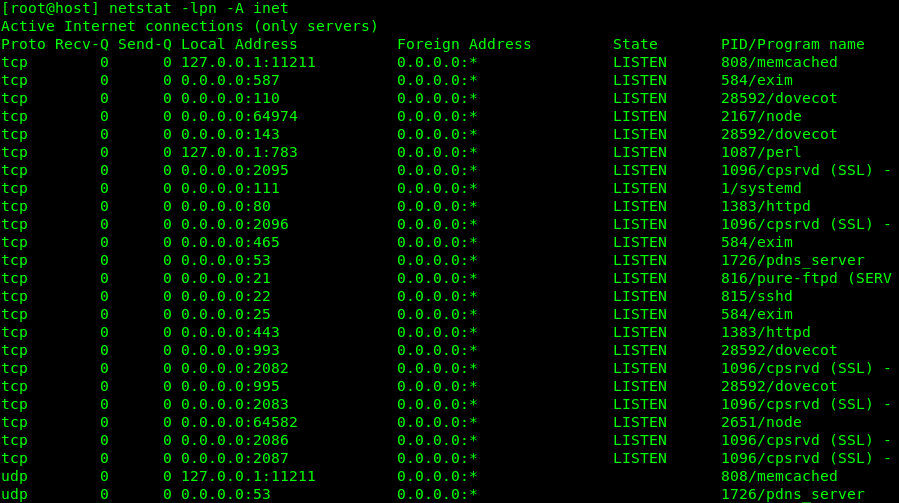
Sample output of netstat -lpn -A inet:
Using telnet to connect to services
Now that we know how to use netstat to look up what services are running on which ports, we can use telnet to actually connect to those services and see if we can connect. The basic syntax for telnet is:
telnet IP PORT
In the above screenshot, we can see that the memcached service is listening on all IP’s on port 11211. To connect to the memcached service with telnet, we can run the following once connected over SSH:
telnet localhost 11211
The below example shows the output, with red arrows next to my commands:
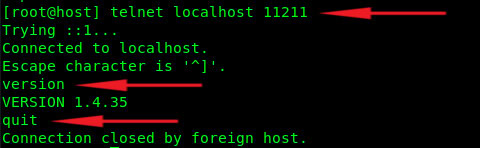
If the memcached service was not running, the output would show a “connection refused” error instead:

Not all services accept the same telnet commands. You’d have to refer to each service’s documentation for further information. However, as long as you’re able to connect with telnet to a given port, you know that the service is indeed listening on the port you’re connected to.