

Logging Into the Cloud Sites Control Panel
Accessing your Cloud Sites Control Panel via your Liquid Web account is a straightforward one-click procedure. Once logged in, you can efficiently manage your account, sites, services, and all Cloud Sites-related tasks.
Note: |
| This tutorial assumes that you have already logged into your Liquid Web account. |
Logging into your Cloud Sites Control Panel from your Liquid Web account is a simple one-click process. Once you’re logged in, you can manage your account, sites, services and all things Cloud Sites. Let’s take a look at how to log in from your Liquid Web Account home page.
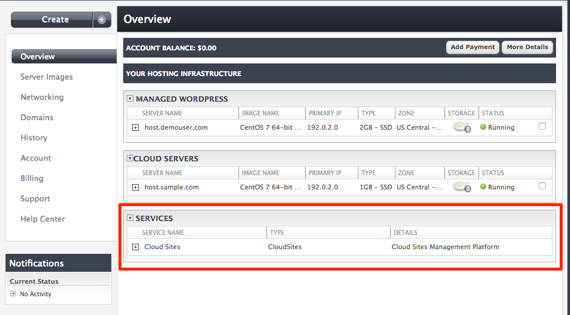
- Once logged into the Manage interface of your Liquid Web account, navigate to the Services section at the bottom of the page.

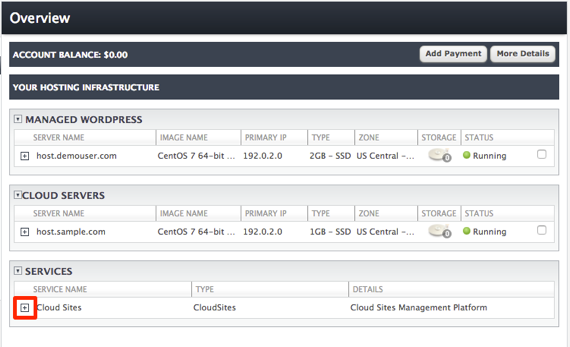
- Click the [+] plus button next to the Cloud Sites service to expand the selection.

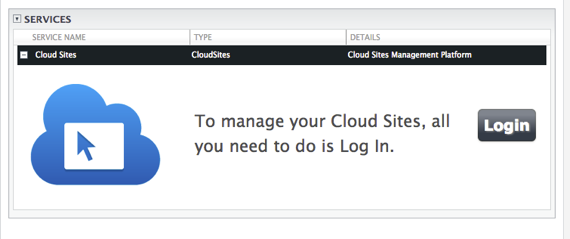
- This will open the link to log into your Cloud Sites service.

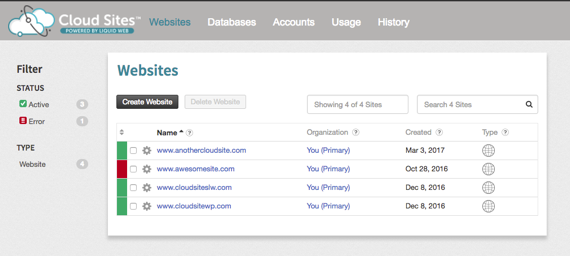
- Once you click on Log In, you will be directed to the home page of your Cloud Sites control panel.

Now that you’ve logged in, let’s take a look around the Cloud Sites Control Panel in our next article Managing Your Account in Cloud Sites.