

Cloud Sites Testing URLs
Cloud Sites control panel provides you with a URL to test your website before changing the DNS and making it live. This is especially important when migrating a site to Cloud Sites, though you can test a new site in development prior to making it live in Cloud Sites as well. Once you complete testing your site and verify that all links, redirects, and capabilities of your site work, you can make it live by changing the DNS.
Locate Your Test Link
- Log into Cloud Sites control panel.
- Open the website you want to test by clicking on the name.
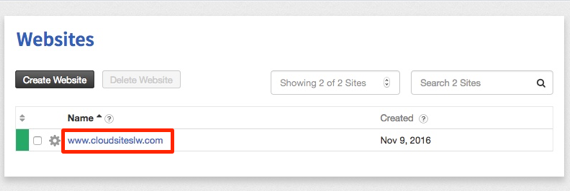
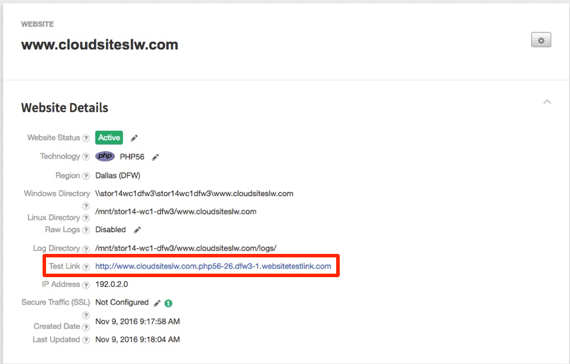
- In the Website Details, you will find your Test Link.

If you need to upload your site via FTP and are unsure how, see our article Uploading Files Using FTP in Cloud Sites.
Testing Your Site
Now that you’ve located your Test Link, click on it to open your testing site. We have compiled a list of the most common testing practices below. This is not a comprehensive list, so please make sure to be thorough in testing and that your site is functioning exactly as it should before making it live.
- Make sure that all pages load, including sub-domains and sub-folders.
- Click on all links and make sure that each directs to the correct page or redirect.
- For WordPress sites, make sure you can log into the wp-admin area and upload a file.
- For E-Commerce sites, log into the back-end area and verify that you can see past orders and complete a transaction on the front-end.
- If you use forum software, log in as a member and create a test post and comment.
Now that you’ve tested your site and verified that it works correctly, you can create the DNS record needed to make your site go live. If you are unsure how to correctly change the DNS, see our article Managing Your DNS with Cloud Sites.