

Liquid Web Private Cloud Product Manual
About Liquid Web Dedicated VMware
Powered by VMware and NetApp, Dedicated VMware delivers all the benefits of a traditional public cloud with the power, performance, and security of an isolated infrastructure on dedicated hardware.
Whether you’re considering your first move from on-premises infrastructure to the cloud, looking for secure elasticity for your development team, or are already in a VMware hosted environment but not getting the support you deserve, we have a managed Dedicated VMware solution to fit for your needs.
Licensing
VMware Licensing
VMware ESXi licensing is leased through Liquid Web and installed during provisioning. For Managed Dedicated VMware, customers cannot provide their own VMware licensing. For Unmanaged Dedicated VMware, we are able to provide an unmanaged ESXi server for custom licensing to be used. If the customer provides their own licensing, they must do so during the sale itself so that the server can be built with it.
Windows licensing
Customers can provide their own Windows OS and SQL licensing or lease Liquid Web-provided Windows licenses. If the customer provides their own Windows licensing, they must do so during the sale itself so that the server can be built with it.
Roles and Responsibilities
A Dedicated VMware environment powered by VMware may be made up of Managed and Unmanaged components. The table below breaks down the roles, responsibilities, and access of both Liquid Web and the customer.
Virtualization | Customer | Liquid Web |
| Management of underlying virtualization infrastructure | X | |
| VM Image troubleshooting | X | |
| Patching VMware environment | X | |
Virtual Machines | Customer | Liquid Web |
| Deploy new virtual machines | X | |
| Delete virtual machines | X | |
| VM resource allocation change | X | |
| Remote administration of VMs | X | X (1) |
Hardware | Customer | Liquid Web |
| Manage deployment of equipment | X | |
| Maintain inventory for repairs | X | |
| Managed storage infrastructure | X | |
| High availability failover configuration, testing, and support | X | |
| vMotion configuration and support | X | |
Operating Systems | Customer | Liquid Web |
| Deploy Liquid Web Managed operating systems (MS Windows Server and Linux) | X | |
| Ensure OS licensing compliance | X (2) | X |
| Patch operating systems | X | |
| SSL installation/troubleshooting | X | X |
| Backups (when subscribed) | X | X |
Monitoring | Customer | Liquid Web |
| Monitor virtual machine operating system | X | |
| Configure monitoring for virtual machine OS | X | |
| Respond to monitoring alerts for virtual machine OS | X | |
| Configure and respond to infrastructure monitoring alerts (such as ping and port alerts) | X | |
| Configure and respond to vCenter monitoring alerts | X | |
Network | Customer | Liquid Web |
| Manage firewalls | X | |
| Manage load balancers | X | |
| Monitor bandwidth consumption | X | |
| Troubleshoot network connectivity | X | |
| Manage firewall rules | X | X |
| Manage DNS | X | X (3) |
| 1. Liquid Web upon request by customer | ||
| 2. Customer is responsible for maintaining licensing compliance when using their own. | ||
| 3. When using Liquid Web Name Servers |
Maintenance
Scheduling certain maintenances or other change requests in advance reduces interruption of service and ensures full team staffing at Liquid Web so that the customer has all the help they need.
Scheduling is based on the maintenance calendar availability of all teams involved and is reserved on a first-come, first-served basis. However, if this maintenance is urgent or if there is a limited timeline in which to execute it, customers can contact their account team to see what accommodations can be made.
Getting Started with Liquid Web Dedicated VMware
This guide contains the following sections:
Liquid Web Dedicated VMware Architecture
An architecture diagram of Liquid Web Dedicated VMware powered by VMWare.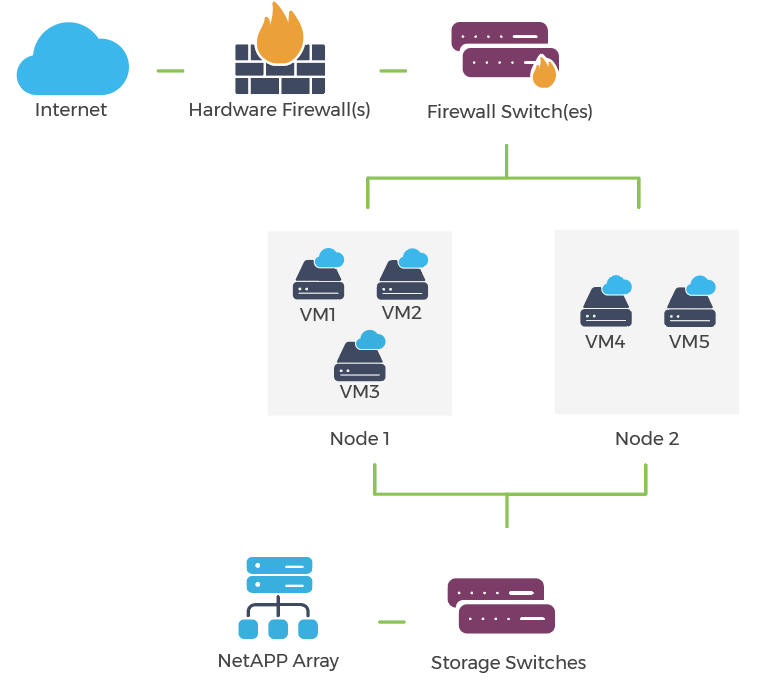
Liquid Web Dedicated VMware Virtualization Features
Overview of features that are available to you as a Liquid Web Dedicated VMware customer, based upon your configuration and subscriptions.
Features | Description |
vMotion® | VMware vMotion allows live migrations of workloads to take place between hosts. Applications will continue to run and will continue to be accessible to the system during the migration, resulting in migrations with zero downtime. |
Storage vMotion® | Much like vMotion allows live migrations of workloads between hosts, Storage vMotion allows live migrations of VMs between different disks/storage media with zero downtime. |
vSwap® | The vSwap feature allows VMs to use host memory instead of disk for their swap to improve performance in memory constrained workloads. |
vSphere High Availability (HA) | VMware HA automatically fails over to a different host and restarts virtual machines in the event of a hardware failure. |
VMware Snapshots | Snapshots allow changes to be committed safely. Saving a snapshot of a VM prior to a change allows for a VM to be rolled back if needed. |
Distributed Resource Scheduler (DRS) | Automatically move VMs between hosts in a cluster to make sure resources are balanced. |
Enhanced vMotion Compatibility (EVC ) | Allows an easier upgrade path, allowing VMs to work across CPU generations by allowing you to set what CPU is showing to a VM. |
Thin Disk Provisioning | Save resources on the Private Cloud. Virtual machines will only use the amount of disk space they actually need to store their data, regardless of how much disk is provisioned. This prevents disk space from being wasted, and makes managing and moving VMs faster. |
Liquid Web Dedicated VMware User Manual
With Liquid Web Dedicated VMware, customers have access to vCenter to view VM’s, start and stop VM’s and console into VM’s.
- Ordering Virtual Machines
- Cloning Virtual Machines
- Managing Virtual Machines
- Viewing Hypervisor and Virtual Machine Performance
- Migrating Workloads to Liquid Web Private Cloud
- Resource Minimums for Supported Images
Ordering Virtual Machines
Upon initial order, a Solutions Representative will work with the customer to have the initial required virtual machines deployed. After the environment is deployed, the customer will be able to order additional virtual machines by contacting the assigned Account Manager and providing the required specifications for virtual machine(s).
– If this request falls outside of normal business hours, support is able to deploy the required virtual machine(s).
Cloning Virtual Machines
If the customer would like to clone an existing VM, this can be done by opening a case with the support team who will handle all the details of cloning the virtual machine in question. This is one of the perks of having a Managed Private Cloud, to let the Helpful Humans do the heavy lifting.
Managing Virtual Machines
Virtual Machines can be built with the industry standard cPanel web administration interface to make managing sites and servers easier and faster. Or by using a core managed VM, the customer can control the resource usage and tweak the environment to fit their needs more specifically.
Viewing Hypervisor and Virtual Machine Performance
With access to the dedicated vCenter server, customers are able to see current resource usage, as well as trends over time for all of their virtual machines and hypervisors. Track resources like CPU, memory, and disk usage over time to identify busy periods and improve performance.
Migrating Workloads to Liquid Web Private Cloud
There are a few different routes for migrating existing workloads over to Liquid Web’s Dedicated VMware. Below are the details for the options available.
- Customers are able to self migrate their workloads.
- Liquid Web is able to provide free migration services. There are specific requirements that need to be met in order to qualify for this. This is assessed by a customer contacting their Solution Team Representative to see if the migration qualifies.
- If the customer is unable to self migrate or qualify for Liquid Web’s free migration service, there are other options as well. Solution Representatives will be able to assist in providing a migration solution to fit the customer’s needs.
Resource Minimums for Supported Images
Linux | |||
Image | # of Cores | RAM | Disk |
CentOS 7 – Fully Managed | 2 | 2GB | 25GB |
CentOS 7 – Core Managed | 2 | 2GB | 15GB |