

Private Networking for Bare Metal Servers
Secure server communication with Private Networking. Learn how to locate your Bare Metal private IP, reduce bandwidth costs, and configure firewall rules.
What is Private Networking?
Private Networking is a feature offered by Liquid Web that enables secure communication between your Bare Metal servers, wherever they are located. This internal network allows you to transfer data between servers without using public internet bandwidth, enhancing both security and efficiency.
Benefits of Using Private Networking
- Cost Efficiency: Avoids public bandwidth charges by keeping internal traffic off the internet.
- Enhanced Security: Data transferred over private networks is not exposed to external threats.
- Improved Performance: Faster data transfer rates due to reduced latency within the data center.
Setting Up Private Networking
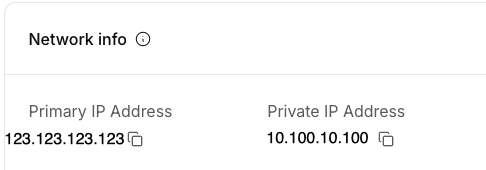
No setup is required! Every Bare Metal and GPU server that Liquid Web offers will be supplied with both a public and private IP address. You can find these IP addresses in your Liquid Web account on the Server details page.
- Log in to your Liquid Web account.
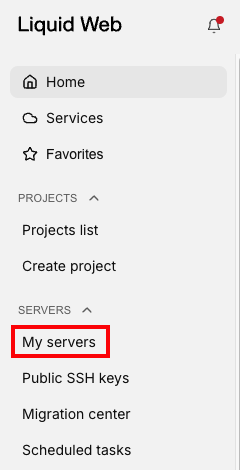
- Click on My Servers in the left menu.

- Click on the name of the server you want to access. This will open the Server details page.
- Your server’s primary and private IP addresses can be found in the Network info block.
Firewall Configuration for Normal Operation
Bare Metal servers are deployed with the default software firewall for the operating system selected. To ensure smooth operation while maintaining security, configure your firewall with these recommended port settings:
- Port 4789 UDP/TCP needs to be open for private communication between your servers.
- SSH (Port 22): Open only if remote management via SSH is required; consider changing default port numbers for added security.
- HTTP (Port 80) & HTTPS (Port 443): Open if web services are hosted on any of your servers.
- Database Ports (e.g., MySQL Port 3306): Open only between specific trusted IP addresses within your private network.
- Custom Application Ports: Open as necessary based on applications running across your servers; restrict access to known IP ranges when possible.
Best Practices
- Regularly review and update firewall rules based on current needs and potential threats.
- Utilize VPN connections when accessing private networks remotely to add an extra layer of encryption and authentication.
- Monitor network traffic regularly using tools like Wireshark or tcpdump for any unusual activity that may indicate a breach attempt.