

DMARC email security: improving your email security infrastructure
Email is one of the most vulnerable attack channels hackers use to target businesses. Therefore, preventing email-based attacks should be a top concern because it only takes one employee clicking a malicious link in an email to allow a hacker to get past all cyber defenses.
This article gives an overview of DMARC email security that you should follow to improve your email security.
Overview
Domain-based Message Authentication, Reporting, and Conformance (DMARC) is a system used to validate email. It was created to defend against the exploitation of business email domains by email spoofing, phishing attacks, and other cybercrimes. DMARC uses the Sender Policy Framework (SPF) and DomainKeys Identified Mail (DKIM) email authentication methods.
A crucial component of a DMARC email security solution is DMARC reporting. A domain owner can see who is sending emails on their behalf when they publish a DMARC entry in their Domain Name System (DNS) record. The domain owner can take control of the emails sent on their behalf using this information. DMARC can be used to protect your domains from phishing and email spoofing attacks.
How does DMARC work?
For email authentication, DMARC uses well-established SPF and DKIM standards. Additionally, it uses the trusted DNS.
What is a DMARC record?
A DMARC record is the backbone of a DMARC implementation, and it contains the DMARC record rulesets. If a domain is configured for DMARC, this DMARC record notifies email recipients. In that case, the domain owner’s desired policy is contained in the DMARC record.
A DMARC entry is just a DNS entry. Implementing a DMARC DNS record is the first step in using DMARC. Next, the DMARC-adopted email receivers will use this DMARC record. As a result, your DMARC policy will be taken into account when tracking all messages that have been delivered to your domain.
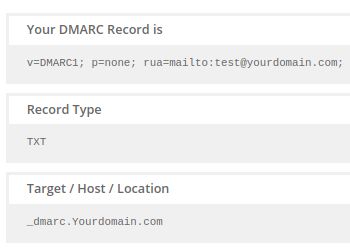
A DMARC record is a version of a typical DNS TXT record that is specially formatted with the name:
_dmarc.yourdomain.com
The format of a DMARC record is as follows.
_dmarc.yourdomain.com. IN TXT “v=DMARC1; p=none; rua=mailto:dmarc_rua@yourdomain.com; ruf=mailto:dmarc_ruf@yourdomain.com; pct=100”
Here is a legend for the DMARC record above:
- v=DMARC1 defines the DMARC version.
- p=none indicates the DMARC policy or desired to handle.
- rua=mailto:dmarc_rua@yourdomain.com is the email address where aggregate reports should be delivered.
- ruf=mailto:dmarc_ruf@yourdomain.com is the email address where forensic reports should be delivered.
- pct=100 is the percentage of mail that the domain owner wants to be subject to its policy
Why is DMARC such an important factor in email security?
More than 90% of network threats use email as a gateway, and without DMARC, it could be difficult to identify whether an email is legitimate. In addition, DMARC protects domain owners’ domains from unauthorized usage by preventing phishing, spoofing, CEO fraud, and Business Email Compromise.
Phishing attacks are made visible by DMARC email security, giving you complete visibility into your email channels. DMARC is an effective technique for reducing the impact of malware and phishing threats. It can prevent spoofing, shield your firm from brand infringement, and prevent corporate email compromise and scams.
What exactly is DMARC domain alignment?
The DMARC protocol introduces the idea of “domain alignment,” which broadens the SPF and DKIM-specific domain validation. DMARC domain alignment compares the “From” domain of communication to information relevant to these other standards. For example, SPF requires that the message’s From domain and Return-Path domain match and DKIM requires a match between the message’s From domain and its DKIM d= domain.
The alignment is set as relaxed (matching base domains but allowing for various subdomains) or as strict (matching base domains but allowing for different subdomains — precisely matching the entire domain). This option is provided in the sender domain’s published DMARC policy.
What are DMARC policies?
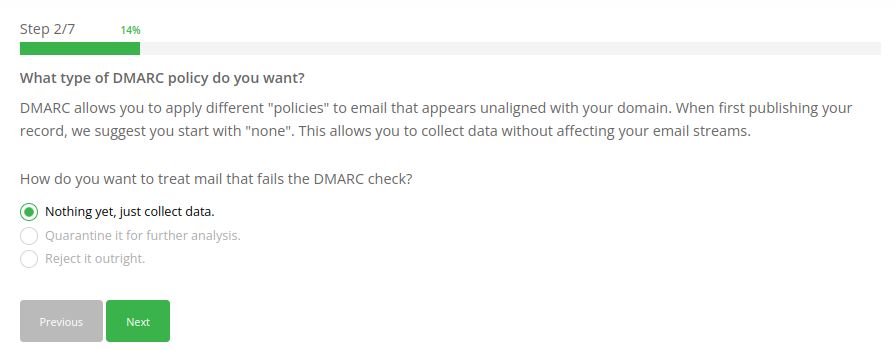
The DMARC email security gives domain owners three options for specifying their desired treatment of mail that fails the DMARC email test.
- p=none — this option examines the traffic in your email. There are no further actions performed.
- p=quarantine — with this option unauthorized emails are sent to the spam folder.
- p=reject — This option is the final policy and ultimate purpose of DMARC implementation. This rule makes sure that no illegitimate email is ever delivered.
What is a DMARC report?
As part of the DMARC Email Test, inbound mail servers generate DMARC reports. DMARC reports come in two different formats.
- Aggregate Reports are XML files displaying statistics on the messages obtained that were stated to be from a specific domain. The reported date contains the authentication results as well as the message disposition. Aggregate reports are intended to be machine-readable.
- Failed/Forensic Reports are individual copies of failed authentication messages wrapped in a whole email message using a specific format known as AFRF (which stands for Aggregate Failure Reporting Format). A Failed/Forensic Report can be helpful for both locating fraudulent domains and websites as well as troubleshooting any authentication issues that may be present on a domain.
SPF and DKIM: how are they related to DMARC?
Different parts of email authentication are made possible by the standards DKIM, SPF, and DMARC. They deal with related concerns. SPF enables senders to specify which IP addresses are permitted to send mail on behalf of a specific domain. DKIM offers an encryption key and digital signature that confirm an email message was not forwarded or altered.
DMARC combines the SPF and DKIM authentication mechanisms into a single framework and allows domain owners to specify how an email from their domain should be treated if an authorization test fails.
How to generate DMARC records?
You can build your domain’s DMARC record using the DMARC Record Wizard, allowing you to learn crucial details about anyone misusing your domain.
You can follow the below steps to generate a DMARC record for your domain.
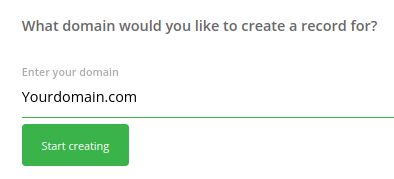
- Enter the domain:
- Choose your DMARC policy:
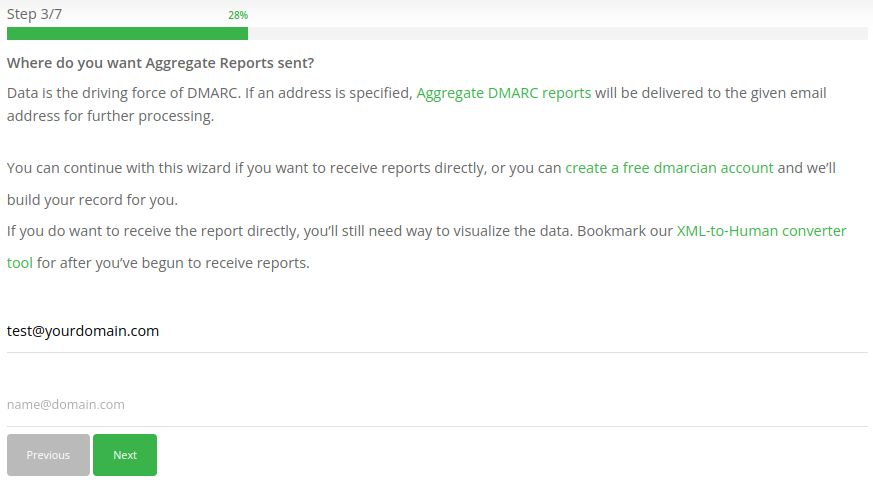
- Provide your email address to receive Aggregate Reports:
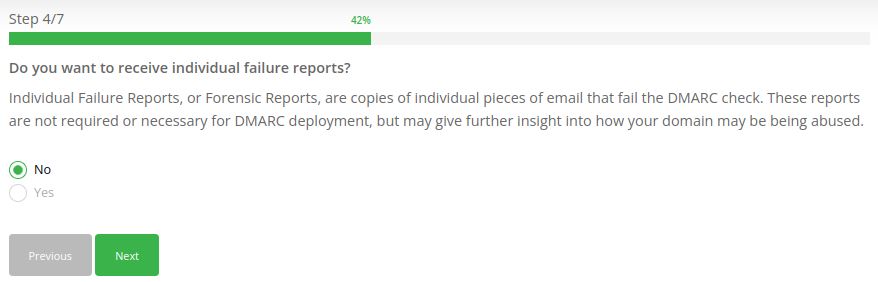
- Provide your email address to receive individual Failed/Forensic Reports (optional):
- Choose Identifier Alignment for DKIM and SPF Alignments:
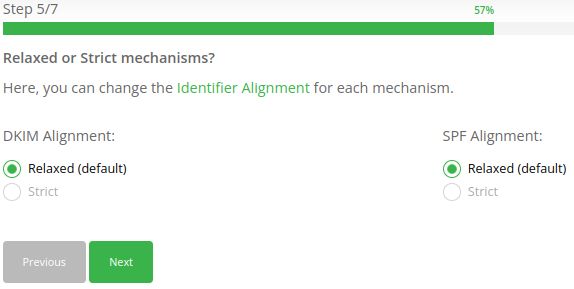
- Choose Subdomain DMARC Policy (optional):
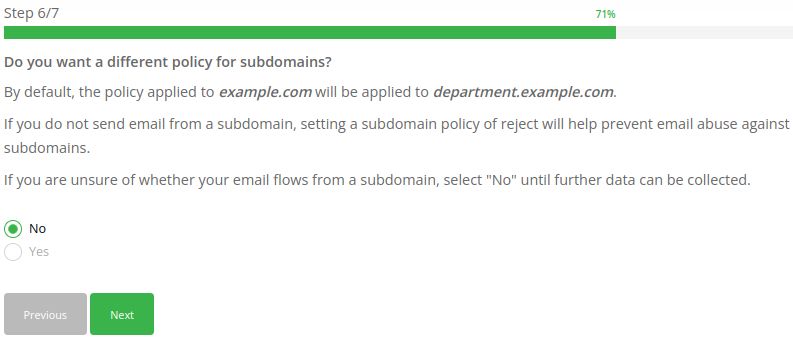
- Choose the DMARC Policy percentage: (optional).
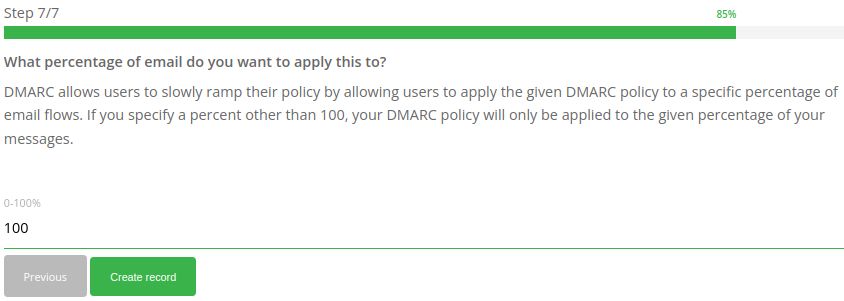
Here is the sample DMARC record:
You can also use MxToolbox DMARC Check Tool or Mimecast DMARC Analyzer online DMARC generator tools to generate DMARC records.
How to add your DMARC record to the DNS record?
You can add a DMARC record for your domain via my.nexcess.net by following the below steps:
- Login to my.nexcess.net.
- Click on DNS > DNS Zone.
- Click on the domain name. If there is no DNS Zone for the domain, you can go through How to create and edit DNS Zones in the Nexcess Client Portal to create a new DNS zone.
- Click the plus symbol (+) on the right-hand side to add new DNS records
- Select TXT as the Type.
- Enter _dmarc in the Hostname field.
- Enter the DMARC record in the Value field. For example, v=DMARC1; p=none; rua=mailto:test@yourdomain.com; could be what an entry looks like.
- Set 300 as the TTL (Time to Live).
- Click on the Add button to save the changes.
Conducting a DMARC email test
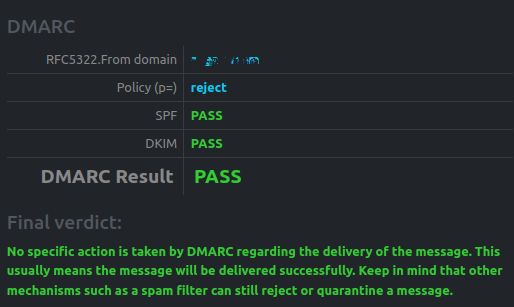
To conduct a DMARC Email Test, you can use the online DMARC Email Test tool. You can go through their website and follow the instructions. If your domain has a valid DMARC record, you will get the same result as in the following screenshot:
Conclusion
The DMARC protocol validates your domain’s SPF and DKIM records. The email server looks at DMARC to determine what to do with the outbound mail if it cannot locate any SPF or DKIM records. DMARC is a method that is becoming more and more crucial for preserving the integrity of email that originates from a specific domain.