Skip to content
Search our site for answers
Login
  • Help Docs
  • API Docs
  • liquidweb.com
  • Hosting Services
    • Cloud VPS Hosting
    • Dedicated Servers
    • GPU Hosting
    • Hosting For WordPress
    • Hosting For WooCommerce
    • Email Hosting
    • VMware Hosting
    • Add-ons
  • Security & Compliance
    • SSL Certificates
    • Firewalls
    • Cloud Hosting
    • Two Factor Authentication
    • DDoS Protection
    • Compliance
    • Malware Protection
  • Domain & DNS
    • Domain Registration
    • DNS Settings
    • Nameservers
    • Subdomains
    • Domain Forwarding
    • Email DNS Setup
  • Account & Billing
    • Account Setup
    • Payment Methods
    • Billing Cycles
    • Refunds Cancellations
    • Invoices Receipts
    • Account Security
  • Email Hosting
    • Email Setup
    • Email Forwarding
    • Spam Protection
    • Microsoft 365
    • G Suite Setup
    • Account Security
    • Email Troubleshooting
  • Performance & Optimization
    • Server Optimization
    • Caching Strategies
    • Content Delivery Network
    • Database Performance
    • Image Optimization
  • Server Administration
    • Server Setup
    • SSH Access
    • Command Line Basics
    • Database Management
    • CRON Jobs
    • Apache Nginx Setup
    • Log Analysis
  • CMS & Applications
    • WordPress
    • WooCommerce
    • Magento
    • Joomla
    • Drupal
  • Backups & Recovery
    • Backup Strategies
    • Cloud Backups
    • Disaster Recovery
    • Restoring Backups
    • Raid Configurations
  • Reseller & Partner Support
    • Reseller Program
    • White Label Hosting
    • Partner Portal
    • Client Management
  • Policies & Compliance
    • Terms Of Service
    • Privacy Policy
    • GDPR Compliance
    • Acceptable Use Policy
Help Docs Email Spam Management Troubleshooting: I Can’t Find My Spam Folder

Troubleshooting: I Can’t Find My Spam Folder

Can't find your spam folder? Learn how to recover SpamAssassin emails by subscribing to your spam folder in Horde, Roundcube, and SquirrelMail.
Account Email Server Management Troubleshooting
3 min read

Problem

Spam filters like SpamAssassin do a pretty good job of catching unwanted email. But, sometimes they catch an email you want in your inbox! If you are using SpamAssassin or another filtering program that is configured to move spam mail into a spam box automatically it might not be showing up in your webmail or email client. You have to separately subscribe to your spam folder to be able to see it.

When you set up Spam Box in SpamAssassin, all messages marked as spam will go to a spam folder on the server. It’s just not automatically sent to your webmail, desktop, or mobile client. If you think you had a legitimate email go to your spam folder but don’t see a spam folder in your webmail, don’t worry! The email is likely still on your server. The rest of this article will show you how to subscribe to your spam folder.

Solution

Creating a spam folder and subscribing to it will allow you to see spam email as it comes in. The process is straightforward, but is different for each webmail provider:

  • Horde
  • Roundcube
  • SquirrelMail

Horde

  1. Log into your Horde webmail interface.
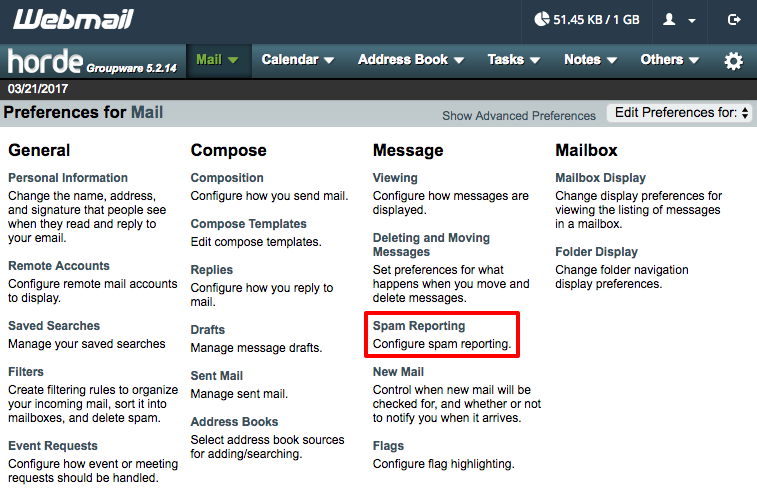
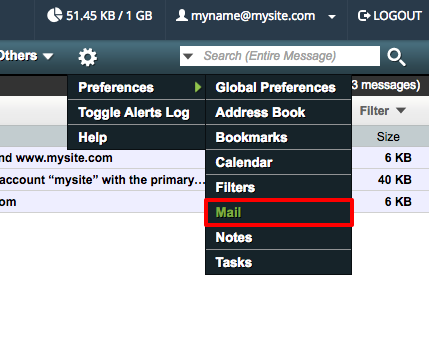
  2. In the navigation menu, click on the gear icon, then Preferences and Mail.
    Horde preferences
  3. In the Message section, click on Spam Reporting.
    spam reporting
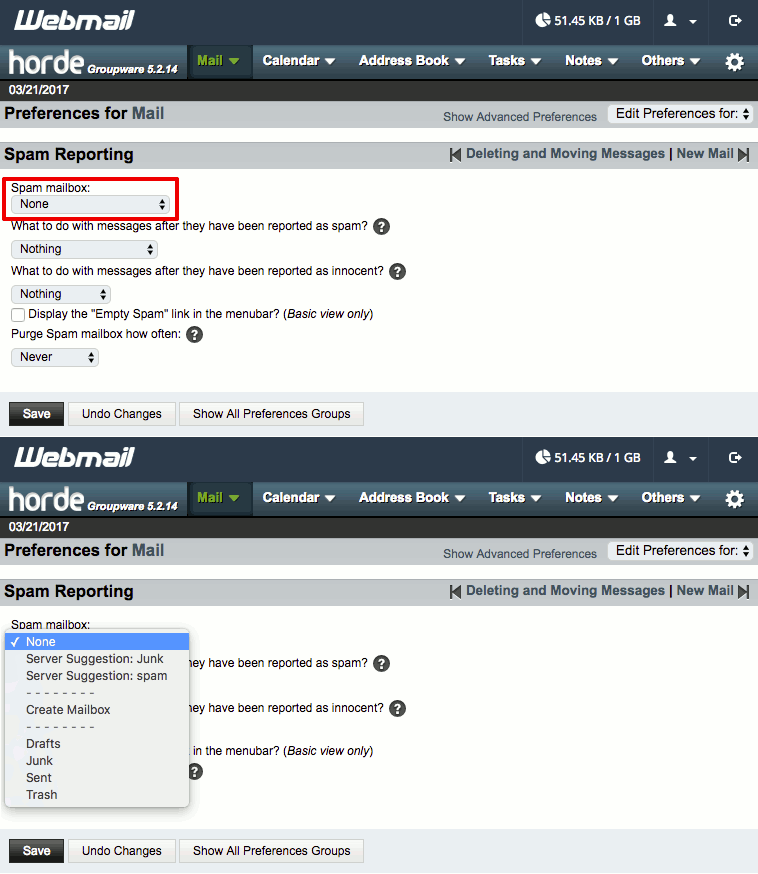
  4. Use the Spam mailbox dropdown to select what you’d like to call your spam folder.
    naming your spam folder
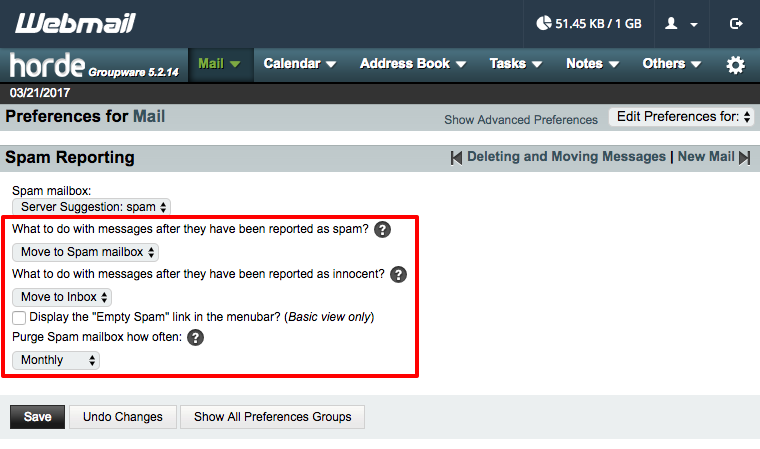
  5. Then use the remaining dropdown menus to decide what you want to do with messages reported as spam or as innocent. You can also choose how often you want to delete the contents of your spam folder.
    choosing spam settings
  6. Once you’ve chosen your settings, click Save.
Roundcube

  1. Log into your Roundcube webmail interface.
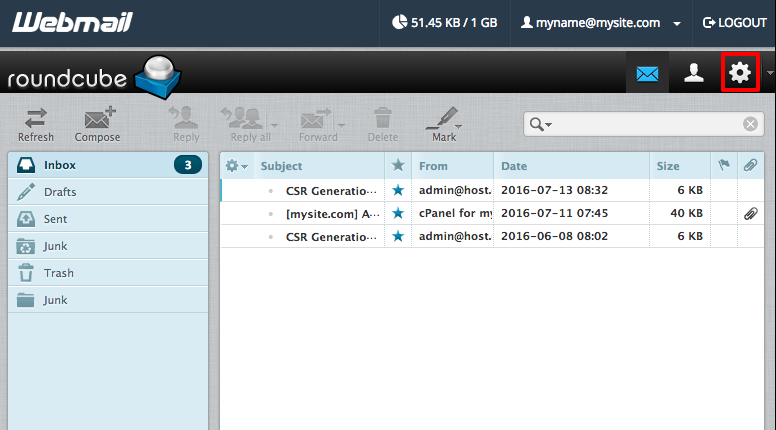
  2. Click on the gear icon to view your settings.
    Roundcube preferences
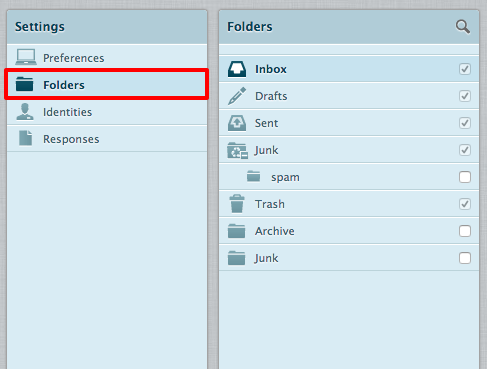
  3. Click on the Folders tab.
    Roundcube folders
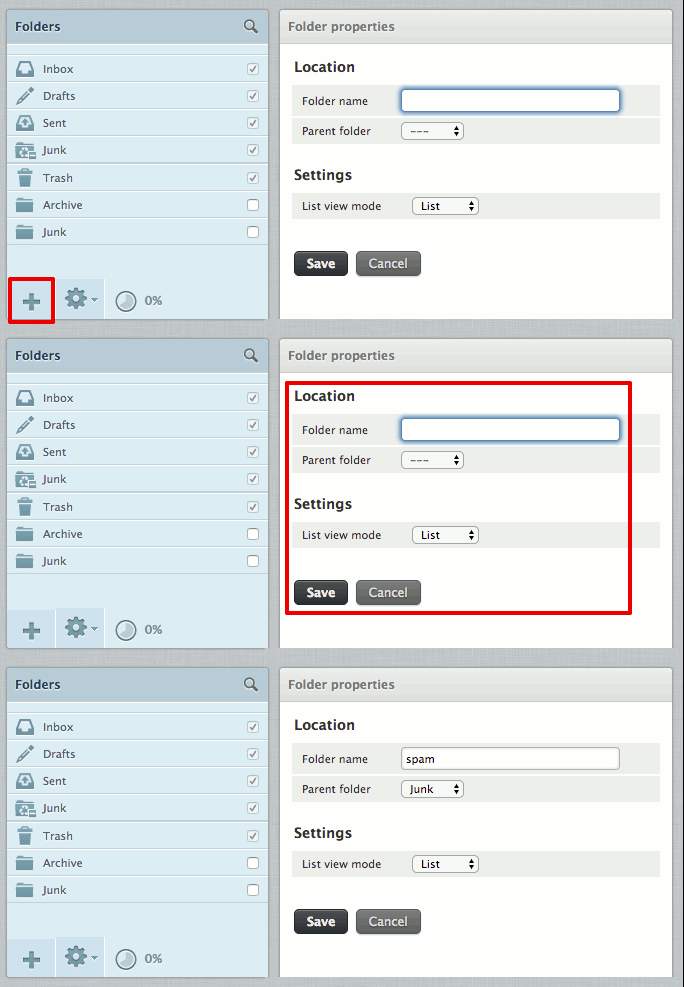
  4. Click the + at the bottom of the folder listing and add a “spam” folder. SpamAssassin will only find this folder if you use all lowercase letters. You can place the spam folder in any parent folder you’d like. Click Save to create your folder.
    adding your spam folder
  5. Make sure the checkbox next to your newly created folder is checked. You can return to your mailbox (click Mail) and you will be able to see your new spam folder.
SquirrelMail

  1. Log into your SquirrelMail webmail interface.
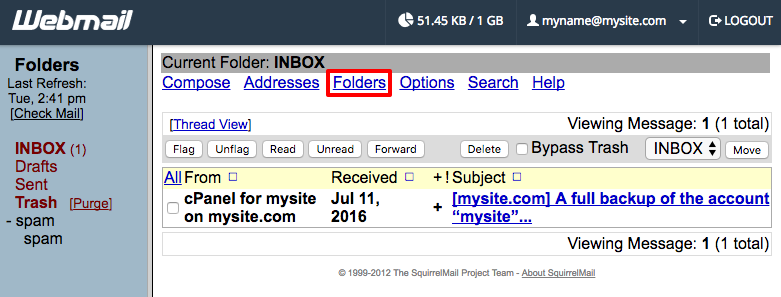
  2. In the top navigation, click Folders.
    SquirrelMail folders
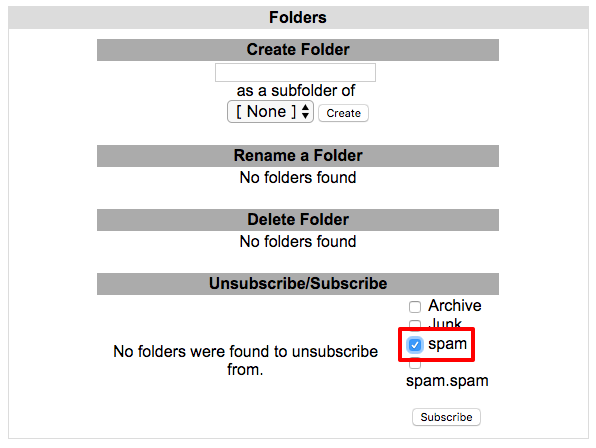
  3. In the Unsubscribe/Subscribe section, click the checkbox next to spam and click Subscribe.
    subscribing to your spam folder
  4. If you don’t see a spam folder, use the Create Folder section to add a “spam” folder. SpamAssassin will only find this folder if you use all lowercase letters. Once you’ve created it, you can subscribe to it as normal.
Once you’ve subscribed to your spam folder, any messages marked as spam will be synced to your webmail the next time your email syncs.

Was this article helpful?
Thank you for your input.
Thank you for your feedback.
Table of Contents
  • Problem
  • Solution
Essential hosting resources to help your business stay ahead
Get the guides
Related hosting content
  • Hosting Add-Ons
  • High-Speed Cloud Hosting Services
  • WordPress VPS Hosting

Dedicated Hosting

Dedicated ServersManaged DedicatedBare Metal ServersGPU Hosting

Cloud Services

Bare Metal CloudDedicated CloudManaged CloudVPS HostingPrivate Cloud

Managed Apps

Managed Hosting for WordPressManaged MagentoManaged WooCommerceNexcess Platform

Solutions

HIPAA HostingPCI Compliant HostingEcommerce HostingEnterprise HostingFinance & FintechHigh AvailabilityAgency HostingSMB HostingAI HostingWindows Hosting

Partnerships

Hosting Affiliate ProgramPartner ProgramsRefer-a-Friend

Resources

Help DocsResource CenterWeb Hosting ToolsDedicated ServersManaged HostingFinancial HostingCloud HostingWeb HostingEcommerceHIPAAVPS

Software & Design

The Events CalendarRestrict Content ProModern TribeMemberDashKadence WPLearnDashIconicWPSolidWPGiveWP

Company

ContactTerms of ServicePrivacy PolicyCustomer StoriesData CentersComplianceCareersAboutSitemapHosting Coupons

Liquid Web, a web hosting company with 18 data centers globally

HostingAdvice.com logo
Liquid Web reviewLiquid Web review

© 2026 Liquid Web, LLC

Privacy Policy

* Promotions may be exclusively available to new customers and cannot be applied to existing accounts. Qualification is at the sole discretion of Liquid Web. Reach out with questions.

  • Solutions
    • Solutions by industry
      Ecommerce

      Secure, compliant infrastructure for regulated online sales

      Financial Services

      High-trust hosting built for security and compliance

      Agencies

      Fast, flexible hosting for high-traffic client projects

      Healthcare

      HIPAA-ready environments for protected health data

      Solutions by outcomes
      Compliance

      Hosting aligned with HIPAA, PCI, GDPR, and audit readiness

      Launch

      Configure a high-performance server in minutes

      Commerce Scale

      Infrastructure built to handle surges, orders, and growth

      Disaster Recovery

      Redundant, resilient systems for rapid recovery and uptime

  • VPS Hosting
    • VPS Packages
      Cloud VPS Hosting
      Windows VPS Hosting
      Linux VPS Hosting
      Managed VPS
      View All VPS Hosting

  • Dedicated Servers
    • Bare Metal Servers
      Bare Metal Packages
      Managed Dedicated
      Cloud Metal Packages
      View All Dedicated Servers

  • Managed Hosting
    • Managed Hosting
      Managed Servers
      Managed Applications
  • WordPress
    • Hosting for WordPress
      Managed Hosting
      for WordPress
      VPS for WordPress
      Dedicated WordPress
      WooCommerce Hosting
      WordPress Plugins
      Kadence WP
      The Events Calendar
      Give
      LearnDash
  • GPU Hosting
    • GPU Hosting
      NVIDIA GPU Hosting
      AI Training & Interface

  • Products
    • Compute
      Cloud Servers

      Scalable, high-speed compute

      Dedicated Servers

      Reliability, power, and control

      Private Cloud

      Isolated, enterprise-grade cloud

      GPU

      Accelerated for AI & ML

      Containers

      Portable workloads for any app

      Platform services
      Cloud Storage

      Storage for growing data needs

      Backups & DR

      Protection for critical workloads

      Global Private Fabric

      Unify networks across servers

      Security & Protection

      Advanced defense for data

      Load Balancing

      Optimized traffic distribution

      Applications
      WordPress

      Optimized for fast, secure sites

      WooCommerce

      Performance for scalable stores

      Magento

      Commerce-ready, built to scale

Log in
  • System status
  • Support | Get Help