

Creating Reseller Accounts in WHM
Liquid Web offers a Reseller Program for selling hardware and servers, but we also allow for resellers to sell off some of their server space at a discounted price. If you are looking to resell Liquid Web servers and hardware, take a look at our Reseller Program Information on our main website.
If you have an account owner who is looking to resell some of his server space, you can make them a reseller with just a few clicks in WHM. This will allow them to sell space on your server, under their account, and allow additional sites to be on your server from customers.
If your client is selling server space from their account in cPanel, they will need to maintain and provide all Tier 1 support for their customers. Anything that is needing Liquid Web Support, must be requested by the owner of the reseller account.
So, when you have a cPanel account that you’d like to sell additional cPanel accounts on, you can set up the reseller account with just a few clicks. Let’s find out how!
- First, log into WHM.
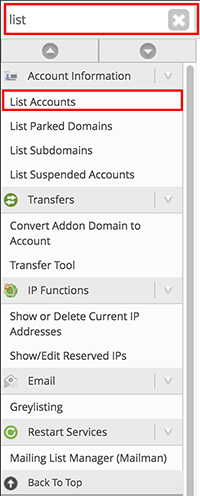
- In the search bar on the left-hand side of the page, start typing the word list to search for List Accounts.Click on the List Accounts link.

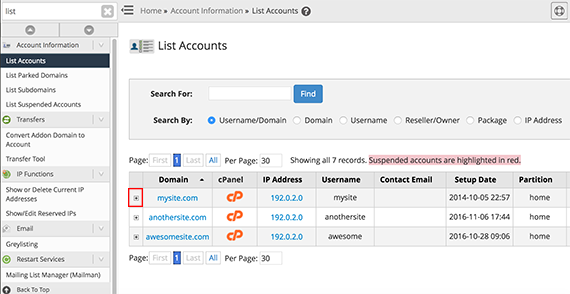
- From the list of accounts, click the [+] Plus Sign next to the domain name.

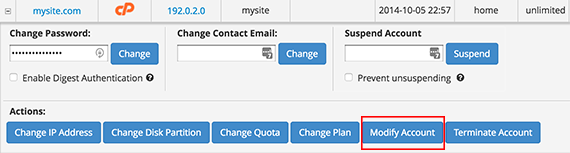
- This will open the account settings, click on the Modify Account button.

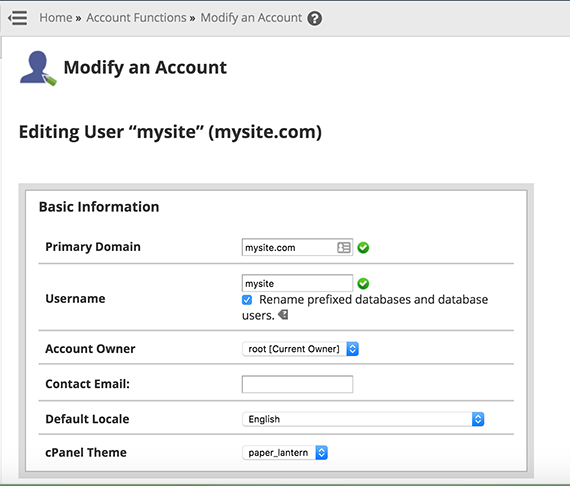
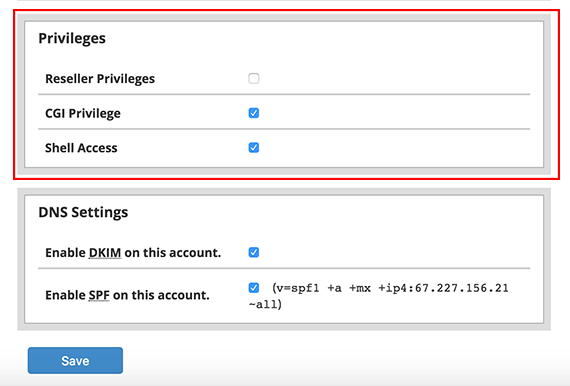
- When the page opens, you will see your account details, scroll down to the Privileges section of the page.


- Click Save. Now the account is set up as a reseller.
Don’t have a cPanel account in WHM yet? Not to worry, follow the instructions in our article Creating a cPanel User Account and check the box for reseller during the setup process.
Learn more about reselling VPS and using our WHMCS reseller hosting now.