

Creating a Sub-domain in Interworx Web Panel
You’ve already created your first domain on your InterWorx Web Panel server (if you haven’t created a domain yet, see Creating a User Account/Domain in Interworx Web Panel). But now you’d like to create a sub-domain for a blog or test site and name it blog.domain.com or something similar. You can create a subdomain in SiteWorx in the Hosting Features section.
Creating a SubDomain as the Domain User in SiteWorx
- Login to your InterWorx Server using the domain user credentials. For help with logging in, see Logging into InterWorx Web Panel).
- Click on the Hosting Features menu in the left navigation group, then click on Domains, then click Subdomain.

- You are now in the Domain Management: SubDomains screen. Select the primary domain for which you want to create a subdomain from the drop-down menu at the top of section.
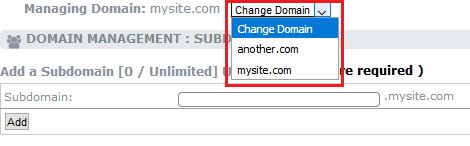
- Enter the subdomain name in the text box and click Add.

The subdomain is now created and you can begin adding content to the subdomain.